Case study
This is a case study. Case studies are not timed separately. You can use as much exam time as you would like to complete each case. However, there may be additional case studies and sections on this exam. You must manage your time to ensure that you are able to complete all questions included on this exam in the time provided.
To answer the questions included in a case study, you will need to reference information that is provided in the case study. Case studies might contain exhibits and other resources that provide more information about the scenario that is described in the case study. Each question is independent of the other questions in this case study.
At the end of this case study, a review screen will appear. This screen allows you to review your answers and to make changes before you move to the next section of the exam. After you begin a new section, you cannot return to this section.
To start the case study
To display the first question in this case study, click the Next button. Use the buttons in the left pane to explore the content of the case study before you answer the questions. Clicking these buttons displays information such as business requirements, existing environment, and problem statements. If the case study has an All Information tab, note that the information displayed is identical to the information displayed on the subsequent tabs. When you are ready to answer a question, click the Question button to return to the question.
Overview
General Overview
Contoso, Ltd. is an international accounting company that has offices in France, Portugal, and the United Kingdom.
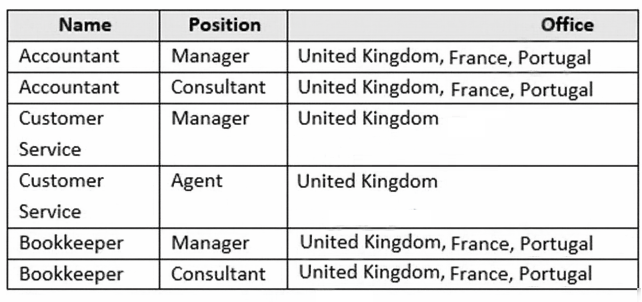
Contoso has a professional services department that contains the roles shown in the following table.
Existing environment
Infrastructure
Contoso has the following subscriptions:
-Azure
-Microsoft 365
-Microsoft Dynamics 365
-Azure Active (Azure AD) Directory
Contoso has Azure Active Directory groups for securing role-based access. The company uses the following group naming conventions:
[Country]-[Level]-[Role]
[Level]-[Role]
Intellectual Property
Contoso has the intellectual property shown in the following table.
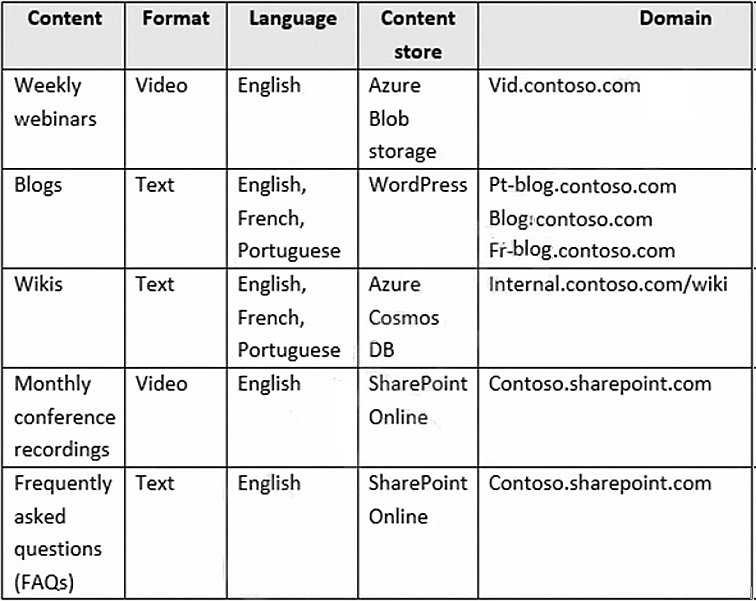
Text-based content is provided only in one language and is not translated.
Requirements
Planned Projects
Contoso plans to develop the following:
-A document processing workflow to extract information automatically from PDFs and images of financial documents
-A customer-support chatbot that will answer questions by using FAQs
-A searchable knowledgebase of all the intellectual property
Technical Requirements
Contoso identifies the following technical requirements:
-All content must be approved before being published.
-All planned projects must support English, French, and Portuguese.
-All content must be secured by using role-based access control (RBAC).
-RBAC role assignments must use the principle of least privilege.
-RBAC roles must be assigned only to Azure Active Directory groups.
-AI solution responses must have a confidence score that is equal to or greater than 70 percent.
-When the response confidence score of an AI response is lower than 70 percent the response must be improved by human input.
Chatbot Requirements
Contoso identifies the following requirements for the chatbot:
-Provide customers with answers to the FAQs.
-Ensure that the customers can chat to a customer service agent.
-Ensure that the members of a group named Management-Accountants can approve the FAQs. Ensure that the members of a group named Consultant-Accountants can create and amend the FAQs. Ensure that the members of a group named the Agent-CustomerServices can browse the FAQs.
-Ensure that access to the customer service agents is managed by using Omnichannel for Customer Service.
When the response confidence score is low, ensure that the chatbot can provide other response options to the customers.
Document Processing Requirements
Contoso identifies the following requirements for document processing:
-The document processing solution must be able to process standardized financial documents that have the following characteristics:
-Contain fewer than 20 pages.
-Be formatted as PDF or JPEG files.
-Have a distinct standard for each office.
-The document processing solution must be able to extract tables and text from the financial documents. The document processing solution must be able to extract information from receipt images.
-Members of a group named Management-Bookkeeper must define how to extract tables from the financial documents.
-Members of a group named Consultant-Bookkeeper must be able to process the financial documents.
Knowledgebase Requirements
Contoso identifies the following requirements for the knowledgebase:
-Supports searches for equivalent terms
-Can transcribe jargon with high accuracy
-Can search content in different formats, including video Provides relevant links to external resources for further research