Case study
This is a case study. Case studies are not timed separately. You can use as much exam time as you would like to complete each case. However, there may be additional case studies and sections on this exam. You must manage your time to ensure that you are able to complete all questions included on this exam in the time provided.
To answer the questions included in a case study, you will need to reference information that is provided in the case study. Case studies might contain exhibits and other resources that provide more information about the scenario that is described in the case study. Each question is independent of the other questions in this case study.
At the end of this case study, a review screen will appear. This screen allows you to review your answers and to make changes before you move to the next section of the exam. After you begin a new section, you cannot return to this section.
To start the case study
To display the first question in this case study, click the Next button. Use the buttons in the left pane to explore the content of the case study before you answer the questions. Clicking these buttons displays information such as business requirements, existing environment, and problem statements. If the case study has an All Information tab, note that the information displayed is identical to the information displayed on the subsequent tabs. When you are ready to answer a question, click the Question button to return to the question.
Overview
ADatum Corporation is consulting firm that has a main office in Montreal and branch offices in Seattle and New York.
Existing Environment Azure Environment
ADatum has an Azure subscription that contains three resource groups named RG1, RG2, and RG3.
The subscription contains the storage accounts shown in the following table.

The subscription contains the virtual machines shown in the following table.

The subscription has an Azure container registry that contains the images shown in the following table.

The subscription contains the resources shown in the following table.

Azure Key Vault
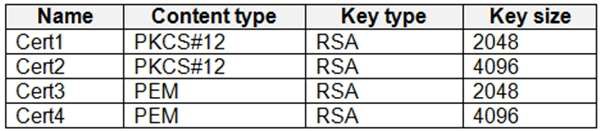
The subscription contains an Azure key vault named Vault1. Vault1 contains the certificates shown in the following table.
Vault1 contains the keys shown in the following table.

Microsoft Entra Environment
ADatum has a Microsoft Entra tenant named adatum.com that is linked to the Azure subscription and contains the users shown in the following table.

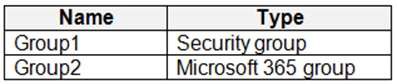
The tenant contains the groups shown in the following table.
The adatum.com tenant has a custom security attribute named Attribute1.
Planned Changes
ADatum plans to implement the following changes:
Configure a data collection rule (DCR) named DCR1 to collect only system events that have an event ID of 4648 from VM2 and VM4.
In storage1, create a new container named cont2 that has the following access policies:
- Three stored access policies named Stored1, Stored2, and Stored3
- A legal hold for immutable blob storage
Whenever possible, use directories to organize storage account content. Grant User1 the permissions required to link Zone1 to VNet1.
Assign Attribute1 to supported adatum.com resources. In storage2, create an encryption scope named Scope1.
Deploy new containers by using Image1 or Image2.
Technical Requirements
ADatum must meet the following technical requirements: Use TLS for WebApp1.
Follow the principle of least privilege.
Grant permissions at the required scope only.
Ensure that Scope1 is used to encrypt storage services.
Use Azure Backup to back up cont1 and share1 as frequently as possible.
Whenever possible, use Azure Disk Encryption and a key encryption key (KEK) to encrypt the virtual machines.