Free AZ-802 Exam Braindumps
Administering Windows Server Questions 1–12 (page: 18)

Updated On: 29-Oct-2026
View Related Case Study

You have two servers named Server1 and Server2 that run Windows Server and have the Hyper-V role installed.
You plan to deploy Hyper-V Replica between Server1 and Server2. The deployment will use certificate-based authentication.
You need to configure the prerequisites for the Hyper-V Replica deployment.
Which two actions should you perform on each server? Each correct answer presents part of the solution.
Note: Each correct answer is worth one point.

  1. Create a self-signed certificate.
  2. Install a trusted computer certificate.
  3. Install a trusted user certificate.
  4. Enable the Hyper-V Replica HTTPS Listener (TCP-In) firewall rule.
  5. Enable the Hyper-V Replica HTTP Listener (TCP-In) firewall rule.

Answer(s): B,D

Explanation:

Each server requires a trusted computer certificate with a private key, both Client Authentication and Server Authentication purposes, and a name matching the host’s FQDN. Enable Hyper-V Replica HTTPS Listener (TCP-In) to permit certificate-authenticated replication over HTTPS, which uses TCP port 443 by default.


Reference:

https://learn.microsoft.com/en-us/windows-server/virtualization/hyper-v/configure-replication-single-host?tabs=windows-admin-center


View Related Case Study

HOTSPOT (Drag and Drop is not supported)
You implement the planned changes for Record1 and Record2.
On which DNS servers is each record stored after AD DS replication completes? To answer, select the appropriate options in the answer area.
Note: Each correct selection is worth one point.
Hot Area:

  1. See Explanation section for answer.

Answer(s): A

Explanation:


Record1: DC3 only
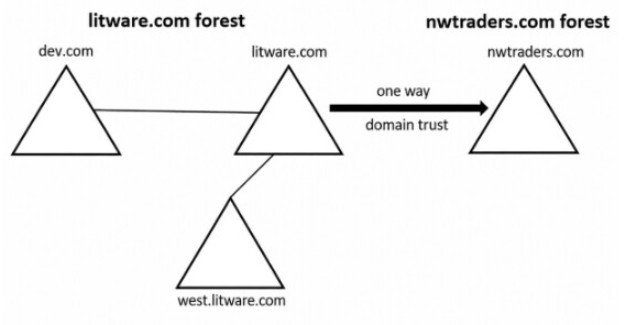
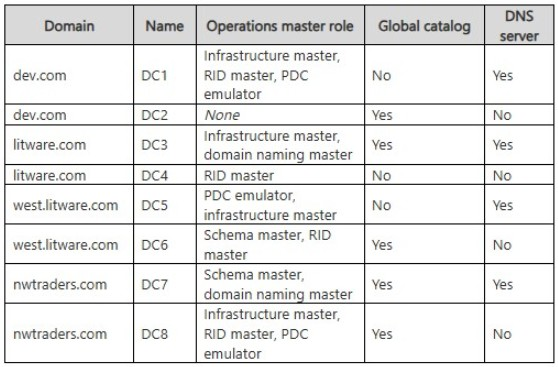
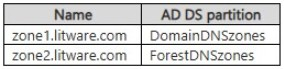
Record2: DC1, DC3, and DC5 only zone1.litware.com is stored in the DomainDNSZones application partition, so its records replicate only to DNS servers that participate in that partition within the litware.com domain. DC3 is the only DNS server in that domain.
zone2.litware.com is stored in the ForestDNSZones application partition, so its records replicate to DNS servers throughout the litware.com forest. DC1, DC3, and DC5 are the DNS servers in that forest.


View Related Case Study

Note: This question is part of a series of questions that present the same scenario. Each question in the series contains a unique solution that might meet the stated goals. Some question sets might have more than one correct solution, while others might not have a correct solution.
After you answer a question in this section, you will NOT be able to return to it. As a result, these questions will not appear in the review screen.
You have a server named Server1 that runs Windows Server and has the DHCP Server role. Server1 contains a single DHCP scope named Scope1.
You deploy five printers to the network.
You need to ensure that the printers are always assigned the same IP address.
Solution: You create a DHCP address exclusion for each printer.
Does this meet the requirement?

  1. Yes
  2. No

Answer(s): B

Explanation:

A DHCP exclusion only prevents the DHCP server from leasing specified addresses. To ensure each printer always receives the same IP address from DHCP, you must create a DHCP reservation for each printer based on its MAC address.


View Related Case Study

Your network contains an Active Directory Domain Services (AD DS) domain. The domain contains a server named DHCP1 that runs Windows Server and has the DHCP Server role installed. DHCP1 has a static IPv4 address of 10.10.10.5/24.
DHCP1 is authorized in AD DS and contains an active scope for a subnet of 10.10.20.0/24.
Client computers on the 10.10.20.0/24 subnet receive APIPA addresses. You verify that the DHCP Server service is running, and the scope has available IP addresses.
You need to ensure that the computers on 10.10.20.0/24 can obtain IPv4 address leases from DHCP1.
What should you do?

  1. Run Add-DhcpServerInDC.
  2. Create an exclusion.
  3. Configure a DHCP relay.
  4. Run Add-DhcpServerSecurityGroup.

Answer(s): C

Explanation:

Configure a DHCP Relay Agent (such as an IP Helper address on the router) to forward DHCP traffic from the 10.10.20.0/24 subnet to the DHCP server at 10.10.10.5.
Subnet Mismatch: The DHCP server is located on the 10.10.10.0/24 subnet.
Broadcast Isolation: Client computers are on the 10.10.20.0/24 subnet. DHCP discovery requests use network broadcasts, which routers drop by default.
APIPA Result: Because the broadcast messages never cross the router to reach the DHCP server, the clients fail to get an IP and fall back to APIPA (169.254.x.x) addresses.


Reference:

https://learn.microsoft.com/en-us/windows-server/networking/technologies/dhcp/quickstart-install-configure-dh cp-server


View Related Case Study

Note: This question is part of a series of questions that present the same scenario. Each question in the series contains a unique solution that might meet the stated goals. Some question sets might have more than one correct solution, while others might not have a correct solution.
After you answer a question in this section, you will NOT be able to return to it. As a result, these questions will not appear in the review screen.
Your network contains an Active Directory Domain Services (AD DS) forest. The forest contains three Active Directory sites named Site1, Site2, and Site3. Each site contains two domain controllers. The sites are connected by using DEFAULTIPSITELINK.
You open a new branch office that contains only client computers.
You need to ensure that the client computers in the new office are primarily authenticated by the domain controllers in Site1.
Solution: You create a new site named Site4 and associate Site4 to DEFAULTIPSITELINK.
Does this meet the goal?

  1. Yes
  2. No

Answer(s): B

Explanation:

Correct:
* You create a new subnet object that is associated to Site1.
Creating a new subnet object for the branch office's IP address range and associating that subnet with Site1 meets the requirement.
Active Directory uses IP subnets to determine which site a client computer belongs to during logon and authentication. By mapping the new branch office subnet to Site1, client computers in that office will identify as part of Site1 and preferentially locate and authenticate using the domain controllers in that site.
Incorrect:
* You configure the Try Next Closest Site Group Policy Object (GPO) setting in a GPO that is linked to Site1.
* You create a new site named Site4 and associate Site4 to DEFAULTIPSITELINK.
* You create an organizational unit (OU) that contains the client computers in the new branch office. You configure the Try Next Closest Site Group Policy Object (GPO) setting in a GPO that is linked to the new OU.


Reference:

https://learn.microsoft.com/en-us/previous-versions/windows/it-pro/windows-server-2008-R2-and-2008/cc7546 97(v=ws.11)


Viewing page 18 of 37
Viewing questions 86 - 90 out of 224 questions


Post your Comments and Discuss Microsoft AZ-802 exam prep with other Community members:

AI Tutor AI Tutor 👋 I’m here to help!