Free AZ-802 Exam Braindumps
Administering Windows Server Questions 29–33 (page: 9)

Updated On: 29-Oct-2026
View Related Case Study

HOTSPOT (Drag and Drop is not supported)
Your network contains an Active Directory Domain Services (AD DS) domain. The domain contains two domain controllers named DC1 and DC2.
Active Directory Recycle Bin is disabled.
You discover that an organizational unit (OU) named Finance and its child objects were deleted from DC1. The deletion replicated to DC2. DC1 has a system state backup from before the deletion. Changes to other AD DS objects were made after the backup.
You need to recover only the Finance OU and its child objects. The solution must ensure that the recovered objects replicate to DC2, and the unrelated AD DS changes are preserved.
What should you configure? To answer, select the appropriate options in the answer area.
Note: Each correct selection is worth one point.
Hot Area:

  1. See Explanation section for answer.

Answer(s): A

Explanation:


Box 1: Directory Services Restore Mode (DSRM)
Directory Services Restore Mode (DSRM) (also referred to in the system configuration boot options as Active Directory repair) must be configured for DC1.
Stops AD DS: Booting into DSRM ensures that Active Directory Domain Services are offline while allowing you to access the database files for restoration.
Performs Authoritative Restore: After doing a non-authoritative system state restore from the backup, you use the ntdsutil tool while still in DSRM to mark the specific deleted OU and its child objects as authoritative.
Preserves Later Changes: Marking only the target objects as authoritative ensures that when the domain controller reboots into normal mode and replicates, the restored OU overrides the deletion on the second controller, while newer, unrelated changes made after the backup are preserved.
Box 2: Authoritative subtree restore
An authoritative restore of a specific subtree using the ntdsutil command-line tool (while in DSRM) is the appropriate recovery method


Reference:

https://learn.microsoft.com/en-us/troubleshoot/windows-server/active-directory/abandoned-objects-block-replic ation-global-catalog-naming-contexts


View Related Case Study

HOTSPOT (Drag and Drop is not supported)
You have an Active Directory Domain Services (AD DS) domain that contains 1,000 users.
The domain has the following password requirements:
● The minimum password length must be 12 characters.
● Passwords must expire in 90 days.
● Passwords must be complex.
You need to ensure that the members of a security team have passwords that meet the following requirements:
● The minimum password length must be 16 characters.
● Passwords must expire in 60 days.
● Passwords must be complex.
The solution must minimize the impact on users who are NOT members of the security team.
What should you do? To answer, select the appropriate options in the answer area.
Note: Each correct selection is worth one point.
Hot Area:

  1. See Explanation section for answer.

Answer(s): A

Explanation:


Fine-grained password policies
Active Directory Administrative Center
Use Active Directory Administrative Center to create a fine-grained password policy requiring a minimum of 16 characters, a maximum password age of 60 days, and password complexity. Apply it to a global security group containing the security team members. This overrides the domain password policy for those members while leaving other users’ password requirements unchanged.


Reference:

https://learn.microsoft.com/en-us/windows-server/identity/ad-ds/get-started/adac/fine-grained-pass word-policies?tabs=adac


View Related Case Study

DRAG DROP (Drag and Drop is not supported)
Your network contains an Active Directory Domain Services (AD DS) domain. The domain contains two servers named Server1 and Server2 that run Windows Server.
You plan to deploy an app named App1 that will be load balanced between Server1 and Server2.
You need to create an identity that will be used to run App1 on Server1 and Server2. The solution must meet the following requirements:
● The password for the identity must be changed regularly.
● Administrative effort must be minimized.
Which three actions should you perform in sequence? To answer, move the appropriate actions from the list of actions to the answer area and arrange them in the correct order.
Select and Place:

  1. See Explanation section for answer.

Answer(s): A

Explanation:


Create a Key Distribution Services (KDS) root key.
Create a group managed service account (gMSA).
Install the service account on Server1 and Server2.
A group managed service account is designed for services or applications that run on multiple servers. Active Directory automatically manages and periodically changes the gMSA password, minimizing administrative effort. The KDS root key must exist before the domain can generate passwords for gMSAs. After creating the gMSA, it must be installed on each server that will use it.


View Related Case Study

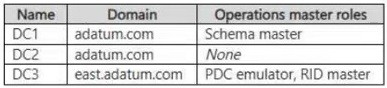
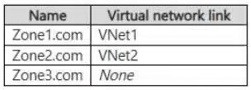
Your network contains the Active Directory Domain Services (AD DS) forests shown in the following table.

No trust relationships exist between the forests.
You need to configure trusts between the forests. The solution must meet the following requirements:
● Users in either forest must be able to access authorized resources in any domain in the other forest.
● The number of trusts must be minimized.
What should you create?

  1. a one-way forest trust in which contoso.com trusts fabrikam.com
  2. two-way external trusts between each pair of domains across the forests
  3. a one-way forest trust in which fabrikam.com trusts contoso.com
  4. a two-way external trust between contoso.com and fabrikam.com
  5. a two-way forest trust between contoso.com and fabrikam.com

Answer(s): E

Explanation:

A two-way forest trust between the forest root domains, contoso.com and fabrikam.com, enables users in every domain of either forest to authenticate for access to authorized resources in the other forest. Its transitivity covers all domains in both forests, so only one forest trust is required.


View Related Case Study

Your network contains an Active Directory Domain Services (AD DS) domain.
The domain contains a client computer named Client1 in an organizational unit (OU) named OU1. Multiple Group Policy Objects (GPOs) are linked at the domain and OU levels.
You need to identify the Group Policy setting that is currently applied to Client1 and the GPO that applied it.
What should you use in Group Policy Management Console (GPMC)?

  1. Group Policy Results Wizard
  2. Group Policy Modeling Wizard
  3. Group Policy Inheritance tab
  4. Group Policy Object Editor

Answer(s): A

Explanation:

The Group Policy Results Wizard reports the Resultant Set of Policy (RSoP) for a specific computer or user. It shows which Group Policy settings are actually applied to Client1 and identifies the GPO responsible for each applied setting.


Viewing page 9 of 37
Viewing questions 41 - 45 out of 224 questions


Post your Comments and Discuss Microsoft AZ-802 exam prep with other Community members:

AI Tutor AI Tutor 👋 I’m here to help!