Case Study
This is a case study. Case studies are not timed separately. You can use as much exam time as you would like to complete each case. However, there may be additional case studies and sections on this exam. You must manage your time to ensure that you are able to complete all questions included on this exam in the time provided.
To answer the questions included in a case study, you will need to reference information that is provided in the case study. Case studies might contain exhibits and other resources that provide more information about the scenario that is described in the case study. Each question is independent of the other questions in this case study.
At the end of this case study, a review screen will appear. This screen allows you to review your answers and to make changes before you move to the next section of the exam. After you begin a new section, you cannot return to this section.
To start the case study
To display the first question in this case study, click the Next button. Use the buttons in the left pane to explore the content of the case study before you answer the questions. Clicking these buttons displays information such as business requirements, existing environment, and problem statements. If the case study has an All Information tab, note that the information displayed is identical to the information displayed on the subsequent tabs.
When you are ready to answer a question, click the Question button to return to the question.
Overview
Litware, Inc. is a United States-based grocery retailer. Litware has a main office and a primary datacenter in Seattle. The company has 50 retail stores across the United States and an emerging online presence. Each store connects directly to the internet.
Existing environment. Cloud and Data Service Environments.
Litware has an Azure subscription that contains the resources shown in the following table.
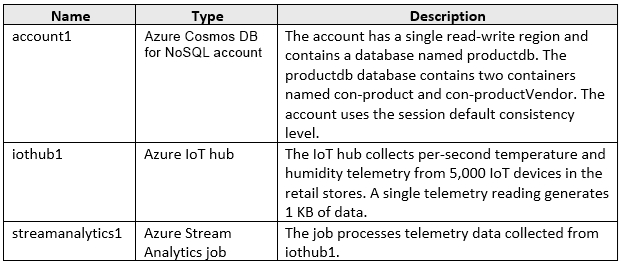
Each container in productdb is configured for manual throughput.
The con-product container stores the company's product catalog data. Each document in con-product includes a con-productVendor value. Most queries targeting the data in con-product are in the following format. SELECT * FROM con-product p WHERE p.con-productVendor = 'name'
Most queries targeting the data in the con-productVendor container are in the following format.
SELECT * FROM con-productVendor pv
ORDER BY pv.creditRating, pv.yearFounded
Existing environment. Current Problems.
Litware identifies the following issues:
-Updates to product categories in the con-productVendor container do not propagate automatically to documents in the con-product container.
-Application updates in con-product frequently cause HTTP status code 429 "Too many requests". You discover that the 429 status code relates to excessive request unit (RU) consumption during the updates.
Requirements. Planned Changes
Litware plans to implement a new Azure Cosmos DB for NoSQL account named account2 that will contain a database named iotdb. The iotdb database will contain two containers named con-iot1 and con-iot2.
Litware plans to make the following changes:
-Store the telemetry data in account2.
-Configure account1 to support multiple read-write regions.
-Implement referential integrity for the con-product container.
-Use Azure Functions to send notifications about product updates to different recipients.
-Develop an app named App1 that will run from all locations and query the data in account1.
-Develop an app named App2 that will run from the retail stores and query the data in account2. App2 must be limited to a single HTTPS endpoint when accessing account2.
Requirements. Business Requirements
Litware identifies the following business requirements:
-Whenever there are multiple solutions for a requirement, select the solution that provides the best performance, as long as there are no additional costs associated.
-Ensure that Azure Cosmos DB costs for IoT-related processing are predictable.
-Minimize the number of firewall changes in the retail stores.
Requirements. IoT Telemetry Requirements
Litware identifies the following IoT telemetry requirements:
-Write the telemetry data from streamanalytics1 to the con-iot1 container as the data arrives. Use streamanalytics1 to create hopping window aggregated telemetry readings once per hour and write the data to con-iot2.
-Automatically delete items in con-iot1 after one hour unless a per-item time to live is set.
-Optimize the partitioning of con-iot1 for queries that support historical data of a specific device.
-Aggregate the telemetry data by device by using streamanalytics1 and write the aggregate data to con-iot2.
-Ensure that the items in con-iot2 persist regardless of the per-item time to live setting.
Requirements. Product Catalog Requirements
Litware identifies the following requirements for the product catalog:
-Implement a custom conflict resolution policy for the product catalog data.
-Minimize the frequency of errors during updates of the con-product container.
-Once multi-region writes are configured, maximize the performance of App1 queries against the data in account1.
-Trigger the execution of two Azure functions following every update to any document in the con-product container.
-