Free DP-420 Exam Braindumps
Designing and Implementing Cloud-Native Applications Using Microsoft Azure Cosmos DB Questions 71–75 (page: 16)

Updated On: 16-Nov-2026
View Related Case Study

HOTSPOT (Drag and Drop is not supported)
You are designing a data model for an Azure Cosmos DB Core (SQL) API account.
What are the partition limits for request units per second (RU/s) and storage? To answer, select the appropriate options in the answer area.
Note: Each correct selection is worth one point.
Hot Area:

  1. See Explanation section for answer.

Answer(s): A

Explanation:


Box 1: 10,000
Maximum RU/s per physical partition:
Physical partitions
A container is scaled by distributing data and throughput across physical partitions. Internally, one or more logical partitions are mapped to a single physical partition. Typically smaller containers have many logical partitions but they only require a single physical partition. Unlike logical partitions, physical partitions are an internal implementation of the system and Azure Cosmos DB entirely manages physical partitions.
The number of physical partitions in your container depends on the following characteristics:
The amount of throughput provisioned (each individual physical partition can provide a throughput of up to 10,000 request units per second). The 10,000 RU/s limit for physical partitions implies that logical partitions also have a 10,000 RU/s limit, as each logical partition is only mapped to one physical partition.
The total data storage (each individual physical partition can store up to 50 GBs of data).
Box 2: 50 GB


Reference:

https://learn.microsoft.com/en-us/azure/cosmos-db/partitioning-overview


View Related Case Study

Note: This section contains one or more sets of questions with the same scenario and problem. Each question presents a unique solution to the problem. You must determine whether the solution meets the stated goals. More than one solution in the set might solve the problem. It is also possible that none of the solutions in the set solve the problem.
After you answer a question in this section, you will NOT be able to return. As a result, these questions do not appear on the Review Screen.
You have an Azure Cosmos DB for NoSQL database. The database hosts a container named families that stores data in the following format.

You need to return the following data:
● The ID of the family
● The family names of the children
● The name of any pets if the pet is a cat
Solution: You run the following query.

Does this meet the goal?

  1. Yes
  2. No

Answer(s): A

Explanation:

Correct:
* You run the following query.

The following Azure Cosmos DB NoSQL query fulfills the requirements by unnesting child array items and filtering the pet array:
To retrieve the family ID, the children's family names, and the rabbit's name, you can use the query below.
SELECT f.id, c.familyName AS FamilyName, p.givenName AS petName
FROM families f
JOIN f.children c
JOIN (SELECT VALUE p FROM p IN c.pets WHERE p.type = 'cat') AS p
1. Flatten the Children Array
To access individual properties within the children sub-array, use a JOIN statement. In Azure Cosmos DB, a JOIN performs an inner product between the document root (f) and the array (f.children). This filters out any family documents that contain no children.
2. Isolate Cat Pets
To inspect the properties of the pets array embedded inside each child, apply a secondary JOIN on c.pets. The WHERE clause then filters these projected items to only include cases where the property $p.type$ matches the string "cat".
3. Project Specific Attributes
The SELECT clause restricts the final JSON output schema to contain exactly three custom-aliased properties: familyId: Extracted from the root document
IDchildFamilyName: Extracted from the current child item iterationpetName: Extracted from the matching pet item iteration
Incorrect:
* You run the following query.

Use two JOINS and one subquery, not three JOINS and a subquery.
* You run the following query.

CROSS APPLY should not be used.


Reference:

https://learn.microsoft.com/en-us/cosmos-db/query/subquery


View Related Case Study

You have an Azure Cosmos DB for NoSQL account that contains a database and a container named Container1. You plan to develop a new app named App1 that will store entities in Container1. App1 will have the following versioning requirements for the entities:
● Each entity must be associated with multiple document versions.
● Each document version must be associated with one entity.
You need to recommend a versioning model for App1. The solution must minimize development and operational effort.
What should you recommend?

  1. Use a single document model that contains all the versions of an entity as a value in a root property.
  2. Use a multiple document model that stores each version of an entity as a separate document. Each document will include the data for all the entities in that version.
  3. Use a multiple document model that contains all the versions of an entity as separate documents in a collection.
  4. Use a single document model that contains all the entities as a value in a root property.

Answer(s): B

Explanation:

The multiple document model is the optimal choice for your Azure Cosmos DB for NoSQL application. It keeps development and operational efforts as low as possible while cleanly satisfying the requirements. Storing each version as a separate document prevents the application from hitting the strict maximum limit of 2 MB per item in Azure Cosmos DB, which would eventually occur under a single-document approach as the version history grows.
Compare Multiple Document Models
Azure Cosmos DB for NoSQL functions best when documents are isolated, right-sized, and predictable.


Reference:

https://learn.microsoft.com/en-us/samples/azure-samples/cosmos-db-design-patterns/document-versioning/


View Related Case Study

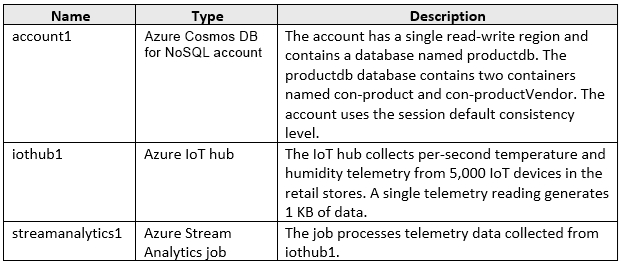
You are building an application that will store data in an Azure Cosmos DB for NoSQL account. The account uses the session default consistency level. The account is used by five other applications. The account has a single read-write region and 10 additional read regions.
Approximately 20 percent of the items stored in the account are updated hourly.
Several users will access the new application from multiple devices.
You need to ensure that the users see the same item values consistently when they browse from the different devices. The solution must NOT affect the other applications.
Which two actions should you perform? Each correct answer presents part of the solution.
Note: Each correct selection is worth one point.

  1. Set the default consistency level to eventual
  2. Associate a session token to the device
  3. Use implicit session management when performing read requests
  4. Provide a stored session token when performing read requests
  5. Associate a session token to the user account

Answer(s): D,E

Explanation:

Use Session consistency and use Stateful Entities in Durable Functions or something similar that will allow you to implement a distributed mutex to store and update the Session token across multiple Cosmos client instances.
Note: The session consistency is the default consistency that you get while configuring the cosmos DB account. This level of consistency honors the client session. It ensures a strong consistency for an application session with the same session token.
What that means is that whatever is written by a session will return the latest version for reads as well, from that same session.
Incorrect:
Not A: Eventual consistency is the weakest consistency level of all. The first thing to consider in this model is that there is no guarantee on the order of the data and also no guarantee of how long the data can take to replicate. As the name suggests, the reads are consistent, but eventually.
This model offers high availability and low latency along with the highest throughput of all. This model suits the application that does not require any ordering guarantee. The best usage of this type of model would be the count of retweets, likes, non-threaded comments where the count is more important than any other information.
Not B: The reads should be the same from different devices.


Reference:

https://stackoverflow.com/questions/64084499/can-i-use-a-client-constructed-session-token-for-cosmosdb


View Related Case Study

You have an Azure Cosmos DB for NoSQL database named DB1 that hosts the containers shown in the following table.

The user permissions are bound to a user and will NOT be queried independently of the user.
The product price is bound to a product and will NOT be queried independently of the product.
You are designing a new data model for DB1.
You need to optimize the data model to improve read performance and maintainability. The solution must meet the following requirements:
● Future enhancements of the user permissions must be supported.
● Future enhancements of the product price do NOT need to be supported.
Which two actions should you perform? Each correct answer presents part of the solution.
Note: Each correct selection is worth one point.

  1. Create a new container to store both the product information and the product price in separate documents and link the documents by using a shared product ID.
  2. Denormalize the product price into product documents in Container3.
  3. Denormalize the user permissions into user documents in Container1.
  4. Denormalize user documents into the user permissions in Container2.
  5. Denormalize product documents into the product price in Container4.
  6. Store both the user information and the user permissions in a single container in separate documents that have references.

Answer(s): B,C

Explanation:

To improve read performance and maintainability, you must transition from a normalized relational design to an optimized NoSQL design. NoSQL databases prioritize reading data in a single request rather than joining multiple containers.
Container Denormalization Strategy
[B]
Product Data (Container3 and Container4)
Action: Denormalize Container4 into Container3 by flattening the fields.
Product prices are never queried independently. Combining them allows a single read operation to fetch the complete product details.
Maintainability: Since future price enhancements are not required, you can directly flatten the price fields (e.g., price, currency) into the root of the product document. This keeps the schema simple and highly efficient.
[C]
User Data (Container1 and Container2)
Action: Denormalize Container2 into Container1 using reference (embedding as an array).
Users and permissions are always queried together. Embedding eliminates a second network call, drastically improving read performance.
Maintainability: Because future enhancements to permissions must be supported, embedding them as a strongly-typed JSON array or sub-object within the user document allows you to easily add new fields (e.g., expiration dates, scopes) later without breaking the schema.


Reference:

https://microsoftlearning.github.io/dp-420-cosmos-db-dev/instructions/17-denormalize.html


Viewing page 16 of 61
Viewing questions 76 - 80 out of 296 questions


Post your Comments and Discuss Microsoft DP-420 exam prep with other Community members:

AI Tutor AI Tutor 👋 I’m here to help!