Free DP-800 Exam Braindumps
Developing AI-Enabled Database Solutions Questions 25–32 (page: 5)

Updated On: 20-Jun-2026

DRAG DROP (Drag and Drop is not supported)
You have an Azure SQL database that contains a table named Sales.Orders. Sales.Orders contains the following columns.

Reporting queries frequently repeat logic to calculate the number of days since an order was placed.
You need to create a scalar user-defined function (UDF) that returns the number of days between an input value of @OrderDate and the current date and time.
How should you complete the Transact-SQL code? To answer, drag the appropriate values to the correct targets. Each value may be used once, more than once, or not at all. You may need to drag the split bar between panes or scroll to view content.
NOTE: Each correct selection is worth one point.
Select and Place:

  1. See Explanation section for answer.

Answer(s): A

Explanation:


To complete your scalar function, you need to define the function's return type and use the DATEDIFF function to calculate the time difference.
Box 1: RETURNS INT Every scalar function must explicitly declare the data type it returns after the parameter list.
Box 2: DATEDIFF The DATEDIFF function counts the number of "date boundaries" crossed. day: This argument specifies that you want the result in days (you can also use dd or d). GETDATE(): This retrieves the current system date and time on the Azure SQL instance.


Reference:

https://www.sqlservercentral.com/steps/stairway-to-advanced-t-sql-level-10-using-scalar-functions


View Related Case Study

HOTSPOT (Drag and Drop is not supported)
You need to create a table in the database to store the telemetry data.
You have the following Transact-SQL code.

For each of the following statements, select Yes if the statement is true. Otherwise, select No.
NOTE: Each correct selection is worth one point.
Hot Area:

  1. See Explanation section for answer.

Answer(s): A

Explanation:


Box 1: No No - The code meets the database performance requirements for partitioning.
Scenario: Telemetry data must be stored in a partitioned table.
This telemetry table is not partitioned.
To create a partitioned table in Azure SQL Database using Transact-SQL (T-SQL), you follow a three-step process: defining a partition function, creating a partition scheme, and finally creating the table on that scheme.
Box 2: Yes Yes - The code meets the database performance requirements for JSON property querying.
Scenario: latitude, longitude, and accuracy JSON properties must be filtered by using an index seek.
The CREATE JSON INDEX statement indeed defines a filter on the latitude, longitude, and accuracy JSON properties.
Box 3: Yes Yes - Queries that filter on $location.heading will use the JI_VehicleTelemetry_location index.


Reference:


View Related Case Study

HOTSPOT (Drag and Drop is not supported)
You are creating a table that will store customer profiles.
You have the following Transact-SQL code.

For each of the following statements, select Yes if the statement is true. Otherwise, select No.
NOTE: Each correct selection is worth one point.
Hot Area:

  1. See Explanation section for answer.

Answer(s): A

Explanation:


Box 1: Yes Yes - The schema meets the security requirements for PII data.
Scenario: Restrict the support staff from viewing Personally Identifiable Information (PII) data, which is full email addresses and phone numbers.
The EmailAdress and the PhoneNumber columns are protected with MASKED WITH.
In an Azure SQL Database, the MASKED WITH clause (used for Dynamic Data Masking or DDM) does not technically "protect" columns from being viewed; rather, it obfuscates the data in the result set for unauthorized users. Here are the key distinctions regarding how this feature works: Visibility vs. Security: It is a presentation-layer feature that hides sensitive data (like emails or credit card numbers) from non-privileged users. It is not encryption and does not change the actual data stored on the disk.
Role-Based Access: By default, users with administrative rights—such as server admins, db_owner, or those with the UNMASK permission—will still see the original, unmasked data.
Box 2: No No - Administrators of the Azure SQL server can see all the rows in dbo.CustomerProfiles when they use an application
The application is using the CustomerRegionPolicy which filters by region. Only rows in the specific region will be displayed.
Box 3: Yes Yes - The masking rules will apply even when row-level security (RLS) filters out rows.
In Azure SQL Database, Dynamic Data Masking (DDM) and Row-Level Security (RLS) function as independent layers of protection that are applied sequentially during a query.
RLS is applied first to restrict the rows a user can see. If RLS filters out a row, that row is never part of the result set, and therefore masking rules have no data to apply to for that specific row.
DDM is applied to the resulting set of rows allowed by RLS. It obfuscates specific columns (MASKED WITH) for any rows that successfully passed the RLS filter.
Because they operate on different dimensions (rows vs. columns), they are often used together to provide defense-in-depth: RLS ensures users only see their own records, while DDM ensures that even within those records, sensitive fields like credit card numbers or emails remain hidden.


Reference:


View Related Case Study

HOTSPOT (Drag and Drop is not supported)
You need to meet the database performance requirements for maintenance data.
How should you complete the Transact-SQL code? To answer, drag the appropriate values to the correct targets. Each value may be used once, more than once, or not at all. You may need to drag the split bar between panes or scroll to view content.
NOTE: Each correct selection is worth one point.
Select and Place:

  1. See Explanation section for answer.

Answer(s): A

Explanation:


Scenario: Telemetry data must provide predictable performance for ingestion and retention operations.
Box 1: m.VehicleID = i.VehicleID VehicleID columns are used in the tables. There are no MaintenanceID columns.
Box 2: m.LastModifiedUtc <> i.lastModifiedUtc
Example of Optimized Trigger CREATE TRIGGER [trg_Table_AfterUpdate] ON [dbo].[YourTable] AFTER UPDATE AS BEGIN -- Set-based update joining with 'inserted' UPDATE t SET t.ModifiedDate = GETDATE(), t.ModifierUser = SUSER_SNAME() FROM [dbo].[YourTable] t INNER JOIN inserted i ON t.PrimaryKeyID = i.PrimaryKeyID WHERE t.ModifiedDate IS NULL; -- Prevent unnecessary re-updates END;


Reference:


View Related Case Study

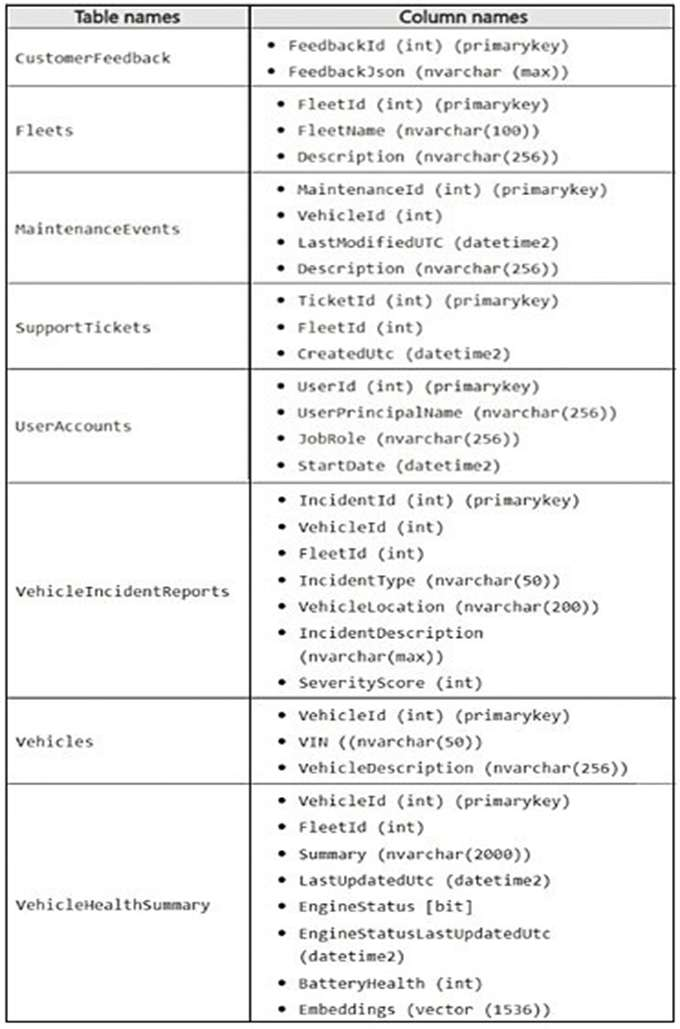
You need to recommend a solution to resolve the slow dashboard query issue.
What should you recommend?

  1. Create a clustered index on LastUpdatedUtc.
  2. On FleetId, create a nonclustered index that includes LastUpdatedUtc, EngineStatus, and
    BatteryHealth.
  3. On LastUpdatedUtc, create a nonclustered index that includes FleetId.
  4. On FleetId, create a filtered index where LastUpdatedUtc > DATEADD(DAY, -7,
    -SYSUTCDATETIME()).

Answer(s): B

Explanation:

Scenario: The engineers at Contoso report that the following dashboard query runs slowly.

You review the execution plan and discover that the plan shows a clustered index scan.
--To optimize this query, you should create a covering nonclustered index that handles both the filtering (WHERE) and the sorting (ORDER BY) requirements while including the remaining columns to avoid expensive
lookups.
Recommended Index Strategy Creating an index with FleetID as the first key column and LastUpdateUtc as the second key column will allow SQL Server to perform an Index Seek to find the specific fleet and then retrieve those rows in the pre-sorted order required by your ORDER BY clause.
T-SQL Implementation:
CREATE NONCLUSTERED INDEX IX_VehicleHealth_Fleet_Update ON dbo.VehicleHealthSummary (FleetID, LastUpdateUtc DESC) INCLUDE (EngineStatus, BatteryHealth); Use code with caution.
Why this works Eliminates Clustered Index Scan: The current plan scans the entire table because no index exists that starts with FleetID. This new index allows the engine to jump directly to the relevant rows.
Avoids a Sort Operator: By including LastUpdateUtc DESC in the index key, the data is already physically ordered. SQL Server can read the index and return the results immediately without needing a costly in-memory sort.
Fully Covers the Query: Using the INCLUDE clause for EngineStatus and BatteryHealth ensures all data required by the SELECT statement is present in the index. This prevents "Key Lookups," where the engine would otherwise have to go back to the original table for those specific values.


Reference:


View Related Case Study

You need to recommend a solution that will resolve the ingestion pipeline failure issues.
Which two actions should you recommend? Each correct answer presents part of the solution.
NOTE: Each correct selection is worth one point.

  1. Enable snapshot isolation on the database.
  2. Use a trigger to automatically rewrite malformed JSON.
  3. Add foreign key constraints on the table.
  4. Create a unique index on a hash of the payload.
  5. Add a check constraint that validates the JSON structure.

Answer(s): D,E

Explanation:

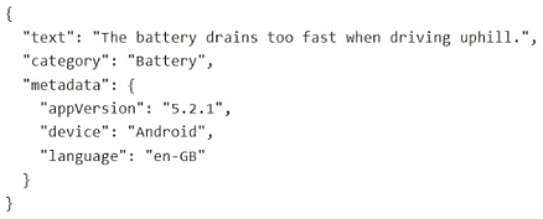
Scenario: Sometimes the ingestion pipeline fails due to malformed JSON and duplicate payloads.
Adding a CHECK constraint with ISJSON and creating a unique index on a computed hash of the payload are effective measures in Azure SQL Database to handle malformed JSON and duplicate payloads.
[E] JSON Validation with a CHECK Constraint You can use a CHECK constraint in conjunction with the built-in ISJSON function to ensure that only valid JSON text is stored in a VARCHAR or NVARCHAR column. The constraint automatically rejects any insert or update operation that contains malformed JSON data, preventing pipeline failures due to invalid formatting at the database level.
[D]
Deduplication with a Unique Index on a Hashed Payload To prevent duplicate payloads, you can create a unique index on a computed column that stores a hash of the entire JSON payload or relevant business keys within the JSON.


View Related Case Study

HOTSPOT (Drag and Drop is not supported)
You are evaluating the DAB configuration.
For each of the following statements, select Yes if the statement is true. Otherwise, select No.
NOTE: Each correct selection is worth one point.
Hot Area:

  1. See Explanation section for answer.

Answer(s): A

Explanation:


Box 1: Yes Yes - Applications can read data in the Procedures table without authentication.
In the Data API Builder (DAB) configuration, the anonymous role is a built-in role that allows access to entities without requiring a JSON Web Token (JWT) or any other identity provider.
Key Configuration Breakdown Role: anonymous This targets any user or application that is not logged in.
Action: read This explicitly allows the SELECT operation via REST and GraphQL.'
Endpoints: rest: true and graphql: true Both the RESTful endpoint and the GraphQL schema will be exposed to the public.
Box 2: No No - Applications can read and update data in the Transactions table once authenticated.
While applications can read data, they currently cannot update it.
Configuration Breakdown The actions array defines what an authenticated user is permitted to do. In the file, it is set to: actions : [ "read", "create" ] Read: Applications can fetch data from the Transactions table.
Create: Applications can insert new records into the Transactions table.
Update: This action is missing from the configuration.
Delete: This action is missing from the configuration.
Box 3: Yes Yes - Applications can execute the sp_UpdateProcedurePatient stored procedure.
Applications can execute the sp_UpdateProcedurePatient Transactions stored procedure, provided the request is made by an authenticated user. The Data API Builder (DAB) configuration correctly maps the stored procedure to a REST endpoint.
Configuration Breakdown REST Endpoint: Enabled at /procedurepatient
Method: Restricted to POST (standard for stored procedures in DAB).
Permissions: The authenticated role is explicitly granted the execute action.
GraphQL: Disabled (false), so it cannot be accessed via GraphQL queries.


Reference:

https://learn.microsoft.com/en-us/azure/data-api-builder/concept/security/authorization-overview https://learn.microsoft.com/en-us/azure/data-api-builder/command-line/dab-add


View Related Case Study

You plan to implement changes to sp_UpdateProcedureForPatient to meet the performance requirements.
You change the stored procedure to run all its code within a transaction.
Which transaction level should you use?

  1. REPEATABLE READ
  2. SERIALIZABLE
  3. SNAPSHOT
  4. READ COMMITTED SNAPSHOT

Answer(s): A

Explanation:

Scenario: Database Performance Requirements Records accessed by using sp_UpdateProcedureForPatient must NOT be changed by other transactions while the stored procedure runs.
To prevent other transactions from changing records while your stored procedure runs, you should use the Repeatable Read isolation level.
Repeatable ReadMechanism: Places shared locks on all data read by the query.
Prevention: Prevents other transactions from modifying or deleting the rows you have accessed.
Consistency: Ensures that if you read the same data twice within the procedure, the values remain identical.
Incorrect: [Not C] Serializable Strictness: This is the highest level of isolation.
Phantom Protection: In addition to preventing changes to existing records, it prevents other transactions from inserting new records that would fall into the range of your query (phantom reads).
Usage: Use this if your procedure relies on aggregate counts or specific ranges that must remain absolutely static. Key Considerations Concurrency: Both levels reduce system performance because they hold locks longer, potentially causing other users to wait.
Deadlocks: Higher isolation levels increase the risk of deadlocks in busy databases.


Reference:

https://learn.microsoft.com/en-us/sql/connect/jdbc/understanding-isolation-levels


Viewing page 5 of 14
Viewing questions 33 - 40 out of 101 questions


Post your Comments and Discuss Microsoft DP-800 exam prep with other Community members:

AI Tutor AI Tutor 👋 I’m here to help!