Case Study:
This is a case study. Case studies are not timed separately. You can use as much exam time as you would like to complete each case. However, there may be additional case studies and sections on this exam.
You must manage your time to ensure that you are able to complete all questions included on this exam in the time provided.
To answer the questions included in a case study, you will need to reference information that is provided in the case study. Case studies might contain exhibits and other resources that provide more information about the scenario that is described in the case study. Each question is independent of the other questions in this case study.
At the end of this case study, a review screen will appear. This screen allows you to review your answers and to make changes before you move to the next section of the exam. After you begin a new section, you cannot return to this section.
To start the case study:
To display the first question in this case study, click the Next button. Use the buttons in the left pane to explore the content of the case study before you answer the questions. Clicking these buttons displays information such as business requirements, existing environment, and problem statements. If the case study has an All Information tab, note that the information displayed is identical to the information displayed on the subsequent tabs.
When you are ready to answer a question, click the Question button to return to the question.
Background:
Best for You Organics Company started as a home-based business. The founders began making handmade soaps and bath products in their kitchen. As sales increased, the business established a production facility and distribution center that supplies three retail stores.
Soaps and bath products are manufactured in the production facility and are stocked in the warehouse for distribution to the retail stores. Employees at retail stores use mobile point of sale (MPOS) tablet devices to sell the products to customers.
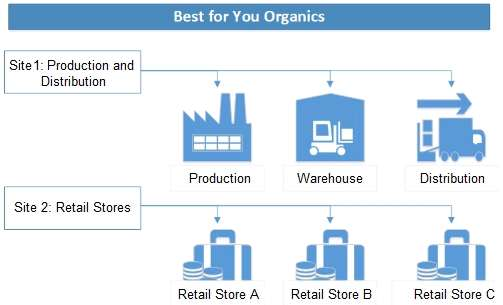
The company structure is a single legal entity with two sites as shown in the diagram below:
Current environment:
Best for You Organics plans to introduce a new product line of face creams. Each product in the new line uses the same base ingredients but includes a different extract (for example, lime, avocado, kiwi). The marketing department is preparing to introduce the new product line. Minimal inventory will be held in the warehouse.
The company uses a cloud-based deployment of Dynamics 365 Supply Chain Management to manage finances for all company operations and locations. The company does not use Bill of Materials (BOM) versioning.
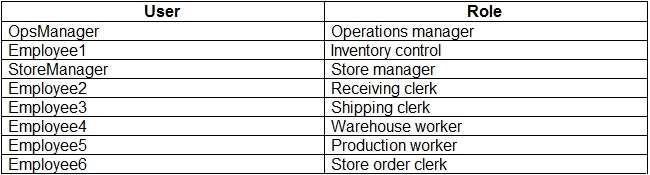
The production and warehouse facility is set up with the following organizational hierarchy:
External customers include:
CustomerA: a walk-in store customer (business-to-consumer)
CustomerB: a customer with an existing account (business-to-business)
External vendors include:
VendorA: a trucking company
VendorB: a raw materials supplier
Requirements: General
The new product line must be set up in the system and readily available for sale when the company introduces the product line to the public at an upcoming trade show.
Requirements: Production
You must configure the system to produce the new products:
Ensure that the warehouse stocks the minimum quantities of raw materials to produce the products.
Use a single version per item.
Implement FIFO inventory valuation methods.
Track raw and finished goods using different General ledger accounts.
Use a primary location to determine where to stock product in the warehouse.
Configure alternate locations in the warehouse to hold overstock products and refill the primary location as-needed.
Requirements: Shipments
You identify the following requirements related to shipping:
Ship product to retail stores weekly.
Stores require a packing slip to check in merchandise. Drivers require transport documentation and charge per mile to the stores.
Shipments to Store1 must be scheduled for Monday, Wednesday, or Friday. Store1 will sometimes pick up their own deliveries when an order is small because they have their own van. Shipments to Store2 and Store3 must be scheduled for Tuesday or Thursday.
You must transmit Advance Shipping Notifications (ASN's) to the stores prior to deliveries.
Set up the system configuration to allow for store transfers.
Set up the system so that products may be shipped to the retail stores as bulk orders.
Set up the transport providers to deliver products from the warehouse to the retails stores.
Requirements: Reporting
Once the new products are available in stores, review 30 days of historical sales data from day-to-day transactions will determine the reorder quantities.
Set up reporting to allow the product line to be costed and tracked independent of other items.
Requirements: Pricing and inventory
You identify the following requirements related to pricing and inventory:
Determine the quantity of the new products that can be produced and ready for sale within the first 90 days.
Ensure that specialty packaging is on hand for retail sales. The packaging must be shipped directly to the stores from the vendor.
Stores must not inventory the packaging materials. Stores must maintain a 30-day supply of specialty packaging materials. Stores must reorder packaging materials as needed.
Retail store customers must pay full retail price. Resellers must receive a 10 percent discount off the list price.