Case study
This is a case study. Case studies are not timed separately. You can use as much exam time as you would like to complete each case. However, there may be additional case studies and sections on this exam. You must manage your time to ensure that you are able to complete all questions included on this exam in the time provided.
To answer the questions included in a case study, you will need to reference information that is provided in the case study. Case studies might contain exhibits and other resources that provide more information about the scenario that is described in the case study. Each question is independent of the other questions in this case study.
At the end of this case study, a review screen will appear. This screen allows you to review your answers and to make changes before you move to the next section of the exam. After you begin a new section, you cannot return to this section.
To start the case study
To display the first question in this case study, click the Next button. Use the buttons in the left pane to explore the content of the case study before you answer the questions. Clicking these buttons displays information such as business requirement, existing environment, and problem statements. If the case study has an All Information tab, note that the information displayed is identical to the information displayed on the subsequent tabs. When you are ready to answer a question, click the question button to return to the question.
Overview
General overview
Litware, Inc. is an international manufacturing company that has 4,000 users. The company has the following four departments:
-IT
-HR
-R&D
-Sales
Physical locations
Litware has two main offices. The offices are located in New York and London.
All offices connect to each other by using a WAN link. Each office connects directly to the Internet.
Existing environment
All user accounts have an Azure Active Directory Premium Plan P1 license.
Litware has a Microsoft 365 subscription that has Office 365 Enterprise E3 licenses for all users. All the E3 products and services are enabled for each user.
Litware uses Microsoft Skype for Business Online.
Requirements
Planned Upgrade
Litware identifies the following requirements for a planned upgrade from Skype for Business Online to Microsoft Teams:
-Provide high quality audio, video, and online meeting experience for Microsoft Teams end users.
-Implement a data retention solution in Microsoft Teams.
-Minimize costs and administrative effort. Use the principle of least privilege.
For the sales department, Litware plans to create a team that dynamically updates its membership when users leave and join the department.
Department Upgrade Requirements
Litware plans to implement upgrade requirements for the departments as shown in the following table.
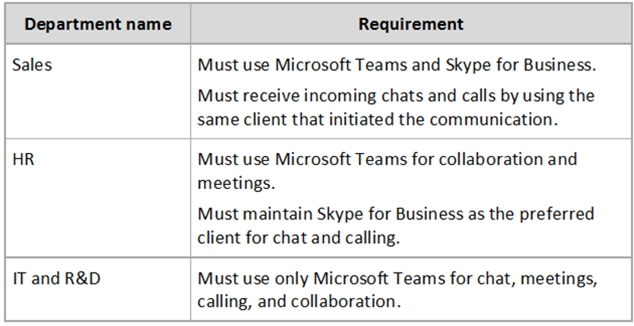
Microsoft Teams Requirements
All teams must meet the following requirements:
-Only users in a partner company that uses a domain named fabrikam.com must be able to collaborate in teams by using guest accounts.
-Only users in the compliance department of Litware must be able to create teams.
Planned Network Tasks
Litware identifies the following network validation tasks:
-An administrator named Admin5 must be able to review the required bandwidth to support audio conferencing, video conferencing, and screen sharing in Microsoft Teams.
-An administrator named Admin6 must be able to review network issues that cause poor call quality reported by users.
Data Retention Requirements
Litware identifies the following data retention requirements:
-Requirement1: All messages in team collaborations must be deleted after seven years. Requirement2: all files used in team collaborations must be retained for five years.
-Requirement3: All files used in personal chats must be retained for five years.
Device Requirements
You provide Microsoft Teams-certified IP phones to users in the IT and R&D departments. Each device must meet the following requirements:
-The time zone on the phones used by the R&D department must be set to UTC-8.
-The time zone on the phones used by the IT department must be set to UTC-5.
-All phones must lock automatically after 60 seconds of inactivity.
Voice Pilot Requirements
Litware wants to pilot Phone System as a calling solution for 20 IT department users. The pilot project will receive phone numbers from Microsoft Teams.
Collaboration and Meeting Requirements
Litware identifies the following collaboration and meeting requirements:
-Cloud recording must be disabled for all Microsoft Teams meetings organized by users in the HR departments only.
-Meeting email invitations must be customized to include the Logo URL, Legal URL, and Help URL of Litware.
-