Case study
This is a case study. Case studies are not timed separately. You can use as much exam time as you would like to complete each case. However, there may be additional case studies and sections on this exam. You must manage your time to ensure that you are able to complete all questions included on this exam in the time provided.
To answer the questions included in a case study, you will need to reference information that is provided in the case study. Case studies might contain exhibits and other resources that provide more information about the scenario that is described in the case study. Each question is independent of the other questions in this case study.
At the end of this case study, a review screen will appear. This screen allows you to review your answers and to make changes before you move to the next section of the exam. After you begin a new section, you cannot return to this section.
To start the case study
To display the first question in this case study, click the Next button. Use the buttons in the left pane to explore the content of the case study before you answer the questions. Clicking these buttons displays information such as business requirements, existing environment, and problem statements. If the case study has an All Information tab, note that the information displayed is identical to the information displayed on the subsequent tabs. When you are ready to answer a question, click the question button to return to the question.
Overview
Existing Environment
A company named Wide World Importers is developing an e-commerce platform.
You are working with a solutions architect to design and implement the features of the e-commerce platform. The platform will use microservices and a serverless environment built on Azure.
Wide World Importers has a customer base that includes English, Spanish, and Portuguese speakers.
Applications
Wide World Importers has an App Service plan that contains the web apps shown in the following table.

Azure Resources
You have the following resources:
-An Azure Active Directory (Azure AD) tenant
-The tenant supports internal authentication.
-All employees belong to a group named AllUsers.
-Senior managers belong to a group named LeadershipTeam.
-An Azure Functions resource
-A function app posts to Azure Event Grid when stock levels of a product change between OK, Low Stock, and Out of Stock. The function app uses the Azure Cosmos DB change feed.
-An Azure Cosmos DB account
-The account uses the Core (SQL) API.
-The account stores data for the Product Management app and the Inventory Tracking app.
-An Azure Storage account
-The account contains blob containers for assets related to products.
-The assets include images, videos, and PDFs.
-An Azure Cognitive Services resource named wwics
-A Video Indexer resource named wwivi
Requirements
Business Goals
Wide World Importers wants to leverage AI technologies to differentiate itself from its competitors.
Planned Changes
Wide World Importers plans to start the following projects:
-A product creation project: Help employees create accessible and multilingual product entries, while expediting product entry creation.
-A smart e-commerce project: Implement an Azure Cognitive Search solution to display products for customers to browse.
-A shopping on-the-go project: Build a chatbot that can be integrated into smart speakers to support customers.
Business Requirements
Wide World Importers identifies the following business requirements for all the projects:
-Provide a multilingual customer experience that supports English, Spanish, and Portuguese.
-Whenever possible, scale based on transaction volumes to ensure consistent performance.
-Minimize costs.
Governance and Security Requirements
Wide World Importers identifies the following governance and security requirements:
-Data storage and processing must occur in datacenters located in the United States.
-Azure Cognitive Services must be inaccessible directly from the internet.
Accessibility Requirements
Wide World Importers identifies the following accessibility requirements:
-All images must have relevant alt text.
-All videos must have transcripts that are associated to the video and included in product descriptions.
-Product descriptions, transcripts, and all text must be available in English, Spanish, and Portuguese.
Product Creation Requirements
Wide World Importers identifies the following requirements for improving the Product Management app:
-Minimize how long it takes for employees to create products and add assets.
-Remove the need for manual translations.
Smart E-Commerce Requirements
Wide World Importers identifies the following requirements for the smart e-commerce project:
-Ensure that the Cognitive Search solution meets a Service Level Agreement (SLA) of 99.9% availability for searches and index writes.
-Provide users with the ability to search insight gained from the images, manuals, and videos associated with the products.
-Support autocompletion and autosuggestion based on all product name variants.
-Store all raw insight data that was generated, so the data can be processed later.
-Update the stock level field in the product index immediately upon changes.
-Update the product index hourly.
Shopping On-the-Go Requirements
Wide World Importers identifies the following requirements for the shopping on-the-go chatbot:
-Answer common questions.
-Support interactions in English, Spanish, and Portuguese.
-Replace an existing FAQ process so that all Q&A is managed from a central location.
-Provide all employees with the ability to edit Q&As. Only senior managers must be able to publish updates.
-Support purchases by providing information about relevant products to customers. Product displays must include images and warnings when stock levels are low or out of stock.
Product JSON Sample
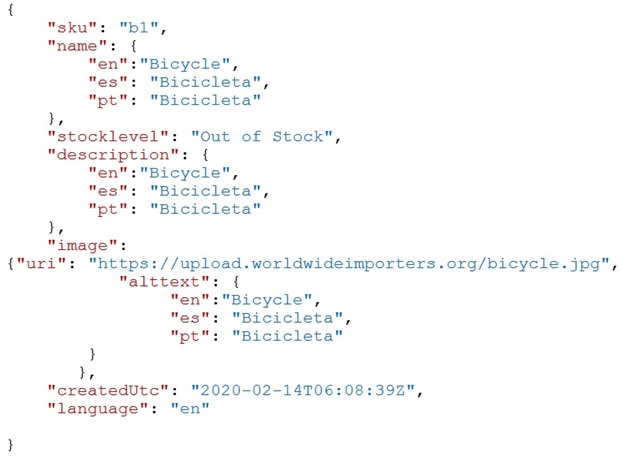
You have the following JSON sample for a product.