Case Study
This is a case study. Case studies are not timed separately. You can use as much exam time as you would like to complete each case. However, there may be additional case studies and sections on this exam. You must manage your time to ensure that you are able to complete all questions included on this exam in the time provided.
To answer the questions included in a case study, you will need to reference information that is provided in the case study. Case studies might contain exhibits and other resources that provide more information about the scenario that is described in the case study. Each question is independent of the other questions in this case study.
At the end of this case study, a review screen will appear. This screen allows you to review your answers and to make changes before you move to the next section of the exam. After you begin a new section, you cannot return to this section.
To start the case study
To display the first question in this case study, click the Next button. Use the buttons in the left pane to explore the content of the case study before you answer the questions. Clicking these buttons displays information such as business requirements, existing environment, and problem statements. If the case study has an All Information tab, note that the information displayed is identical to the information displayed on the subsequent tabs.
When you are ready to answer a question, click the Question button to return to the question.
Overview
Litware, Inc. is a medium-sized finance company that has a main office in Boston.
Existing Environment
Identity Environment
The network contains an Active Directory forest named litware.com that is linked to a Microsoft Entra tenant named litware.com. All users have Microsoft Entra ID P2 licenses.
Litware has a second Microsoft Entra tenant named dev.litware.com that is used as a development environment.
The litware.com tenant has a Conditional Access policy named Capolicy1. Capolicy1 requires that when users manage the Azure subscription for a production environment by using the Azure portal, they must connect from a hybrid Microsoft Entra-joined device.
Azure Environment
Litware has 10 Azure subscriptions that are linked to the Litware.com tenant and five Azure subscriptions that are linked to the dev.litware.com tenant. All the subscriptions are in an Enterprise Agreement (EA).
The litware.com tenant contains a custom Azure role-based access control (Azure RBAC) role named Role1 that grants the DataActions read permission to the blobs and files in Azure Storage.
On-Premises Environment
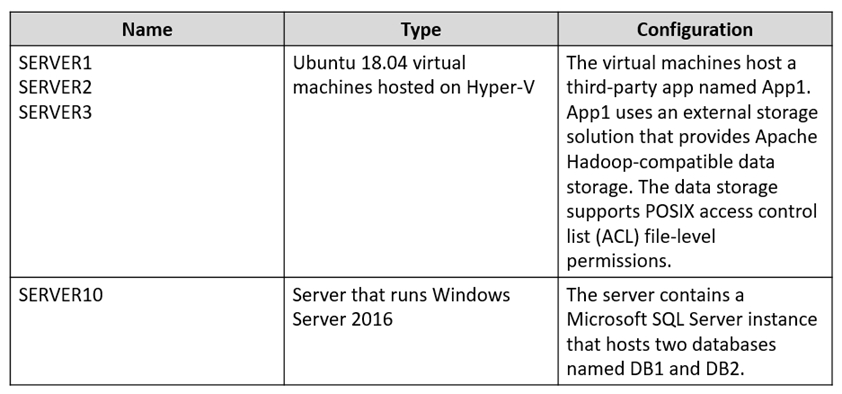
The on-premises network of Litware contains the resources shown in the following table.
Network Environment
Litware has ExpressRoute connectivity to Azure.
Planned Changes and Requirements
Planned Changes
Litware plans to implement the following changes:
-Migrate DB1 and DB2 to Azure.
-Migrate App1 to Azure virtual machines.
-Migrate the external storage used by App1 to Azure Storage.
-Deploy the Azure virtual machines that will host App1 to Azure dedicated hosts.
Authentication and Authorization Requirements
Litware identifies the following authentication and authorization requirements:
-Only users that manage the production environment by using the Azure portal must connect from a hybrid Microsoft Entra-joined device and authenticate by using Azure Multi-Factor Authentication (MFA).
-The Network Contributor built-in RBAC role must be used to grant permissions to the network administrators for all the virtual networks in all the Azure subscriptions.
-To access the resources in Azure, App1 must use the managed identity of the virtual machines that will host the app.
-RBAC roles must be applied to management groups.
Resiliency Requirements
Litware identifies the following resiliency requirements:
-Once migrated to Azure, DB1 and DB2 must meet the following requirements:
- Maintain availability if two availability zones in the local Azure region fail.
- Fail over automatically.
- Minimize I/O latency.
-App1 must meet the following requirements:
- Be hosted in an Azure region that supports availability zones.
- Be hosted on Azure virtual machines that support automatic scaling.
- Maintain availability if two availability zones in the local Azure region fail.
Security and Compliance Requirements
Litware identifies the following security and compliance requirements:
-Once App1 is migrated to Azure, you must ensure that new data can be written to the app, and the modification of new and existing data is prevented for a period of three years.
-On-premises users and services must be able to access the Azure Storage account that will host the data in App1.
-Access to the public endpoint of the Azure Storage account that will host the App1 data must be prevented.
-All Azure SQL databases in the production environment must have Transparent Data Encryption (TDE) enabled.
-App1 must NOT share physical hardware with other workloads.
Business Requirements
Litware identifies the following business requirements:
-Minimize administrative effort.
-Minimize costs.
-