Free AZ-800 Exam Braindumps
Administering Windows Server Hybrid Core Infrastructure Questions 89–96 (page: 13)

Updated On: 9-Aug-2026

Your network contains an Active Directory Domain Services (AD DS) forest named contoso.com. The forest contains the users shown in following table.

You have a workgroup server named Server1 that runs Windows Server and contains the local users shown in the following table.

You promote Server1 to the first domain controller in a new child domain named east.contoso.com.
Which users can sign in to Server1 locally?

  1. User1 only
  2. User3 only
  3. User1 and User2 only
  4. User1 and User3 only
  5. User3 and User4 only
  6. User1, User2, User3 and User4

Answer(s): A

Explanation:

* User1 - Yes Enterprise admins in a forest can sign in locally on a new child domain's first domain controller by default, because the Enterprise Admins group is automatically a member of the Administrators group in every domain within the forest.
* User2 - No A regular domain user cannot log in locally to the first domain controller of a child domain by default, but it is possible with a proper forest trust configuration. Authentication across domains in a forest relies on trust relationships, and a user needs the correct permissions to be allowed to log on locally to another domain's domain controller.
* User3 - No A user who is a member of the local Administrators group of a domain controller cannot sign in locally. Once a server is promoted to a domain controller, it does not have a local administrator account anymore; instead, the "local" administrator is the domain's domain-local "Administrators" group, which is populated with domain accounts. The user can sign in to the domain controller if their domain account is a member of that domain-local Administrators group.
* User4 -No See User3.


Reference:

https://learn.microsoft.com/en-us/windows-server/identity/ad-ds/manage/understand-security-groups


HOTSPOT (Drag and Drop is not supported)
Your network contains two Active Directory Domain Services (AD DS) forests named contoso.com and adatum.com. A two-way external trust exists between contoso.com and adatum.com. The forests contain the servers shown in the following table.

You need to ensure that users from contoso.com can access only shared resources hosted on SRV1. The solution must meet the following requirements:
-Ensure that users from adatum.com can access the resources hosted in contoso.com.
-Prevent the contoso.com users from accessing any other resources in adatum.com.
What should you do? To answer, select the appropriate options in the answer area.
Note: Each correct selection is worth one point.
Hot Area:

  1. See Explanation section for answer.

Answer(s): A

Explanation:


Box 1: DC1 Modify the trust on: Prevent the contoso.com users from accessing any other resources in adatum.com.
To prevent users in domain contoso.com from accessing resources in domain adatum.com you must break the existing two-way external trust by removing the outgoing trust from domain contoso.com using the Active Directory Domains and Trusts snap-in on a domain controller that hosts all FSMO roles in domain contoso.com, this is DC1. This will cut the connection from contoso.com's perspective, while the two-way trust still allows users in fabrik adatum.com to access resources in contoso.com.
Box 2: File shares on SRV1 Modify the permissions for the: Prevent the contoso.com users from accessing any other resources in adatum.com.
Configure both share and NTFS permissions on the specific file server resource in domain adatum.com to grant access to users from domain contoso.com while denying access to all others. This can be achieved by creating a group in domain contoso.com that contains the users, and then adding that group to a local group on the domain adatum.com server, which is then granted permissions to the file share.


Reference:

https://learn.microsoft.com/en-us/entra/identity/domain-services/concepts-forest-trust https://learn.microsoft.com/sv-se/azure/storage/files/storage-files-identity-multiple-forests


Your company has an office in New York.
The network contains an Active Directory Domain Services (AD DS) forest.
You plan to open a new office in Seattle. The Seattle office will connect to the New York office by using a high-speed WAN link.
You need to recommend a solution for the Seattle office that meets the following requirements.
-Ensures that users in the Seattle office authenticate against a local domain controller, whenever possible
-Ensures that the Seattle office users can change their password in the event of a WAN outage
-Minimizes administrative effort
What should you include in the recommendation?

  1. a subnet, an SMTP site link, and a read-only domain controller (RODC)
  2. a custom AD DS partition, a subnet, and a site link bridge
  3. a subnet, a site, and a domain controller
  4. a subnet, an IP site link, and an Active Directory Lightweight Directory Services (AD LDS) server

Answer(s): C

Explanation:

To ensure users in the second office can authenticate locally and manage password changes during a WAN outage, your Active Directory (AD) design must focus on Site resilience and Writeable Directory services.
To add a second office to an existing Active Directory Domain Services (AD DS) forest, enabling local authentication, password changes during a Wide Area Network (WAN) outage, and using an RODC with an SMTP site link, follow this plan: 1. Pre-deployment Configuration (Active Directory Sites and Services) *-> Create a New Site: In AD Sites and Services, create a new site for the second office (e.g., "BranchOffice2").
*-> Create Subnet: Create a new subnet object corresponding to the IP range of the second office and associate it with the "BranchOffice2" site.
Configure Site Link: Create a new site link between the main office and the second office.
While high-speed links usually use IP, if using SMTP for low-bandwidth scenarios (as mentioned in the prompt), create an SMTP site link under the "Inter-Site Transports" folder. Note that SMTP does not support domain partition replication.
Pre-create RODC Account: To ensure security, pre-create the RODC computer account in AD and designate a local administrator in the second office to perform the installation.
*-> 2. RODC Installation
Incorrect:
[Not A] There are two significant issues with the "SMTP site link" and "RODC" components that will prevent the setup from meeting the requirements:
The Problem with SMTP Site Links: SMTP site links are deprecated and only support asynchronous replication for the Schema, Configuration, and Global Catalog partitions. They do not support the replication of the Domain partition (user data/passwords). For a high-speed WAN link, an IP site link (RPC over IP) is the standard and necessary choice.
The Problem with RODCs: By design, a Read-Only Domain Controller (RODC) cannot process password changes directly. If the WAN link is down and a user attempts to change their password, the RODC cannot "write" that change. A writable Domain Controller is required in the second office to support password changes during a WAN outage.
[Not D] Active Directory Lightweight Directory Services (AD LDS) primarily by binding to the service using LDAP with a username and password. AD LDS supports authentication for specific applications, often using local AD LDS user accounts or proxy objects that link to external AD DS users, without needing a full Active Directory domain.


Reference:

https://learn.microsoft.com/en-us/windows-server/identity/ad-ds/plan/creating-a-site-link-design


Your network contains two Active Directory Domain Services (AD DS) forests as shown in the following table.

West.fabrikam.com contains a file server named Fileserver01. South.contoso.com contains a global group named Group1.
You need to ensure that the members of Group1 can access a share on Fileserver01. The solution must ensure that the users in the fabrikam.com forest cannot access the resources in south.contoso.com.
Which type of trust should you implement?

  1. realm
  2. external
  3. shortcut
  4. forest

Answer(s): D

Explanation:

To allow members of a global group in forest contoso to access a share in forest fabrikam, while preventing users in forest fabrikam from accessing resources in forest contoso, a one-way forest trust is required.
Trust Configuration Details: Trust Type: Forest Trust. This is necessary because it is a transitive trust established between the root domains of two forests, allowing authentication and resource access across all domains in those forests (e.g., from South.contoso.com to West.fabrikam.com).
Direction: One-way, Incoming (from the perspective of forest fabrikam) or One-way, Outgoing (from the perspective of forest contoso). Forest fabrikam must be the trusting forest (the forest containing the resource). Forest contoso must be the trusted forest (the forest containing the users/groups).
Transitivity: Forest trusts are transitive, meaning the relationship automatically extends to all child domains within the two forests.
Access Restriction: Because the trust is one-way, users in forest fabrikam cannot authenticate to or access any resources in forest contoso.
Implementation
Note: To grant access, you should create a Domain Local group in West.fabrikam.com, add the Global Group from South.contoso.com to it, and then assign the share permissions to that Domain Local group.


Reference:

https://learn.microsoft.com/en-us/entra/identity/domain-services/concepts-forest-trust


View Related Case Study

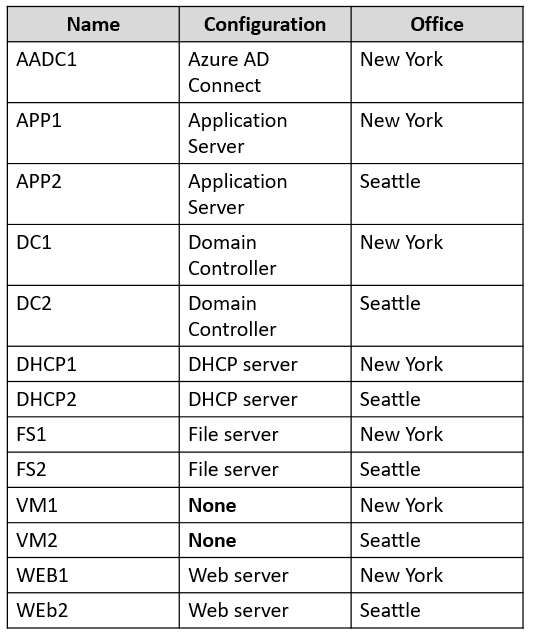
You need to implement the planned changes for Microsoft Entra users to sign in to Server1.
Which PowerShell cmdlet should you run?

  1. New-ADComputer
  2. Set-AzVM
  3. Set-AzVMExtension
  4. Add-ADComputerServiceAccount

Answer(s): C

Explanation:

Enable Azure AD users to sign in to Server1. Sever1 is a Windows Server 2022 Datacenter. Azure Edition server with Trusted launch running in a Virtual machine.
Set-AzVMExtension Updates extension properties or adds an extension to a virtual machine.
Description The Set-AzVMExtension cmdlet updates properties for existing Virtual Machine Extensions or adds an extension to a virtual machine.
Note: Enable Azure AD login for a Windows VM in Azure To use Azure AD login for a Windows VM in Azure, you must:
Enable the Azure AD login option for the VM. Configure Azure role assignments for users who are authorized to log in to the VM. There are two ways to enable Azure AD login for your Windows VM:
The Azure portal, when you're creating a Windows VM. Azure Cloud Shell, when you're creating a Windows VM or using an existing Windows VM.
Install the Azure AD login VM extension to enable Azure AD login for Windows VMs. VM extensions are small applications that provide post-deployment configuration and automation tasks on Azure virtual machines. Use az vm extension set to install the AADLoginForWindows extension on the VM named myVM in the myResourceGroup resource group.
The following example uses the Azure CLI to install the extension:
AzureCLI az vm extension set \ --publisher Microsoft.Azure.ActiveDirectory \ --name AADLoginForWindows \ --resource-group myResourceGroup \ --vm-name myVM


Reference:

https://learn.microsoft.com/en-us/azure/active-directory/devices/howto-vm-sign-in-azure-ad-windows https://learn.microsoft.com/en-us/powershell/module/az.compute/set-azvmextension


View Related Case Study

Which two languages can you use for Task1? Each correct answer presents a complete solution.
Note: Each correct selection is worth one point.

  1. Bicep
  2. Python
  3. Java
  4. PowerShell
  5. JavaScript

Answer(s): B,D

Explanation:

Planned changes: Configure an Azure runbook named Task1.
The Azure Automation Process Automation feature supports several types of runbooks, as defined in the following table.
* Python Textual runbook based on Python scripting. The currently supported versions are: Python 2.7 (GA), Python 3.8 (GA), and Python 3.10 (preview).
* PowerShell Textual runbook based on Windows PowerShell scripting. The currently supported versions are: PowerShell 5.1 (GA), PowerShell 7.1 (preview), and PowerShell 7.2 (preview).
* Etc.


Reference:

https://learn.microsoft.com/en-us/azure/automation/automation-runbook-types


View Related Case Study

You need to ensure that Automanage meets the technical requirements.
On which Azure virtual machines should you enable Automanage?

  1. Server1 only
  2. Server2 only
  3. Server1 and Server2 only
  4. Server2 and Server3 only
  5. Server1 and Server4 only

Answer(s): D

Explanation:

Azure Automanage must be used on all supported Azure virtual machines.

Automanage does not support Trusted Launch VMs. This excludes Server1 and Server4.
Note: What are all of the prerequisites required to enable Azure Automanage? The following are prerequisites for enabling Azure Automanage:
Supported Windows Server versions and Linux distros VMs must be in a supported region User must have correct permissions Non-scale set VMs only Automanage does not support Sandbox subscriptions at this time *-> Automanage does not support Trusted Launch VMs at this time


Reference:

https://learn.microsoft.com/en-us/azure/automanage/faq


View Related Case Study

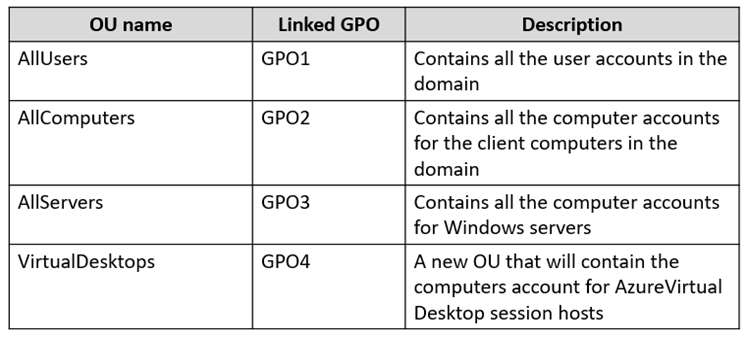
You are planning the implementation Azure Arc to support the planned changes.
You need to configure the environment to support configuration management policies.
What should you do?

  1. Create a hybrid runbook worker in Azure Automation.
  2. Install the Azure Monitor agent to all the servers.
  3. Deploy the Azure Connected Machine agent to all the servers.
  4. Hybrid Microsoft Entra join all the serves.

Answer(s): C


Reference:

https://docs.microsoft.com/en-us/azure/azure-arc/servers/plan-at-scale-deployment


Viewing page 13 of 39
Viewing questions 97 - 104 out of 311 questions


Post your Comments and Discuss Microsoft AZ-800 exam prep with other Community members:

AI Tutor AI Tutor 👋 I’m here to help!