Case Study:
This is a case study. Case studies are not timed separately. You can use as much exam time as you would like to complete each case. However, there may be additional case studies and sections on this exam. You must manage your time to ensure that you are able to complete all questions included on this exam in the time provided.
To answer the questions included in a case study, you will need to reference information that is provided in the case study. Case studies might contain exhibits and other resources that provide more information about the scenario that is described in the case study. Each question is independent of the other questions in this case study.
At the end of this case study, a review screen will appear. This screen allows you to review your answers and to make changes before you move to the next section of the exam. After you begin a new section, you cannot return to this section.
To start the case study To display the first question in this case study, click the Next button. Use the buttons in the left pane to explore the content of the case study before you answer the questions. Clicking these buttons displays information such as business requirements, existing environment, and problem statements. If the case study has an All Information tab, note that the information displayed is identical to the information displayed on the subsequent tabs.
When you are ready to answer a question, click the Question button to return to the question.
Overview:
Fabrikam, Inc is a manufacturing company that has a main office in New York and a branch office in Seattle.
Existing Environment
On-premises Servers
The on-premises network contains servers that run Windows Server as shown in the following table.
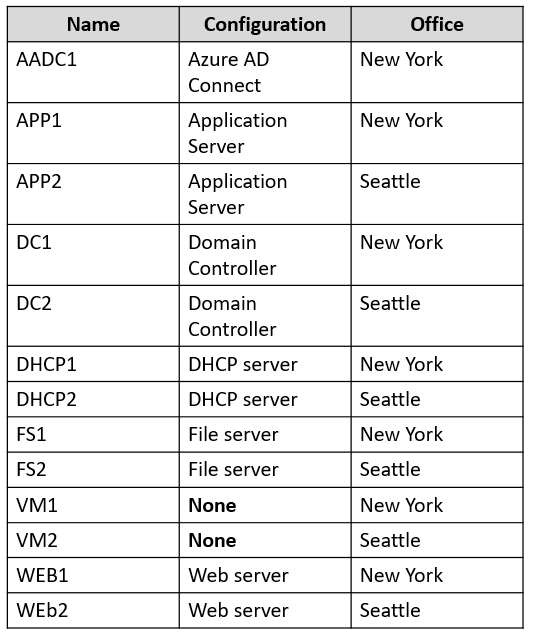
DC1 hosts all the operation master roles.
VM1 and VM2 are connected to the internet.
WEB1 and WEB2 run an Internet Information Services (IIS) web app named Webapp1.
On-premises Network
The New York and Seattle offices are connected by using redundant WAN links.
The client computers in each office get IP addresses from their local DHCP server.
DHCP1 contains a scope named Scope1 that has addresses for the New York office, DHCP2 contains a scope named Scope2 that has addresses for the Seattle office.
Identity Infrastructure
The network contains a single on-premises Active Directory Domain Services (AD DS) domain named corp.falbrikam.com. Currently, all the service accounts use individual domain user accounts.
All domain controllers have the DNS Server role installed and host a copy of the Active Directory integrated DNS zone of corp.fabrikam.com.
The corp.fabrikam.com AD DS domain syncs with a Microsoft Entra tenant.
Group Policy Objects (GPOs)
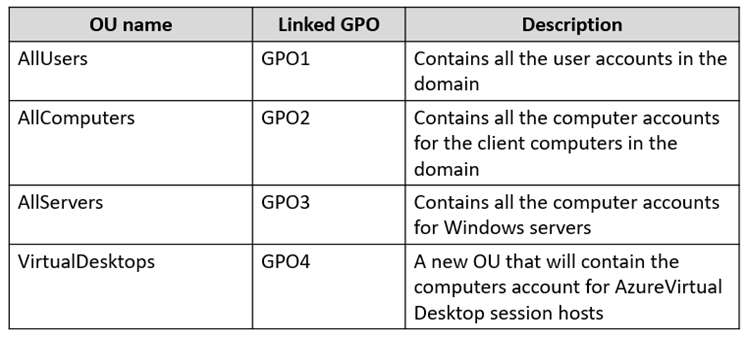
The corp.fabrikam.com domain contains the organizational units (OUs) and custom Group Policy Objects (GPOs) shown in the following table.
Requirements
Planned Changes
Fabrikam identifies the following planned changes:
-Create a single Azure subscription named Sub1 that will contain a single Azure virtual network named Vnet1.
-Replace the WAN links between the Seattle and New York offices by using Azure Virtual WAN and FxpressRoute. Both on premises offices will be connected to Vnet1 by using ExpressRoute.
-Create three Azure file shares named newyorkfiles, seattlefiles, and companyfiles.
-Create a domain controller named dc3.corp.fabrikam.com in Vnet1.
-Deploy an Azure Virtual Desktop host pool to Vnet1. The Azure Virtual Desktop session hosts will be hybrid Microsoft Entra joined.
-License all servers for Microsoft Defender for servers.
-Use Azure Policy to enforce configuration management policies on the servers in Azure and on-premises.
Networking
Requirements
Fabrikam identifies the following networking requirements:
-Implement Virtual WAN and ensure that all the network traffic between the sites uses Virtual WAN. All communications must occur over ExpressRoute.
-If a DHCP server fails, ensure that the client computers can continue to receive their dynamic IP address and renew their existing lease.
-Ensure that the resources in Vnet1 can resolve the names of the on-premises servers in the corp.fabrikam.com domain.
Security
Requirements
Fabrikam identifies the following security requirements:
-Apply GPO4 to the Azure Virtual Desktop session hosts. Ensure that Azure Virtual Desktop user sessions lock after being idle for 10 minutes. Users must be able to control the lockout time manually from their client computer.
-Ensure that server administrators request approval before they can establish a Remote Desktop connection to an Azure virtual machine. If the request is approved, the connection must be established within two hours.
-Prevent user passwords from containing all or part of words that are based on the company name, such as Fab, f@br1kAm or fabr!.
-Ensure that all instances of Webapp1 use the same service account. The password of the service account must change automatically every 30 days.
-Prevent domain controllers from directly contacting hosts on the internet.
File Sharing
Requirements
You need to configure the synchronization of Azure files to meet the following requirements:
-Ensure that seattlefiles syncs to FS2.
-Ensure that newyorkfiles syncs to FS1.
-Ensure that companyfiles syncs to both FS1 and FS2.