Free AZ-802 Exam Braindumps
Administering Windows Server Questions 5–9 (page: 12)

Updated On: 29-Oct-2026
View Related Case Study

HOTSPOT (Drag and Drop is not supported)
You have an Azure virtual machine scale set named vmssWeb.
vmssWeb hosts identical virtual machines that run Windows Server and have the Web Server (IIS) server role installed. vmssWeb has a fixed capacity of 10 virtual machine instances.
Monitoring shows the following patterns:
● On Saturdays and Sundays, vmssWeb requires only two virtual machine instances by 7:00 AM.
● During business days, launches by your company’s marketing department can cause unpredictable processor demand.
You need to configure capacity management for vmssWeb. The solution must meet the following requirements:
● Automatically set weekend capacity to two virtual machine instances.
● Increase capacity during business-day demand spikes.
● Minimize manual intervention.
What should you configure for each requirement? To answer, select the appropriate options in the answer area.
Note: Each correct selection is worth one point.
Hot Area:

  1. See Explanation section for answer.

Answer(s): A

Explanation:


Box 1: Configure a recurring autoscale profile
Autoscale settings with a recurrence schedule is the correct feature to set up.
Steps:
1. Enable Autoscale: Go to your Virtual Machine Scale Set in the Azure Portal and select Scaling.
2. Create a Custom Profile for Weekends: Add a new scaling profile configured for a Recurrence schedule.
3. Set Weekend Times: Choose Saturday and Sunday and set the time to 7:00 AM.
4. Set Instance Limits: Change the instance count to a fixed capacity of 2 for this weekend profile.
5. Configure Weekday Scaling: Set up a separate default profile or metric rules based on CPU percentage (e.g., scale out when CPU is high, scale in when low) with a minimum of 2 and a maximum of 10 instances to handle unpredictable marketing launches.
Box 2: Create a scheduled scale-out profile
Create a Business-Day Profile (Metric-based):
Set a scale condition for Monday through Friday (or use as your default profile).Define an instance range with a minimum of baseline instances (e.g., 2 or higher) and a maximum instance limit of 10.
Add a scale-out rule based on a host performance metric like Percentage CPU (e.g., increase instance count by 2 or by a percentage when average CPU > 70% over a 5 to 10-minute period) to seamlessly catch unpredictable marketing demand.
Add a corresponding scale-in rule (e.g., decrease instance count when CPU < 30% over a 10-minute period) to reduce capacity back down safely during quieter intervals.


Reference:

https://learn.microsoft.com/en-us/azure/virtual-machine-scale-sets/virtual-machine-scale-sets-autoscale-overvi ew


View Related Case Study

HOTSPOT (Drag and Drop is not supported)
You have an Azure subscription. The subscription contains a virtual network named VNet1. VNet1 contains two virtual machines named VM1 and VM2 that run Windows Server.
You need to ensure that when you sign in to the Azure portal from VM2, you can manage the operating system of VM1. The solution must minimize costs.
Which two settings should you configure for VM1? To answer, select the appropriate settings in the answer area.
Note: Each correct answer is worth one point.
Hot Area:

  1. See Explanation section for answer.

Answer(s): A

Explanation:


Access control (IAM)
Windows Admin Center
Enable Windows Admin Center on VM1 and use Access control (IAM) to assign your account the Windows Admin Center Administrator Login role, together with Reader access. Windows Admin Center provides operating system management directly through the Azure portal at no additional cost. Because VM2 is in the same virtual network, it can connect to VM1 using its private IP address.


Reference:

https://learn.microsoft.com/en-us/windows-server/manage/windows-admin-center/azure/manage-vm


View Related Case Study

Note: This section contains one or more sets of questions with the same scenario and problem. Each question presents a unique solution to the problem. You must determine whether the solution meets the stated goals. More than one solution in the set might solve the problem. It is also possible that none of the solutions in the set solve the problem.
After you answer a question in this section, you will NOT be able to return. As a result, these questions do not appear on the Review Screen.
Your network contains an Active Directory Domain Services (AD DS) domain. The domain contains servers that run Windows Server and store BitLocker recovery keys in AD DS.
A server named Server1 starts in BitLocker recovery mode.
You need to identify the BitLocker recovery key for Server1.
Solution: From Active Directory Users and Computers, you use BitLocker Recovery Password Viewer.
Does this meet the goal?

  1. Yes
  2. No

Answer(s): A

Explanation:

Correct:
* From Active Directory Users and Computers, you use BitLocker Recovery Password Viewer.
You can locate the BitLocker recovery key in Active Directory by using the BitLocker Recovery Password Viewer extension inside Active Directory Users and Computers (ADUC).
Incorrect:
* You run ntdsutil.exe on a domain controller.
* You run repair-bde.exe by using a BitLocker key package exported from AD DS.
* You use ADSI Edit and view the properties of the Server1 computer object.


Reference:

https://learn.microsoft.com/en-us/windows/security/operating-system-security/data-protection/bitlocker/recover y-process


View Related Case Study

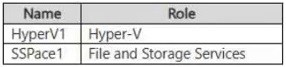
You have on-premises servers that run Windows Server as shown in the following table.

You have an Azure subscription that contains a virtual machine named VM1.
You need to ensure that you can manage all the servers by using Azure Arc. The solution must minimize administrative effort.
On which servers should you install the Azure Connected Machine agent?

  1. Server1 only
  2. VM1 only
  3. VM2only
  4. VM1 and VM2 only
  5. Server1 and VM2 only
  6. Server1, VM1, and VM2

Answer(s): E

Explanation:

Install the Azure Connected Machine agent on Server1 and VM2 to register the on-premises physical server and Hyper-V virtual machine with Azure Arc. Each machine requires its own agent. VM1 is already an Azure resource and can use native Azure management capabilities without installing the Connected Machine agent.


Reference:

https://learn.microsoft.com/en-us/azure/azure-arc/servers/overview https://learn.microsoft.com/en-us/azure/azure-arc/servers/agent-overview


View Related Case Study

Your network contains an Active Directory Domain Services (AD DS) domain named contoso.com.
The domain contains a server named Server1 that runs Windows Server and has Remote SSH Access enabled. The sshd service is running on Server1.
The domain contains an account named CONTOSO\OpsAdmin that is a member of the local Administrators group on Server1.
You need to enable key-based SSH authentication to Server1 tor CONTOSO\OpsAdmin from a management workstation that has a public/private ecdsa key pair.
What should you do on Server1?

  1. Add the public key to C;\ProgramData\ssh\administrators_authorized_keys and grant Full control to Administrators and SYSTEM only.
  2. Add the public key to C:\Users\OpsAdmin\.ssh\authorized_keys and grant Full control to CONTOSO\OpsAdmin and SYSTEM only.
  3. Add the public key to C:\ProgramData\ssh\administrators_authorized_keys and grant Full control to Authenticated Users and SYSTEM only.
  4. Add the public key to C:\Users\OpsAdmin\.ssh\administrators_authorized_keys and grant Full control to Administrators and SYSTEM only.

Answer(s): A

Explanation:

For members of the local Administrators group, Windows OpenSSH uses C:\ProgramData\ssh\administrators_authorized_keys. Add the workstation’s public key to this file and restrict its permissions to Administrators and SYSTEM, granting both Full control and removing inherited permissions.


Reference:

https://learn.microsoft.com/en-us/windows-server/administration/openssh/openssh_keymanagement


Viewing page 12 of 37
Viewing questions 56 - 60 out of 224 questions


Post your Comments and Discuss Microsoft AZ-802 exam prep with other Community members:

AI Tutor AI Tutor 👋 I’m here to help!