Free AZ-802 Exam Braindumps
Administering Windows Server Questions 10–14 (page: 13)

Updated On: 29-Oct-2026
View Related Case Study

HOTSPOT (Drag and Drop is not supported)
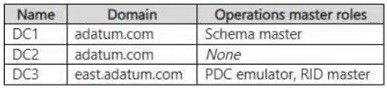
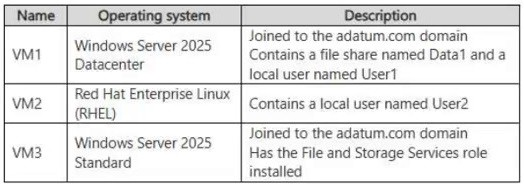
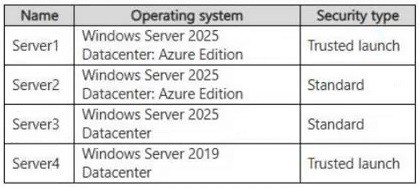
Your network contains an Active Directory Domain Services (AD DS) domain. The domain contains the servers shown in the following table.
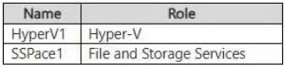
The domain contains the users shown in the following table.

On Server2, you run the Enable-PSRemoting cmdlet.
For each of the following statements, select Yes if the statement is true. Otherwise, select No.
Note: Each correct selection is worth one point.
Hot Area:

  1. See Explanation section for answer.

Answer(s): A

Explanation:


No
Yes
No
User1 belongs to the domain’s built-in Administrators group, which grants administrative rights on domain controllers but does not automatically grant them on Server2. User2’s membership in the domain’s Remote Management Users group permits PowerShell remoting to DC1, where remoting is enabled by default on modern Windows Server versions. User3’s membership in Server2’s Power Users group does not grant access to its PowerShell remoting endpoint. Running Enable-PSRemoting configures connectivity without granting additional users permission to connect.


Reference:

https://learn.microsoft.com/en-us/windows-server/identity/ad-ds/manage/understand-security-groups https://learn.microsoft.com/en-us/powershell/module/microsoft.powershell.core/about/about_remote_requirem ents?view=powershell-7.6


View Related Case Study

Your network contains an Active Directory Domain Services (AD DS) domain.
The domain contains a member server named DNS1 that has the DNS Server role installed and PowerShell remoting enabled. The domain contains a group named DNSOperators.
The members of DNSOperators perform routine DNS tasks on DNS1 by using PowerShell. The DNSOperators members are NOT local administrators on DNS1.
You need to configure remote management for DNSOperators. The solution must meet the following requirements:
● Enable access to DNS1 by using non-admin domain accounts.
● Allow only the required DNS commands to run on DNS1.
● Prevent adding DNSOperators to privileged groups.
What should you implement?

  1. resource-based Kerberos constrained delegation for the computer account of DNS1
  2. CredSSP for PowerShell remoting on the client computers and DNS1
  3. a Just Enough Administration (JEA) endpoint that uses a role capability and a virtual account
  4. a standard PowerShell session configuration that uses a domain RunAsCredential

Answer(s): C

Explanation:

Just Enough Administration (JEA) should be used to configure secure, delegated remote management for this group.
Enable non-admin access: JEA allows users to connect to the server using their standard, non-privileged domain user accounts while executing commands under the context of a temporary, elevated local virtual account.
Allow only required DNS commands: By using role capability files (.psrc), you can restrict the session to expose only specific DNS PowerShell cmdlets and parameters, blocking all other system commands.
Prevent privileged group membership: Group members do not need to be added to the local Administrators, Domain Admins, or any other privileged security groups.


Reference:

https://learn.microsoft.com/en-us/powershell/scripting/security/remoting/jea/overview


View Related Case Study

Note: This section contains one or more sets of questions with the same scenario and problem. Each question presents a unique solution to the problem. You must determine whether the solution meets the stated goals. More than one solution in the set might solve the problem. It is also possible that none of the solutions in the set solve the problem.
After you answer a question in this section, you will NOT be able to return. As a result, these questions do not appear on the Review Screen.
Your network contains an Active Directory Domain Services (AD DS) domain. The domain contains servers that run Windows Server and store BitLocker recovery keys in AD DS.
A server named Server1 starts in BitLocker recovery mode.
You need to identify the BitLocker recovery key for Server1.
Solution: You run ntdsutil.exe on a domain controller.
Does this meet the goal?

  1. Yes
  2. No

Answer(s): B

Explanation:

Correct:
* From Active Directory Users and Computers, you use BitLocker Recovery Password Viewer.
You can locate the BitLocker recovery key in Active Directory by using the BitLocker Recovery Password Viewer extension inside Active Directory Users and Computers (ADUC).
Incorrect:
* You run ntdsutil.exe on a domain controller.
* You run repair-bde.exe by using a BitLocker key package exported from AD DS.
* You use ADSI Edit and view the properties of the Server1 computer object.


Reference:

https://learn.microsoft.com/en-us/windows/security/operating-system-security/data-protection/bitlocker/recover y-process


View Related Case Study

Note: This section contains one or more sets of questions with the same scenario and problem. Each question presents a unique solution to the problem. You must determine whether the solution meets the stated goals. More than one solution in the set might solve the problem. It is also possible that none of the solutions in the set solve the problem.
After you answer a question in this section, you will NOT be able to return. As a result, these questions do not appear on the Review Screen.
Your network contains an Active Directory Domain Services (AD DS) domain. The domain contains servers that run Windows Server and store BitLocker recovery keys in AD DS.
A server named Server1 starts in BitLocker recovery mode.
You need to identify the BitLocker recovery key for Server1.
Solution: You use ADSI Edit and view the properties of the Server1 computer object.
Does this meet the goal?

  1. Yes
  2. No

Answer(s): B

Explanation:

Correct:
* From Active Directory Users and Computers, you use BitLocker Recovery Password Viewer.
You can locate the BitLocker recovery key in Active Directory by using the BitLocker Recovery Password Viewer extension inside Active Directory Users and Computers (ADUC).
Incorrect:
* You run ntdsutil.exe on a domain controller.
* You run repair-bde.exe by using a BitLocker key package exported from AD DS.
* You use ADSI Edit and view the properties of the Server1 computer object.


Reference:

https://learn.microsoft.com/en-us/windows/security/operating-system-security/data-protection/bitlocker/recover y-process


View Related Case Study

You have an on-premises server named Server1 that runs Windows Server.
You have an Azure subscription. The subscription contains a virtual machine named VM1 that runs Windows Server. The subscription contains a network security group (NSG) named NSG1 that has the following custom rules.

The network interface of VM1 is associated with NSG1.
You plan to manage VM1 from Server1 by using Windows Admin Center from the Azure portal.
You need to ensure that you can install Windows Admin Center on VM1 by using the Azure portal. The solution must minimize administrative effort.
What should you do?

  1. Modify the priority of Rule1 and add an inbound port rule.
  2. Modify the priority of Rule2 and add an inbound port rule.
  3. Modify the priority of Rule1 and add an outbound port rule.
  4. Modify the priority of Rule2 and add an outbound port rule.

Answer(s): C

Explanation:

Installing Windows Admin Center requires outbound HTTPS connectivity on TCP port 443. Increase Rule1’s priority number, then add an outbound allow rule with a lower priority number so it takes precedence over the blocking rule.


Reference:

https://learn.microsoft.com/en-us/windows-server/manage/windows-admin-center/azure/manage-vm


Viewing page 13 of 37
Viewing questions 61 - 65 out of 224 questions


Post your Comments and Discuss Microsoft AZ-802 exam prep with other Community members:

AI Tutor AI Tutor 👋 I’m here to help!