Case Study
Company Information
Litware, Inc. is a retail company that has a main office in San Francisco and branch offices across North America.
Litware manages an on-premises Windows Server environment arid integrates selected servers with Azure services.
Litware has an Azure subscription linked to a Microsoft Entra hybrid tenant.
Existing Environment
Active Directory Infrastructure
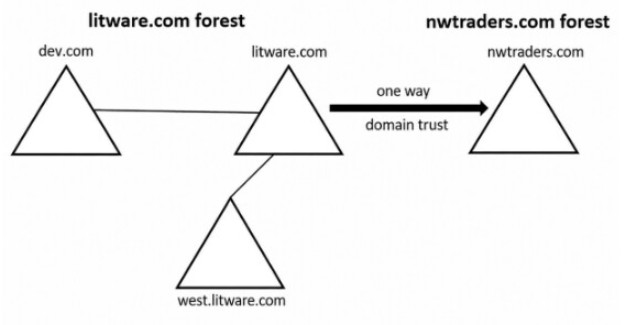
The network contains only two on-premises Active Directory Domain Services (AD DS) forests named litware.com and nwtraders.com as shown in the following exhibit.
Active Directory member servers
The forests contain member servers and 1,000 Windows devices.
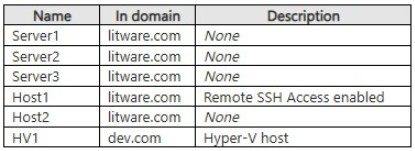
The domains contain the servers shown in the following table.
BitLocker Drive Encryption (BitLocker) is enabled for all the servers. BitLocker recovery information is stored in AD DS.
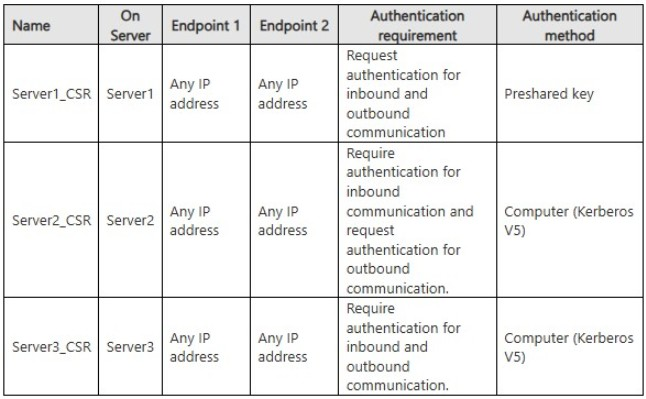
The servers have the connection security rules shown in the following table.
Active Directory domain controllers
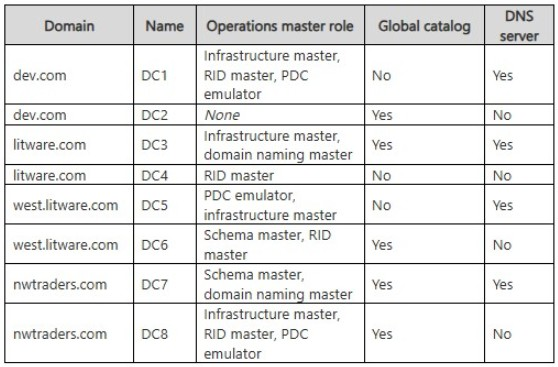
The domains contain the domain controllers shown in the following table.
Active Directory identities
The litware.com forest contains the users shown in the following table.
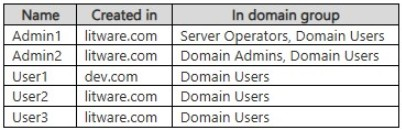
User2 has attached a removable disk named Disk1 to Host1 and has enabled BitLocker.
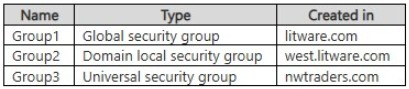
The forests contain the groups shown in the following table.
Virtualization configuration
HV1 has the virtual switches shown in the following table.
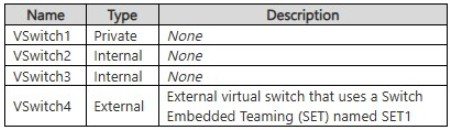
HV1 has five physical network adapters. Two adapters are bound to VSwitch4.
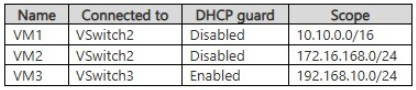
HV1 contains virtual machines that run Windows Server and have the DHCP Server role installed. The virtual machines are configured as shown in the following table.
DNS configuration
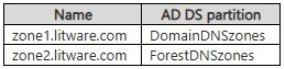
The litware.com domain hosts the Active Directory-integrated DNS zones shown in the following table.
Azure subscription
The Azure subscription contains two resource groups named RG1 and RG2.
The Microsoft Entra tenant contains the identities shown in the following table.
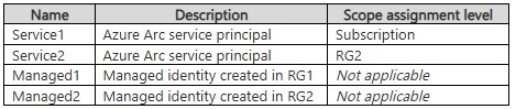
All the identities have the Azure Connected Machine Onboarding role at scope RG2.
Requirements
Planned changes
Litware plans to implement the following changes:
● Deploy a virtual machine named VM5 that runs Windows Server, is connected to VSwitch3, and obtains an IPv4 address automatically.
● Create a DNS resource record named Record1 in zone1.litware.com and a DNS resource record named Record2 in zone2.litware.com.
● On Host1, add User2 to the local OpenSSH Users group and User3 to the local Administrators group.
● Deploy a domain controller named DC9 to the litware.com domain.
● Create a user named User5 in the litware.com domain.
● Onboard Host2 to Azure Arc as a resource in RG2.
● Move Disk1 from Host1 to Host2.
Technical requirements
Litware identifies the following technical requirements:
● The Azure Arc onboarding of Host2 must use automatic machine authentication for Azure sign-ins.
● The deployment of DC9 must minimize initial AD DS replication traffic across the network.
● HV1 must have the maximum possible number of external virtual switches.
● All solutions must follow the principle of least privilege.
● All solutions must minimize administrative effort.
● All solutions must minimize costs.