Free GH-600 Exam Braindumps
Developing in Agentic AI Systems Questions 9–16 (page: 3)

Updated On: 11-Aug-2026
View Related Case Study

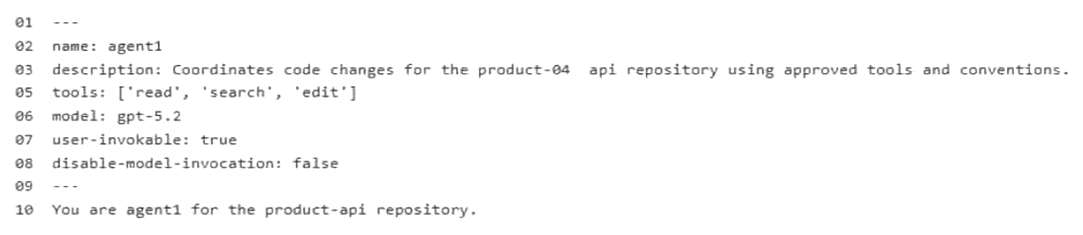
You need to configure agent1 to support the planned changes.
What should you do?

  1. Delete line 05 from the agent configuration.
  2. Add Use all available tools to the .github/copilot-instructions.md file.
  3. Add Use all available tools to the instructions in the agent configuration.
  4. Add the mcp-servers property to the agent configuration.
  5. In the agent configuration, replace line 05 with the following.05 tools: [].

Answer(s): A

Explanation:

Scenario: Litware plans to make the following changes: Ensure that agent1 can access all the tools in the environment. Provide product-api with specific instructions to agent1 without affecting Copilot Chat or Copilot code review. Configure MCP1 as a tool for agent1 by modifying the product-api repository MCP configuration.
The correct action to take is to delete the line with tools: ['read','cearch','edit'] from the agent configuration.
Enabling All Tools: In GitHub Copilot Agent configuration specifications, omitting the tools key entirely or deleting it allows the agent to automatically inherit and utilize all available tools in the runtime environment. Explicitly hardcoding a restricted array limits its capabilities.
Targeted Instructions: Modifying the repository's configuration for the agent ensures that the specific product-api guidelines apply strictly to that custom agent without bleeding into general Copilot Chat or standard Copilot code reviews.


Reference:

https://docs.github.com/en/copilot/how-tos/copilot-sdk/features/mcp


View Related Case Study

You need to provide access to the API key of MCP1. The solution must meet the security requirements.
What should you do?

  1. Store the API key as a GitHub Codespaces user secret scoped to product-api.
  2. Store the API key as a secret in the Copilot environment of product-api by using a name prefix of
    COPILOT_MCP_, and then reference the variable name in the mcp.json configuration.
  3. In the product-api repository settings, add the API key directly to the .mcp/server.json file by using a plaintext apiKey field.
  4. In product-api, add the API key as a GitHub Actions encrypted secret and reference the secret by using
    -${{ secrets.KEY }} in the workflow YAML of agent1.
    -

Answer(s): B

Explanation:

Scenario: Agent environment: A Model Context Protocol (MCP) server named MCP1 is deployed to https:// mcp.litwareinc.internal and provides access to internal ticketing and deployment APIs. MCP1 requires an API key for authentication.
Security requirement: All API keys must be stored and accessed securely.
--The correct solution is to store the API key as an Agents secret in the Copilot environment of the repository using the COPILOT_MCP_ name prefix, and then reference it in your MCP configuration.
Strict Prefix Enforcement: GitHub Copilot cloud agent isolates execution for security. It will only expose secrets and variables that explicitly begin with the COPILOT_MCP_ prefix to the MCP server configuration.
Environment Alignment: Storing it as a native Copilot agent secret ensures that when the remote Copilot agent spins up to execute your JSON configuration, it can securely bind and decrypt the secret directly into the server's runtime environment variables.
Config Separation: This practice keeps your sensitive production tokens entirely out of version-controlled mcp.json or .vscode/mcp.json tracking files.


Reference:

https://docs.github.com/en/copilot/how-tos/copilot-on-github/customize-copilot/configure-mcp-servers


View Related Case Study

HOTSPOT (Drag and Drop is not supported)
You are evaluating how agent1 will behave after you implement the planned changes.
For each of the following statements, select Yes if the statement is true. Otherwise, select No.
Note: Each correct selection is worth one point.
Hot Area:

  1. See Explanation section for answer.

Answer(s): A

Explanation:


Scenario: Planned Changes
Litware plans to make the following changes: Ensure that agent1 can access all the tools in the environment. Provide product-api with specific instructions to agent1 without affecting Copilot Chat or Copilot code review. Configure MCP1 as a tool for agent1 by modifying the product-api repository MCP configuration.
Box 1: Yes
Box 2: Yes
Box 3: Yes
-[Related to another question in this scenario] The correct action to take is to delete the line with tools: ['read','cearch','edit'] from the agent configuration.
Enabling All Tools: In GitHub Copilot Agent configuration specifications, omitting the tools key entirely or deleting it allows the agent to automatically inherit and utilize all available tools in the runtime environment. Explicitly hardcoding a restricted array limits its capabilities.
Targeted Instructions: Modifying the repository's configuration for the agent ensures that the specific product-api guidelines apply strictly to that custom agent without bleeding into general Copilot Chat or standard Copilot code reviews.


Reference:

https://docs.github.com/en/copilot/how-tos/copilot-sdk/features/mcp


View Related Case Study

You need to make changes to repo1 to support the planned changes for the agents.
What should you modify?

  1. .github/agents/*.agent.md
  2. .vscode/settings.json
  3. .vscode/mcp.json
  4. <project>/.mcp/server.json

Answer(s): C

Explanation:

Scenario, Planned Changes: Contoso plans to have all agents and developers in repo1 use the Microsoft Learn MCP to ensure that reviews are validated by using the appropriate documentation. This must be implemented centrally.
To centrally configure the Microsoft Learn Model Context Protocol (MCP) server for all developers and agents within a shared repository, you should modify the .vscode/mcp.json file.
Central Repository Configuration: In GitHub Copilot and Visual Studio Code, placing an mcp.json file inside the workspace root's .vscode/ directory ensures that the defined MCP servers are automatically loaded and shared with any developer or Copilot agent who opens that specific project repository.
Tool Exposure: This configuration file maps the external tools provided by the Microsoft Learn Docs MCP server (such as searching and fetching official documentation) directly into the Copilot agentic workflow.


Reference:

https://docs.github.com/en/copilot/how-tos/copilot-on-github/customize-copilot/configure-mcp-servers


You have a GitHub repository.
You use the GitHub Copilot CLI to run an agentic workflow from the terminal.
During execution, the conversation history approaches the context limit. The agent cannot continue the current session unless the amount of retained context is reduced.
You need to continue the current session without losing all the prior progress.
Which Copilot CLI slash command should you run?

  1. /context
  2. /yolo
  3. /clear
  4. /compact

Answer(s): D

Explanation:

You should run the /compact slash command.
Context Management in GitHub Copilot CLI/compact: This command triggers the compaction process manually. It takes a snapshot of your full conversation history, sends it to the AI model to generate a summary, and replaces the bulky history with that concise summary. This reduces token usage instantly while preserving prior progress.


Reference:

https://docs.github.com/en/copilot/how-tos/copilot-cli/use-copilot-cli/overview


You have a GitHub Enterprise repository.
An agent opens pull requests to the main branch.
You need to ensure that changes to .github/workflows/* and /infra/* require approval from designated reviewers before merge.
What should you configure?

  1. a ruleset and an agents.md file
  2. a ruleset and a .copilotignore file
  3. a branch protection rule and a CODEOWNERS file
  4. a branch protection rule and copilot-instructions.md

Answer(s): C

Explanation:

To secure these specific directories in your GitHub Enterprise repository, you need to configure
CODEOWNERS combined with a Repository Branch Protection Rule.


Reference:

https://docs.github.com/en/pull-requests/collaborating-with-pull-requests/reviewing-changes-in-pull-requests/ approving-a-pull-request-with-required-reviews


HOTSPOT (Drag and Drop is not supported)
You have a GitHub repository that uses the following GrtHub Copilot CLI command in a Bash script.

For each of the following statements, select Yes if the statement is true. Otherwise, select No.
Note: Each correct selection is worth one point.
Hot Area:

  1. See Explanation section for answer.

Answer(s): A

Explanation:


Box 1: Yes Setting --max-autopilot-continues 10 acts as a hard ceiling, preventing infinite loops by cutting off the execution the moment it reaches the 10-step limit.
Box 2: Yes This command will allow the agent to use all local tools without prompting you for permission.
The --yolo flag is a built-in alias in the official GitHub Copilot CLI. It bypasses safety confirmation prompts by combining three specific permission-granting arguments: --allow-all-tools, --allow-all-paths, and --allow-all-urls.
Box 3: No This specific command will not allow targeted human intervention at key decision points because it explicitly strips away all prompt checkpoints
The options configuration used in your script forces the GitHub Copilot CLI to bypass user confirmation entirely and execute the objective fully autonomously


Reference:

https://pub.towardsai.net/i-stopped-prompting-github-copilot-and-started-delegating-to-it-fe2f12a21709? gi=fbf268b2a564 https://docs.github.com/en/copilot/concepts/agents/copilot-cli/autopilot


HOTSPOT (Drag and Drop is not supported)
You have a GitHub repository that uses GitHub Actions for CI.
Your team is piloting the GitHub Copilot coding agent to autonomously create branches and open pull requests. The repository follows trunk-based development that uses main as the default branch.
You need to ensure that the agent meets the following requirements:
-Changes to main can occur only by using pull requests that have at least one approval.
-When a pull request is opened, a validation workflow runs, and the agent can still create branches and open pull requests autonomously.
How should you configure the repository? To answer, select the appropriate options in the answer area.
Note: Each correct selection is worth one point.
Hot Area:

  1. See Explanation section for answer.

Answer(s): A

Explanation:


Box 1: Enabled To meet the requirements, the Branch protection rule (main) - Require pull request before merging must be Enabled. This forces everyone—including GitHub Actions and AI agents—to create a branch and open a pull request first.
Box 2: on: pull_request To allow your GitHub Copilot agent to autonomously open PRs while maintaining branch protection, you must trigger your validation workflow on the pull_request event.
Bypasses Protection: Agents cannot push directly to main due to your branch protection rule. They must create a feature branch and open a PR.Triggers on Creation: The pull_request trigger fires automatically the moment the agent opens a PR.Runs in Isolation: It validates the merged result of the agent's branch and main before any actual code is merged.


Reference:

https://tutorialsdojo.com/github-copilot-coding-agent/


Viewing page 3 of 9
Viewing questions 17 - 24 out of 96 questions


Post your Comments and Discuss Microsoft GH-600 exam prep with other Community members:

AI Tutor AI Tutor 👋 I’m here to help!