Case study:
This is a case study. Case studies are not timed separately. You can use as much exam time as you would like to complete each case. However, there may be additional case studies and sections on this exam. You must manage your time to ensure that you are able to complete all questions included on this exam in the time provided.
To answer the questions included in a case study, you will need to reference information that is provided in the case study. Case studies might contain exhibits and other resources that provide more information about the scenario that is described in the case study. Each question is independent of the other questions in this case study.
At the end of this case study, a review screen will appear. This screen allows you to review your answers and to make changes before you move to the next section of the exam. After you begin a new section, you cannot return to this section.
To start the case study To display the first question in this case study, click the Next button. Use the buttons in the left pane to explore the content of the case study before you answer the questions. Clicking these buttons displays information such as business requirements, existing environment, and problem statements. If the case study has an All Information tab, note that the information displayed is identical to the information displayed on the subsequent tabs.
When you are ready to answer a question, click the Question button to return to the question.
Overview
Fabrikam, Inc. is a financial services company.
The company has branch offices in New York, London, and Singapore. Fabrikam has remote users located across the globe. The remote users access company resources, including cloud resources, by using a VPN connection to a branch office.
Existing Environment
Identity Environment
The network contains an Active Directory Domain Services (AD DS) forest named fabrikam.com that syncs with an Azure AD tenant named fabrikam.com. To sync the forest, Fabrikam uses Azure AD Connect with pass-through authentication enabled and password hash synchronization disabled.
The fabrikam.com forest contains two global groups named Group1 and Group2.
Microsoft 365 Environment
All the users at Fabrikam are assigned a Microsoft 365 E5 license and a Microsoft Entra ID P2 license.
Fabrikam implements Microsoft Defender for Identity and Microsoft Defender for Cloud Apps and enables log collectors.
Azure Environment
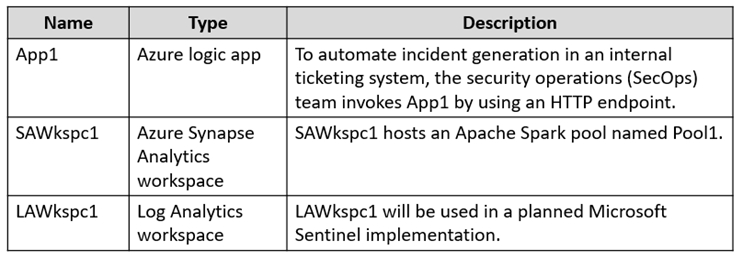
Fabrikam has an Azure subscription that contains the resources shown in the following table.
Amazon Web Services (AWS) Environment
Fabrikam has an Amazon Web Services (AWS) account named Account1. Account1 contains 100 Amazon Elastic Compute Cloud (EC2) instances that run a custom Windows Server 2022. The image includes Microsoft SQL Server 2019 and does NOT have any agents installed.
Current Issues
When the users use the VPN connections, Microsoft 365 Defender raises a high volume of impossible travel alerts that are false positives.
Defender for Identity raises a high volume of Suspected DCSync attack alerts that are false positives.
Requirements
Planned changes
Fabrikam plans to implement the following services:
-Microsoft Defender for Cloud
-Microsoft Sentinel
Business Requirements
Fabrikam identifies the following business requirements:
-Use the principle of least privilege, whenever possible.
-Minimize administrative effort.
Microsoft Defender for Cloud Apps Requirements
Fabrikam identifies the following Microsoft Defender for Cloud Apps requirements:
-Ensure that impossible travel alert policies are based on the previous activities of each user.
-Reduce the amount of impossible travel alerts that are false positives.
Microsoft Defender for Identity Requirements
Minimize the administrative effort required to investigate the false positive alerts.
Microsoft Defender for Cloud Requirements
Fabrikam identifies the following Microsoft Defender for Cloud requirements:
-Ensure that the members of Group2 can modify security policies.
-Ensure that the members of Group1 can assign regulatory compliance policy initiatives at the Azure subscription level.
-Automate the deployment of the Azure Connected Machine agent for Azure Arc-enabled servers to the existing and future resources of Account1.
-Minimize the administrative effort required to investigate the false positive alerts.
Microsoft Sentinel Requirements
Fabrikam identifies the following Microsoft Sentinel requirements:
-Query for NXDOMAIN DNS requests from the last seven days by using built-in Advanced Security Information Model (ASIM) unifying parsers.
-From AWS EC2 instances, collect Windows Security event log entries that include local group membership changes.
-Identify anomalous activities of Azure AD users by using User and Entity Behavior Analytics (UEBA).
-Evaluate the potential impact of compromised Azure AD user credentials by using UEBA.
-Ensure that App1 is available for use in Microsoft Sentinel automation rules.
-Identify the mean time to triage for incidents generated during the last 30 days.
-Identify the mean time to close incidents generated during the last 30 days.
-Ensure that the members of Group1 can create and run playbooks.
-Ensure that the members of Group1 can manage analytics rules.
-Run hunting queries on Pool1 by using Jupyter notebooks.
-Ensure that the members of Group2 can manage incidents.
-Maximize the performance of data queries.
-Minimize the amount of collected data.
-