Microsoft AZ-400 Exam Questions
Designing and Implementing Microsoft DevOps Solutions (Page 13 )

Updated On: 16-Mar-2026
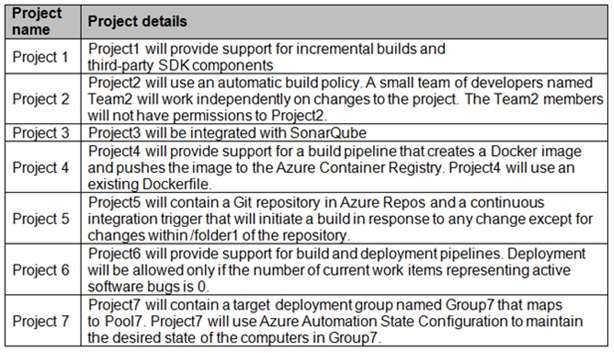
View Related Case Study

DRAG DROP (Drag and Drop is not supported)

You need to implement the code flow strategy for Project2 in Azure DevOps.

Which three actions should you perform in sequence? To answer, move the appropriate actions from the list of actions to the answer area and arrange them in the correct order.

Select and Place:

  1. See Explanation section for answer.

Answer(s): A

Explanation:


Step 1: Create a repository
A Git repository, or repo, is a folder that you've told Git to help you track file changes in. You can have any number of repos on your computer, each stored in their own folder.

Step 2: Create a fork

Step 3: Add a build policy for the fork
Build policies help teams protect their important branches of development. Policies enforce your team's code quality and change management standards.

Scenario:
Implement a code flow strategy for Project2 that will:
Enable Team2 to submit pull requests for Project2.

Enable Team2 to work independently on changes to a copy of Project2.

Ensure that any intermediary changes performed by Team2 on a copy of Project2 will be subject to the same restrictions as the ones defined in the build policy of Project2.


Reference:

https://docs.microsoft.com/en-us/azure/devops/repos/git/manage-your-branches


View Related Case Study

DRAG DROP (Drag and Drop is not supported)

You need to configure Azure Automation for the computers in Pool7.

Which three actions should you perform in sequence? To answer, move the appropriate actions from the list of actions to the answer area and arrange them in the correct order.

Select and Place:

  1. See Explanation section for answer.

Answer(s): A

Explanation:


Step 1: Create a Desired State Configuration (DSC) configuration file that has an extension of .ps1.

Step 2: Run the Import-AzureRmAutomationDscConfiguration Azure Powershell cmdlet The Import-AzureRmAutomationDscConfiguration cmdlet imports an APS Desired State Configuration (DSC) configuration into Azure Automation. Specify the path of an APS script that contains a single DSC configuration.

Example:
PS C:\>Import-AzureRmAutomationDscConfiguration -AutomationAccountName "Contoso17"- ResourceGroupName "ResourceGroup01" -SourcePath "C:\DSC\client.ps1" -Force

This command imports the DSC configuration in the file named client.ps1 into the Automation account named Contoso17. The command specifies the Force parameter. If there is an existing DSC configuration, this command replaces it.

Step 3: Run the Start-AzureRmAutomationDscCompilationJob Azure Powershell cmdlet The Start-AzureRmAutomationDscCompilationJob cmdlet compiles an APS Desired State Configuration (DSC) configuration in Azure Automation.


Reference:

https://docs.microsoft.com/en-us/powershell/module/azurerm.automation/import- azurermautomationdscconfiguration https://docs.microsoft.com/en-us/powershell/module/azurerm.automation/start- azurermautomationdsccompilationjob


You have an Azure Resource Manager template that deploys a multi-tier application.

You need to prevent the user who performs the deployment from viewing the account credentials and connection strings used by the application.

What should you use?

  1. Azure Key Vault
  2. a Web.config file
  3. an Appsettings.json file
  4. an Azure Storage table
  5. an Azure Resource Manager parameter file

Answer(s): A

Explanation:

When you need to pass a secure value (like a password) as a parameter during deployment, you can retrieve the value from an Azure Key Vault. You retrieve the value by referencing the key vault and secret in your parameter file. The value is never exposed because you only reference its key vault ID. The key vault can exist in a different subscription than the resource group you are deploying to.


Reference:

https://docs.microsoft.com/en-us/azure/azure-resource-manager/resource-manager-keyvault-parameter


You have an Azure DevOps organization named Contoso, an Azure DevOps project named Project1, an Azure subscription named Sub1, and an Azure key vault named vault1.

You need to ensure that you can reference the values of the secrets stored in vault1 in all the pipelines of Project1. The solution must prevent the values from being stored in the pipelines.

What should you do?

  1. Create a variable group in Project1.
  2. Add a secure file to Project1.
  3. Modify the security settings of the pipelines.
  4. Configure the security policy of Contoso.

Answer(s): A

Explanation:

Use a variable group to store values that you want to control and make available across multiple pipelines.


Reference:

https://docs.microsoft.com/en-us/azure/devops/pipelines/library/variable-groups


DRAG DROP (Drag and Drop is not supported)

You are configuring an Azure DevOps deployment pipeline. The deployed application will authenticate to a web service by using a secret stored in an Azure key vault.

You need to use the secret in the deployment pipeline.

Which three actions should you perform in sequence? To answer, move the appropriate actions from the list of actions to the answer area and arrange them in the correct order.

Select and Place:

  1. See Explanation section for answer.

Answer(s): A

Explanation:


Step 1: Create a service principal in Microsoft Entra ID.
You will need a service principal to deploy an app to an Azure resource from Azure Pipelines.

Step 2: Configure an access policy in the key vault.
You need to secure access to your key vaults by allowing only authorized applications and users. To access the data from the vault, you will need to provide read (Get) permissions to the service principal that you will be using for authentication in the pipeline.
Select Access policy and then select + Add Access Policy to setup a new policy.


Step 3: Add an Azure Resource Manager service connection to the pipeline You need to authorize the pipeline to deploy to Azure:
1. Select Pipelines | Pipelines,
2. Go to Releases under Pipelines and then select and Edit your pipeline.
3. Under Tasks, notice the release definition for Dev stage has a Azure Key Vault task. This task downloads Secrets from an Azure Key Vault. You will need to point to the subscription and the Azure Key Vault resource.
4. Click Manage, this will redirect to the Service connections page.


5.Click on New Service connection -> Azure Resource Manager -> Service Principal (manual). Fill the information from previously created service principal.


Reference:

https://azuredevopslabs.com/labs/vstsextend/azurekeyvault/


Viewing page 13 of 72
Viewing questions 61 - 65 out of 355 questions


Post your Comments and Discuss Microsoft AZ-400 exam dumps with other Community members:

AZ-400 Exam Discussions & Posts

AI Tutor 👋 I’m here to help!