Free AZ-802 Exam Braindumps
Administering Windows Server Questions 11–15 (page: 4)

Updated On: 23-Sep-2026

Your network contains an on-premises Active Directory Domain Services (AD DS) domain named contoso.com.
You have an Azure virtual network named VNet1 that is connected to the on-premises network by using a Site-to-Site (S2S) VPN.
VNet1 contains a domain-joined virtual machine named VM1 that hosts an application named App1.
App1 uses Kerberos authentication and updates objects in AD DS. An Azure Firewall filters communication from VM1 to the domain controllers in contoso.com.
You need to deploy domain controllers to VNet1. The solution must support the requirements of VM1 and provide domain controller redundancy in Azure.
What should you deploy?

  1. two writable domain controller virtual machines across availability zones
  2. two read-only domain controller (RODC) virtual machines across availability sets
  3. two writable domain controller virtual machines, each in a distinct Azure region
  4. two read-only domain controller (RODC) virtual machines, each in a distinct Azure region

Answer(s): A

Explanation:

Two writable domain controller virtual machines across availability zones should be deployed.
Writable Requirement: The application running on the virtual machine updates objects in Active Directory Domain Services (AD DS). Read-only domain controllers (RODCs) cannot process write operations or object updates, which means an RODC would fail to support the application's write requirements.
Redundancy and High Availability: Availability zones provide a high-availability offering that protects your applications and data from datacenter failures, making them superior to availability sets for domain controller redundancy in Azure.


Reference:

https://learn.microsoft.com/en-us/azure/architecture/example-scenario/identity/adds-extend-domain


Your network contains an Active Directory Domain Services (AD DS) forest.
The forest contains a root domain named contoso.com and a child domain named branch.contoso.com.
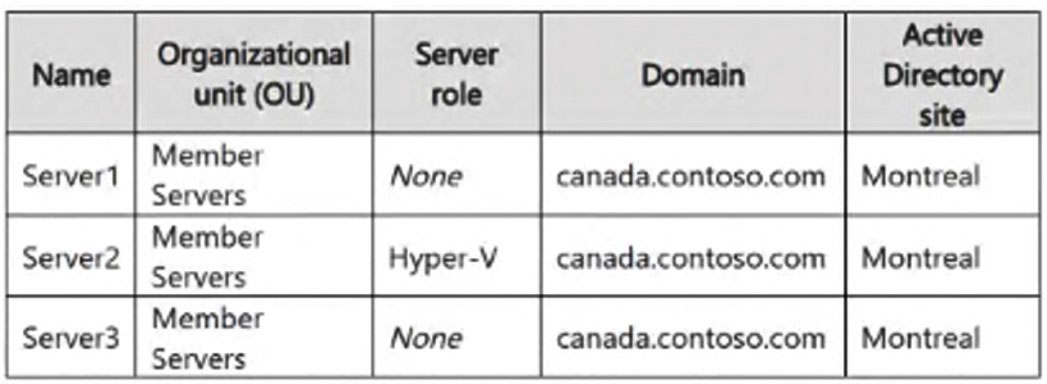
The forest contains the domain controllers shown in the following table.
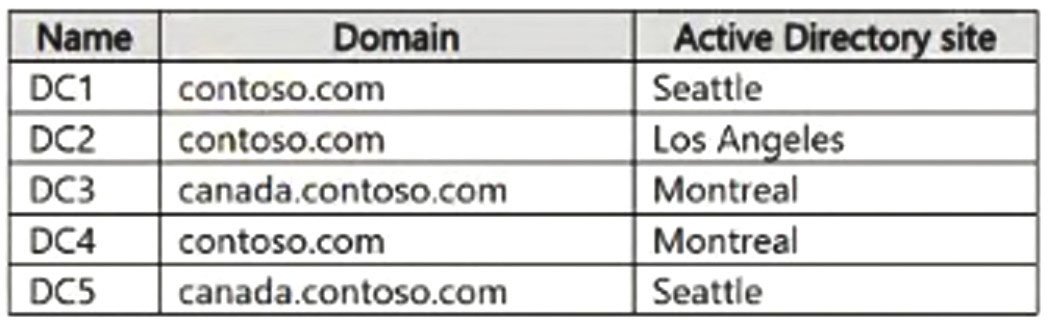
You discover that cross-domain object references in contoso.com fail to update for objects in branch.contoso.com.
You need to modify the FSMO role placement. The solution must minimize administrative changes.
What should you do?

  1. Transfer the infrastructure master role for contoso.com from DC1 to DC2.
  2. Transfer the PDC emulator role for contoso.com from DC1 to DC2.
  3. Transfer the schema master role from DC1 to DC2.
  4. Transfer the infrastructure master role for branch contoso.com from DC4 to DC3.
  5. Transfer the domain naming master role from DC1 to DC2.

Answer(s): A

Explanation:

Transfer the infrastructure master role in contoso.com from DC1 to DC2.
The Conflict: In a multi-domain forest where not all domain controllers are global catalog servers, the Infrastructure Master (IM) role must not be placed on a Global Catalog (GC) server.
The Symptom: DC1 in contoso.com holds the IM role and is also a GC server. Because a GC holds a partial replica of all objects in the forest, an IM on a GC assumes its data is always up-to-date and fails to detect or replicate cross-domain reference updates from branch.contoso.com.
Action to take with low administrative effort Move the Role: Transfer only the Infrastructure Master role in the root domain (contoso.com) from DC1 to DC2.
DC2 is ideal because it resides in contoso.com and is not a global catalog server, which directly satisfies Active Directory best practices and resolves the cross-domain update failure.


Reference:

https://vinitpandey.com/2016/09/05/why-global-catalog-server-and-infrastructure-operation-master-shouldnt-be-on-same-server/


View Related Case Study

HOTSPOT (Drag and Drop is not supported)
You need to meet the technical requirements for Server4.
Which cmdlets should you run on Server1 and Server4? To answer, select the appropriate options in the answer area.
Note: Each correct selection is worth one point
Hot Area:

  1. See Explanation section for answer.

Answer(s): A

Explanation:


Scenario: Ensure that you can manage Server4 from Server1 by using PowerShell remoting.
Box 1: Set-Item Set-Item is the correct command to use on Server1.
Server1 (Manager): Use Set-Item to configure WinRM settings, such as adding the remote machine to the TrustedHosts list (e.g., Set-Item WSMan:\localhost\Client\TrustedHosts).
Box 2: Enable-PSRemoting Configure the Target Server (Server4) You must enable the Windows Remote Management (WinRM) service and allow remote management traffic through the firewall. Run this command in an elevated PowerShell session: Enable-PSRemoting -Force
What this command accomplishes automatically: Starts and configures the WinRM service to start automatically.
Creates a HTTP listener to accept WS-Man requests on any IP address.
Enables default Windows Defender Firewall inbound rules for PowerShell Remoting (TCP port 5985 for HTTP).


Reference:

https://learn.microsoft.com/en-us/powershell/scripting/security/remoting/ps-remoting-second-hop


HOTSPOT (Drag and Drop is not supported)
Your network contains two VLANs for client computers and one VLAN for a datacenter. Each VLAN is assigned an IPv4 subnet. Currently, all the client computers use static IP addresses.
You plan to deploy a DHCP server to the VLAN in the datacenter.
You need to use the DHCP server to provide IP configurations to all the client computers.
What is the minimum number of scopes and DHCP relays you should create? To answer, select the appropriate options in the answer area.
Note: Each correct selection is worth one point.
Hot Area:

  1. See Explanation section for answer.

Answer(s): A

Explanation:


Box 1: 3 You need a DHCP scope for each of the three subnets.
Box 2: 2 The two client VLANs need a DHCP Relay Agent to forward DHCP requests to the DHCP server. The datacenter VLAN that contains the DHCP server does not require a DHCP Relay Agent.


HOTSPOT (Drag and Drop is not supported)
You have an administrative workstation named AdminPC in a workgroup.
AdminPC has existing entries in the WSMan TrustedHosts list.
You have a server named Server1 that has PowerShell remoting enabled and is reachable at an IP address of
172.16.10.20.
You need to create a remote PowerShell session from AdminPC to Server1. The solution must meet the following requirements:

● Preserve the existing TrustedHosts entries on AdminPC.
● Use the IP address of Server1 for the remote session.
How should you complete the script? To answer, select the appropriate options in the answer area.
Note: Each correct selection is worth one point.
Hot Area:

  1. See Explanation section for answer.

Answer(s): A

Explanation:


Box 1: Get-Credential To create a remote PowerShell session using an IP address in a workgroup environment, you must provide explicit administrative credentials, which are captured using Get-Credential and stored in the $var2 variable which is referenced at the end of the script.
The Get-Credential cmdlet prompts you for a username and password, creating the secure credential object required by the -Credential parameter in New-PSSession.
Box 2: Set-Item Set-Item is the standard PowerShell cmdlet used to modify the value of a specific WSMan provider path.


Reference:

https://adamtheautomator.com/psremoting-workgroup/


Viewing page 4 of 14
Viewing questions 16 - 20 out of 180 questions


Post your Comments and Discuss Microsoft AZ-802 exam prep with other Community members:

AI Tutor AI Tutor 👋 I’m here to help!