Free AZ-802 Exam Braindumps
Administering Windows Server Questions 21–25 (page: 6)

Updated On: 23-Sep-2026

Note: This section contains one or more sets of questions with the same scenario and problem. Each question presents a unique solution to the problem. You must determine whether the solution meets the stated goals. More than one solution in the set might solve the problem. It is also possible that none of the solutions in the set solve the problem.
After you answer a question in this section, you will NOT be able to return. As a result, these questions do not appear on the Review Screen.
Your network contains an Active Directory Domain Services (AD DS) domain. The domain contains servers that run Windows Server and store BitLocker recovery keys in AD DS.
A server named Server1 starts in BitLocker recovery mode.
You need to identify the BitLocker recovery key for Server1.
Solution: You run ntdsutil.exe on a domain controller.
Does this meet the goal?

  1. Yes
  2. No

Answer(s): B

Explanation:

Correct: * From Active Directory Users and Computers, you use BitLocker Recovery Password Viewer. You can locate the BitLocker recovery key in Active Directory by using the BitLocker Recovery Password Viewer extension inside Active Directory Users and Computers (ADUC).
Incorrect:
* You run ntdsutil.exe on a domain controller.
* You run repair-bde.exe by using a BitLocker key package exported from AD DS.
* You use ADSI Edit and view the properties of the Server1 computer object.


Reference:

https://learn.microsoft.com/en-us/windows/security/operating-system-security/data-protection/bitlocker/ recovery-process


Note: This section contains one or more sets of questions with the same scenario and problem. Each question presents a unique solution to the problem. You must determine whether the solution meets the stated goals. More than one solution in the set might solve the problem. It is also possible that none of the solutions in the set solve the problem.
After you answer a question in this section, you will NOT be able to return. As a result, these questions do not appear on the Review Screen.
Your network contains an Active Directory Domain Services (AD DS) domain. The domain contains servers that run Windows Server and store BitLocker recovery keys in AD DS.
A server named Server1 starts in BitLocker recovery mode.
You need to identify the BitLocker recovery key for Server1.
Solution: From Active Directory Users and Computers, you use BitLocker Recovery Password Viewer.
Does this meet the goal?

  1. Yes
  2. No

Answer(s): A

Explanation:

Correct: * From Active Directory Users and Computers, you use BitLocker Recovery Password Viewer. You can locate the BitLocker recovery key in Active Directory by using the BitLocker Recovery Password Viewer extension inside Active Directory Users and Computers (ADUC).
Incorrect:
* You run ntdsutil.exe on a domain controller.
* You run repair-bde.exe by using a BitLocker key package exported from AD DS.
* You use ADSI Edit and view the properties of the Server1 computer object.


Reference:

https://learn.microsoft.com/en-us/windows/security/operating-system-security/data-protection/bitlocker/ recovery-process


View Related Case Study

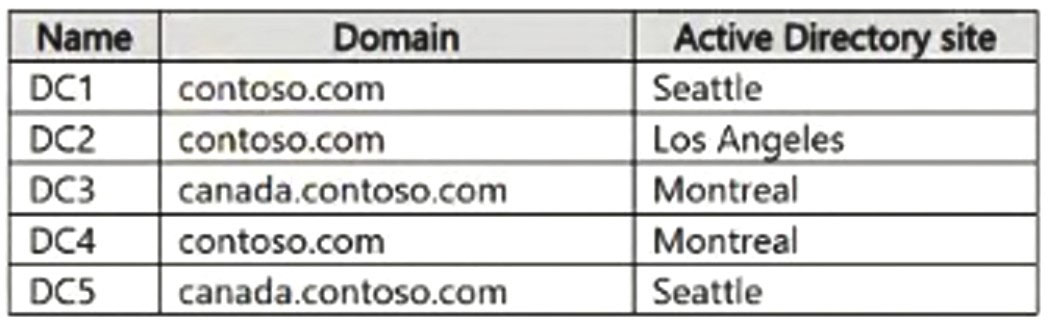
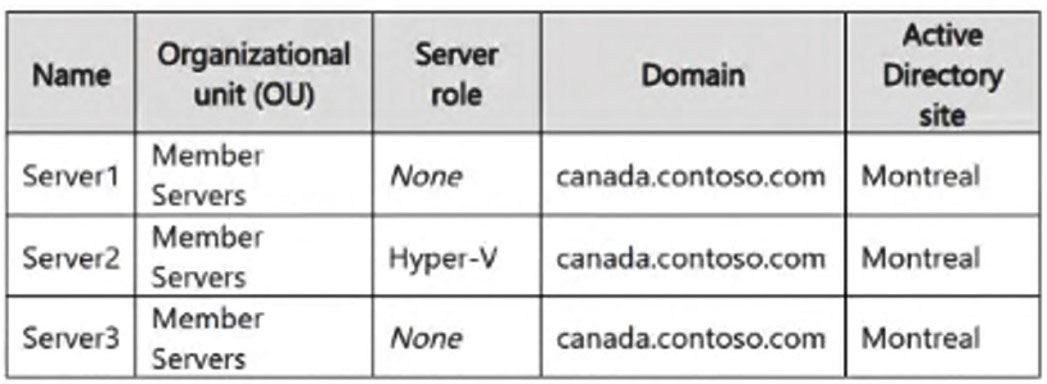
You need to meet the technical requirements for VM2.
What should you do?

  1. Enable enhanced session mode.
  2. Implement shielded virtual machines.
  3. Implement Credential Guard.
  4. Enable the Guest services integration service.

Answer(s): A

Explanation:

Scenario: Force users to provide credentials when they connect to VM2. Server2 hosts three virtual machines named VM1, VM2, and VM3. Server2 has the Hyper-V server role.
Enabling Enhanced Session Mode on the Hyper-V host and ensuring the virtual machine runs a supported guest OS with Remote Desktop enabled forces users to supply credentials via an RDP login prompt instead of automatically sharing or inheriting an active console session.


Reference:

https://learn.microsoft.com/en-us/windows-server/virtualization/hyper-v/use-local-resources-virtual-machine-
connection


View Related Case Study

HOTSPOT (Drag and Drop is not supported)
You need to meet the technical requirements for VM1.
Which cmdlet should you run first? To answer, select the appropriate options in the answer area.
Note: Each correct selection is worth one point
Hot Area:

  1. See Explanation section for answer.

Answer(s): A

Explanation:


Scenario: Ensure that you can run virtual machines on VM1. VM1 is hosted on a Hyper-V server.
Box 1: Set-VMProcessor To run virtual machines inside an existing virtual machine (nested virtualization), you must expose hardware-assisted virtualization extensions to that virtual machine.
Run the following command on the Hyper-V host while the target virtual machine is turned off:
Set-VMProcessor -VMName "<VirtualMachineName>" -ExposeVirtualizationExtensions $true
Box 2: -ExposeVirtualizationExtensions


Reference:

https://learn.microsoft.com/en-us/windows-server/identity/ad-ds/get-started/virtual-dc/virtualized-domain-controllers-hyper-v


HOTSPOT (Drag and Drop is not supported)
You have a Hyper-V host named HV1 that contains a virtual machine named VM1. HV1 supports nested virtualization. VM1 is connected to an external virtual switch.
You plan to install the Hyper-V server role on VM1.
You need to prepare VM1 to host nested virtual machines. The solution must meet the following requirements:

● Enable VM1 to run Hyper-V.
● Enable nested virtual machines to communicate on the physical LAN.
How should you configure VM1? To answer, select the appropriate options in the answer area.
Note: Each correct selection is worth one point.
Hot Area:

  1. See Explanation section for answer.

Answer(s): A

Explanation:


Box 1: Exposing virtualization extensions Exposing virtualization extensions (-ExposeVirtualizationExtensions $true) on the virtual machine's processor configuration is required.
Box 2: Enable MAC address spoofing Communicate on physical LAN: Enable MAC address spoofing on the virtual machine's network adapter settings (or via PowerShell using Set-VMNetworkAdapter -VMName <VMName> -MacAddressSpoofing On) so that nested VMs can use their own generated MAC addresses through the external virtual switch.


Reference:

https://learn.microsoft.com/en-us/windows-server/virtualization/hyper-v/enable-nested-virtualization


Viewing page 6 of 14
Viewing questions 26 - 30 out of 180 questions


Post your Comments and Discuss Microsoft AZ-802 exam prep with other Community members:

AI Tutor AI Tutor 👋 I’m here to help!