Case Study
This is a case study. Case studies are not timed separately. You can use as much exam time as you would like to complete each case. However, there may be additional case studies and sections on this exam. You must manage your time to ensure that you are able to complete all questions included on this exam in the time provided.
To answer the questions included in a case study, you will need to reference information that is provided in the case study. Case studies might contain exhibits and other resources that provide more information about the scenario that is described in the case study. Each question is independent of the other questions in this case study.
At the end of this case study, a review screen will appear. This screen allows you to review your answers and to make changes before you move to the next section of the exam. After you begin a new section, you cannot return to this section.
To start the case study
To display the first question in this case study, click the Next button. Use the buttons in the left pane to explore the content of the case study before you answer the questions. Clicking these buttons displays information such as business requirements, existing environment, and problem statements. If the case study has an All Information tab, note that the information displayed is identical to the information displayed on the subsequent tabs.
When you are ready to answer a question, click the Question button to return to the question.
Background
A manufacturing company produces custom configured-to-order motorcycles. The company plans to implement Dynamics 365 Supply Chain Management. The company contains one legal entity located in Missouri where all production and warehousing operations occur.
Customization options
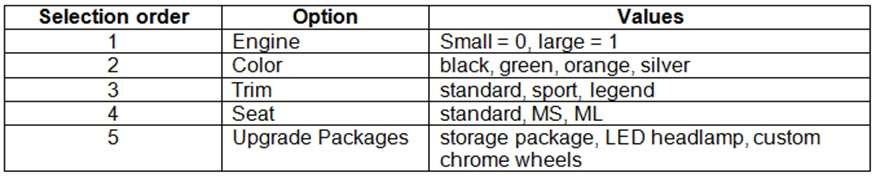
The custom motorcycles have a variety of selections that can be selected in the listed order by the end customer, including the following:
Current environment
Customization restrictions
The following restrictions on customizations are in place:
Green color can only be sold with the Legend Trim.
Orange color can be sold with the Sport or Legend Trim.
The ML seat must be included in the Legend package.
The MS seat must be included in the Sport package.
Manufacturing facilities
The company includes the following manufacturing groups: Assembly and Plastic Molding. The Assembly group is responsible for assembling the motorcycles with purchased and manufactured goods. The Plastic Molding group is responsible for manufacture of all plastic parts used in the assembly area.
Motorcycle manufacturing
The parts for the product assembly are picked from the warehouse and staged at the correct workstation by a warehouse operator for each production order.
Plastic manufacturing
Plastic parts are molded using dyes that create multiple parts at once. The parts are machined in the same production process to remove excess plastic and add additional holes for assembly. Excess plastic is recycled back into the feedstock of the same color plastic chips for use in the molding process.
Metal parts
Raw metal parts are purchased fully machined but without primer or paint. The parts are subcontracted to a vendor for primer and paint based upon the color requirements.
Facility
The company has a single warehouse that supports both the assembly and plastic manufacturing areas. The warehouse consists of three aisles with 15 bins and three shelves. The facility has no Wi-Fi capacity but has hardwired terminal stations throughout the assembly production line Transactions are currently completed by office staff. Raw materials transfer must support capacity constraints for paint and primer.
Requirements
Sales orders
The company has the following requirements for sales order:
During the configuration of a sales order, invalid combinations must be prevented.
Each configuration must create a unique bill of material (BOM) and Route based on options selected.
Sales pricing for the sales order must be based upon options selected.
Due to emissions regulations, the motorcycles cannot be sold to the state of California.
Motorcycle manufacturing
The company has the following requirements for motorcycle manufacturing:
Schedule labor only at the labor pool level without machines by day.
Produce motorcycles within a scheduled day in any order.
Record actual production labor with start/stop times.
Record manager approval of labor entered prior to posting.
Post actual material consumption after production is finished.
Plastic manufacturing
The company has the following requirements for motorcycle manufacturing Schedule both labor and machines.
Adjust schedules by using a Gantt chart.
Backflush standard labor by operation.
Post actual material consumption at the start of production.
Track and allocate costs to the excess plastic.
Report multiple molded part numbers during the same production run.
Determine the correct mold to use on a production order.
Generate a batch number for each production order.
Metal parts
The company has the following requirements for metal parts manufacturing:
Schedule shipments to the vendor for painting.
Receive painted parts into inventory from the vendor.
Track vendor inventory levels.
Defaults
You must configure defaults for manufacturing execution production orders to meet the following requirements:
Ensure accuracy for production order pick list posting.
Ensure correct pick list creation.
Issues
In the current system, the company cannot calculate overhead rates and determine the breakdown of material, labor, machine, and overhead costs for production.
The company is manually calculating an 8% overhead on materials and posting a journal manually.