Overview
General Overview
Litware, Inc. is a consulting company that has a main office in Montreal and a branch office in Seattle. Litware collaborates with a third-party company named ADatum Corporation.
Environment
On-Premises Environment
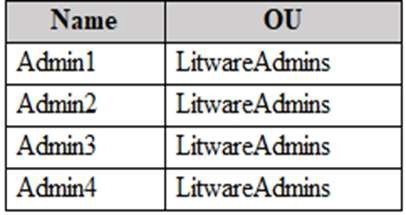
The network of Litware contains an Active Directory domain named litware.com. The domain contains three organizational units (OUs) named LitwareAdmins, Montreal Users, and Seattle Users and the users shown in the following table.
The domain contains 2,000 Windows 10 Pro devices and 100 servers that run Windows Server 2019.
Cloud Environment
Litware has a pilot Microsoft 365 subscription that includes Microsoft 365 E3 licenses. The subscription contains a verified DNS domain named litware.com.
Microsoft Entra Connect is installed and has the following configurations:
Password hash synchronization is enabled. Synchronization is enabled for the LitwareAdmins OU only.
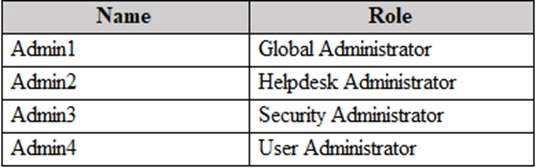
Users are assigned the roles shown in the following table.
Self-service password reset (SSPR) is enabled.
The Microsoft Entra tenant has Security defaults enabled.
Problem Statements
Litware identifies the following issues:
Admin1 cannot create conditional access policies. Admin4 receives an error when attempting to use SSPR.
Users access new Microsoft 365 service and feature updates before the updates are reviewed by Admin2.
Requirements Planned Changes
Litware plans to implement the following changes:
Implement Microsoft Intune. Implement Microsoft Teams.
Implement Microsoft Defender for Office 365.
Ensure that users can install Microsoft 365 apps on their device. Convert all the Windows 10 Pro devices to Windows 10 Enterprise E5.
Configure Microsoft Entra Connect Sync to sync the Montreal Users OU and the Seattle Users OU.
Technical Requirements
Litware identifies the following technical requirements:
Administrators must be able to specify which version of a Microsoft 365 desktop app will be available to users and to roll back to previous versions.
Only Admin2 must have access to new Microsoft 365 service and feature updates before they are released to the company.
Litware users must be able to invite ADatum users to participate in the following activities:
- Join Microsoft Teams channels.
- Join Microsoft Teams chats.
- Access shared files.
Just in time access to critical administrative roles must be required. Microsoft 365 incidents and advisories must be reviewed monthly. Microsoft 365 service status notifications must be sent to Admin2 The principle of least privilege must be used.