Free SC-401 Exam Braindumps
Administering Information Security in Microsoft 365 Questions 61–65 (page: 14)

Updated On: 1-Oct-2026
View Related Case Study

SIMULATION
Username and password
Use the following login credentials as needed:
To enter your username, place your cursor in the Sign in box and select the username below.
To enter your password, place your cursor in the Enter password box and select the password below.
Microsoft 365 Username:
admin@WWLx971455.onmicrosoft.com
Microsoft 365 Password: XXXXXXXXX
If the Microsoft Edge browser or Microsoft 365 portal does not load successfully, select the Microsoft Edge browser icon from the task bar, type the URL “https://admin microsoft.com”, and press Enter.
The following information is for technical support purposes only:
Lab Instance: XXXXXXXX.
Task 1
You need to provide users with the ability to manually classify files that contain product information that are stored in SharePoint Online sites. The solution must meet the following requirements:
-▪ The users must be able to apply a classification of Product1 to the files.
-▪ Any authenticated user must be able to open files classified as Product1.
-▪ Files classified as Product1 must be encrypted.
-

  1. See Explanation section for answer.

Answer(s): A

Explanation:

See explanation below.


Restrict access to content by using sensitivity labels to apply encryption
When you create a sensitivity label, you can restrict access to content that the label will be applied to. For example, with the encryption settings for a sensitivity label, you can protect content so that:
* Only users within your organization can open a confidential document or email.
* Etc.
How to configure a label for encryption
Step 1: From the Microsoft Purview compliance portal, select Solutions > Information protection > Labels
Step 2: Locate and select label Product1.
Step 3: On the Define the scope for this label page, the options selected determine the label's scope for the settings that you can configure and where they'll be visible when they're published:

Step 4: Select Items, and Files. Deselect the other options.
Step 5: Then, on the Choose protection settings for the types of items you selected page, make sure you select
Control access.

Step 6: On the Access control page, select Configure access control settings: Turns on encryption with rights management and makes the following settings visible:

Step 7: Assign permissions to specific users or groups. Add users or groups
Step 7a: For users: Any authenticated users.
Step 7b: Permissions: Select View
Note: You can grant permissions to specific people so that only they can interact with the labeled content:
1. First, add users or groups that will be assigned permissions to the labeled content.
2. Then, choose which permissions those users should have for the labeled content.
Assigning permissions:

Step 8: Click Save


Reference:

https://learn.microsoft.com/en-us/purview/trainable-classifiers-get-started-with https://learn.microsoft.com/en-us/purview/encryption-sensitivity-labels


View Related Case Study

You have a Microsoft 365 E5 subscription.
You plan to deploy Microsoft Purview Data Security Posture Management for AI (DSPM for AI) to protect company data that contains Personally Identifiable Information (PII) from being shared with third-party generative AI tools.
You need to complete the prerequisites for the planned deployment.
Which two Microsoft Purview solutions should you use? Each correct answer presents part of the solution.
Note: Each correct selection is worth one point.

  1. Data Loss Prevention
  2. Information Barriers
  3. Insider Risk Management
  4. Communication Compliance
  5. Audit

Answer(s): A,D

Explanation:

[A] DLP helps protect confidential information such as financial records, personally identifiable information (PII),
health data, or intellectual property by monitoring and controlling how this data is accessed, shared, or transmitted.
Organizations have sensitive information under their control, such as:
financial data proprietary data credit card numbers health records social security numbers
To help protect this sensitive data, and to reduce the risk from oversharing, they need a way to help prevent their users from inappropriately sharing sensitive data with people who shouldn't have it. This practice is called data loss prevention (DLP).
[D] Microsoft Purview Communication Compliance provides the tools to help organizations detect regulatory compliance (for example, SEC or FINRA) and business conduct violations such as sensitive or confidential information, harassing or threatening language, and sharing of adult content. Communication Compliance is built with privacy by design. Usernames are pseudonymized by default, role-based access controls are built in,
investigators are opted in by an admin, and audit logs are in place to help ensure user-level privacy.


Reference:

https://learn.microsoft.com/en-us/purview/dlp-learn-about-dlp https://learn.microsoft.com/en-us/purview/communication-compliance


View Related Case Study

HOTSPOT (Drag and Drop is not supported)
You have a Microsoft 365 E5 subscription that contains two users named User1 and User2.
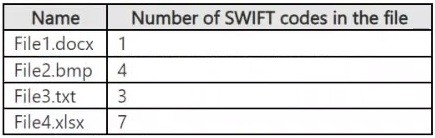
You have a Microsoft SharePoint site named Site1. Site1 stores files that contain IP addresses as shown in the following table.

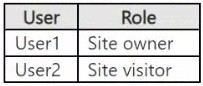
User1 is assigned the SharePoint admin role for Site1. User2 is a member of Site1.
You create the data loss prevention (DLP) policy shown in the following exhibit.

For each of the following statements, select Yes if the statement is true. Otherwise, select No.
Note: Each correct selection is worth one point.
Hot Area:

  1. See Explanation section for answer.

Answer(s): A

Explanation:


Box 1: Yes
Note: Key tasks of the SharePoint admin
Here are some of the key tasks users can do when they are assigned to the SharePoint admin role:
Create sites
Delete sites
Manage sharing settings at the organization level
Add and remove site admins
Manage site storage limits
Box 2: No
File1.text contains 3 IP addresses.
Box 3: Yes
File2.docx contains only 1 IP address.


View Related Case Study

You have a Microsoft 365 tenant that uses Microsoft Purview Information Protection.
You create a sensitivity label named Sensitivity1 and configure Sensitivity1 to encrypt files and emails.
You publish Sensitivity1.
You discover that users are NOT prompted to apply Sensitivity1 to their files and email.
You need to ensure that the users must apply Sensitivity1 to their files and email before saving the files or sending the emails. The solution must meet the following requirements:
▪ Prevent users from removing the label from the files and emails.
▪ Minimize administrative effort.
What should you do?

  1. Select Control access for Sensitivity1.
  2. Create a new auto-labeling policy.
  3. Configure the protection settings of the sensitivity label policy for Sensitivity1.
  4. Publish Sensitivity1 by creating a label policy.

Answer(s): C

Explanation:

To meet your requirements, you should configure the protection settings of the sensitivity label policy for the sensitivity label.
The requirement specifies that the sensitivity label is already published but users are not prompted to apply it.
To change this user behavior (making label application mandatory and preventing label removal) across files and emails with minimal administrative overhead, you must modify the settings of the existing sensitivity label policy.
When you edit the settings of a published sensitivity label policy, you can enable the following built-in controls:
Require users to apply a label to their emails and documents: This forces a prompt before users save a file or send an email, ensuring it cannot be left unlabeled.
Users must provide a justification to remove a label or lower its classification: While you cannot completely lock a label from being modified by standard UI controls alone if they have permissions, enforcing mandatory justification combined with mandatory labeling blocks accidental or unapproved removal. To strictly prevent removal altogether, the encryption settings configured within the label itself dictate who has the usage rights
(e.g., Export/Export control) to strip protection.


Reference:

https://learn.microsoft.com/en-us/answers/questions/5896600/default-sensitivity-label-on-new-blank-document s


View Related Case Study

You have a Microsoft 365 subscription.
You create a new trainable classifier.
You need to train the classifier.
Which source can you use to train the classifier?

  1. an on-premises Microsoft SharePoint Server site
  2. an Azure Files share
  3. a Microsoft SharePoint Online site
  4. an NFS file share

Answer(s): A

Explanation:

How to create a trainable classifier:
1. Collect between 50-500 seed content items. These must be limited to samples that strongly represent the type of content you want the trainable classifier to positively identify as being in the category.
2. Place the seed content in a SharePoint Online folder that is dedicated to holding the seed content only.
Make note of the site, library, and folder URL.
3. Sign in to the Microsoft Purview compliance portal with either Compliance admin or Security admin role access and navigate to Data classification > Classifiers.
4. Choose the Trainable classifiers tab.
5. Choose Create trainable classifier.
6. Fill in appropriate values for the Name and Description fields of the category of items you want this trainable classifier to identify.
7. Pick the SharePoint Online site, library, and folder URL for the seed content site from step 2. Choose Add.
8. Review the settings and choose Create trainable classifier.
9. Within 24 hours the trainable classifier will process the seed data and build a prediction model. The classifier status is In progress while it processes the seed data.
When the classifier is finished processing the seed data,
the status changes to Need test items.
10. You can now view the details page by choosing the classifier.
11. Etc.
Note: Timeline
This timeline reflects a sample deployment of trainable classifiers.


Reference:

https://learn.microsoft.com/en-us/purview/classifier-get-started-with


Viewing page 14 of 60
Viewing questions 66 - 70 out of 291 questions


Post your Comments and Discuss Microsoft SC-401 exam prep with other Community members:

AI Tutor AI Tutor 👋 I’m here to help!