Free SC-401 Exam Braindumps
Administering Information Security in Microsoft 365 Questions 71–75 (page: 16)

Updated On: 1-Oct-2026
View Related Case Study

HOTSPOT (Drag and Drop is not supported)
You have Microsoft 365 E5 tenant that has a domain name of 86s40q.onmicrosoft.com.
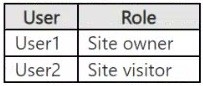
The tenant contains the users shown in the following table.

You have a published sensitivity label.
The Access control settings for the sensitivity label are configured as shown in the exhibit. (Click the Exhibit tab.)

For each of the following statements, select Yes if the statement is true. Otherwise, select No.
Note: Each correct selection is worth one point.
Hot Area:

  1. See Explanation section for answer.

Answer(s): A

Explanation:


Box 1: Yes
Yes - Only users at your company can view an email that the sensitive label applied.
When a Microsoft 365 E5 sensitivity label uses the "Assign permissions now" access control setting, it applies encryption and grants specified internal users (within your company) view-only access, meaning only your organization members can open the email, with administrators or users setting the exact permissions.
Box 2: Yes
Yes - The owner of an email can assign permissions when applying the sensitive label.
In a Microsoft 365 E5 tenant, if a sensitivity label is set to "Assign permissions now," the label owner (or someone with sufficient rights) sets the permissions when applying the label, controlling exactly who gets what access (e.g., Read, Edit, Co-author) to the email and its content, unlike "Let users assign permissions" where users choose from predefined templates or options when they apply it manually. This provides granular control for sensitive communications, ensuring specific users and roles have defined rights, often used for highly confidential information.
Box 3: Yes
Yes - USSales@86s40q.onmicrosoft.com can print an email that has the sensitive label applied.
The USSales@86s40q.onmicrosoft.com has reviewer permission.
A user with Reviewer permission can typically print an encrypted email with an "Assign permissions now" label in Microsoft 365 E5 because the label grants them read-only access but allows for permitted actions, and
"Print" is often included in the standard permissions for Reviewer or similar roles unless specifically blocked in the label's settings. The crucial factor is that the label encrypts the content and enforces some permissions, but
"Reviewer" inherently permits reading and often printing (or copying), even if editing is blocked.


Reference:

https://learn.microsoft.com/en-us/purview/encryption-sensitivity-labels


View Related Case Study

HOTSPOT (Drag and Drop is not supported)
You create a data loss prevention (DLP) policy that meets the following requirements:
▪ Prevents guest users from accessing a sensitive document shared during a Microsoft Teams chat
▪ Prevents guest users from accessing a sensitive document stored in a Microsoft Teams channel
Which location should you select for each requirement? To answer, select the appropriate options in the answer area.
Note: Each correct selection is worth one point.
Hot Area:

  1. See Explanation section for answer.

Answer(s): A

Explanation:


Reference:

https://docs.microsoft.com/en-us/microsoft-365/compliance/dlp-microsoft-teams https://docs.microsoft.com/en-us/microsoftteams/sharepoint-onedrive-interact


View Related Case Study

HOTSPOT (Drag and Drop is not supported)
You have a Microsoft 365 E5 subscription that contains four users named User1, User2, User3, and User4 and a file named File1.docx.
To File1, you apply a sensitivity label that has the permissions shown in the following exhibit.

Use the drop-down menus to select the answer choice that completes each statement based on the information presented in the graphic.
Note: Each correct selection is worth one point.
Hot Area:

  1. See Explanation section for answer.

Answer(s): A

Explanation:


Box 1: User1 and User2 only
Microsoft 365 Copilot can summarize File1 for _________.
For File1:
User1 is Co-Owner. User1 - Yes
User2 is Co-Author. User2 - Yes.
User3 is Reviewer. User3 - No.
A user with "Reviewer" permissions on a document, folder, or site does not have extract permissions.
User4 is Viewer. User4 - No.
A user with "Vewer" permissions on a document, folder, or site does not have extract permissions.
Note: For Microsoft 365 Copilot to summarize data within a file, the user must have both the EXTRACT and
VIEW usage rights on the sensitivity label applied to that file, according to Microsoft Learn. This ensures that
Copilot can access and process the file's content for summarization purposes. If a file is encrypted using Azure
Rights Management without a sensitivity label, the same permissions (EXTRACT and VIEW) are still required for Copilot to function.
Box 2: User1, User2, User3 and User4.
For _______, Microsoft 365 Copilot can reference File1 by using a link.
User1 is Co-Owner. User1 - Yes
User2 is Co-Author. User2 - Yes.
User3 is Reviewer. User3 - Yes.
In Microsoft 365, a Reviewer of a file can reference that file, and potentially other files, within their comments or suggestions. Reviewers can use @mentions to tag individuals, including the file's author or other reviewers, to draw attention to specific points or sections within the document. Additionally, Microsoft 365 Copilot allows reviewers to reference files, emails, and meetings when creating, reviewing, or finalizing documents.
User4 is Viewer. User4 - Yes.
In Microsoft 365, a user with Viewer permissions for a file can indeed reference that file in various ways,
including using it as a source for Microsoft Copilot, or simply copying and pasting the link to share with others.


Reference:

https://techcommunity.microsoft.com/blog/microsoft365insiderblog/expanding-reference-capabilities-with-micro soft-365-copilot-in-word/4406054


View Related Case Study

You have a Microsoft OneDrive folder that contains the files shown in the following table.
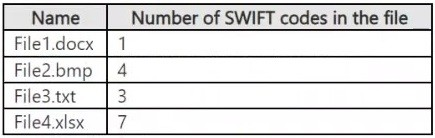
In Microsoft Defender for Cloud Apps, you create a file policy to automatically apply a classification.
What is the effect of applying the policy?

  1. The policy will apply to only the .docx and .txt files. The policy will classify the files immediately.
  2. The policy will apply to only the .docx files. The policy will classify only 100 files daily.
  3. The policy will apply to all the files. The policy will classify only 100 files daily.
  4. The policy will apply to only the .docx and .txt files. The policy will classify the files within 24 hours.

Answer(s): B


Reference:

https://docs.microsoft.com/en-us/cloud-app-security/azip-integration


View Related Case Study

You have a Microsoft 365 E5 subscription that contains three users named User1, User2, and User3 and a file named File1.docx.
You create a sensitivity label named Label1 as shown in the following exhibit.

You apply Label1 to File1.
For which users can Microsoft 365 Copilot summarize File1?

  1. No user
  2. User1 only
  3. User1 and User2 only
  4. User1, User2, and User3

Answer(s): B

Explanation:

When the sensitivity label applies encryption, the user must have the EXTRACT and VIEW usage rights for
Copilot to summarize the data.
User1 - Yes
User1 is Co-Author.
Microsoft 365 co-authors typically have both view and extract permissions when working on documents collaboratively. Co-authors can view and edit the document, and also copy and extract content from it,
depending on the specific permissions granted.
User2 - No
A "Reviewer" role generally has view permissions, but not necessarily extract permissions. Reviewers can typically view the content of documents, files, or other resources, and often can add comments or make tracked changes (depending on the specific implementation and settings). However, they may not have the ability to download or export the content, unless explicitly granted those rights.
User3 - No
User3 has only view permission, not extract permissions.
Note:
If a user is the owner of a sensitivity label and that label is applied to a file, Microsoft 365 Copilot can summarize the file for that user, provided the user also has the necessary usage rights, specifically EXTRACT
and VIEW, granted by the sensitivity label, according to Microsoft Learn. If the label includes encryption, these usage rights become crucial for Copilot's ability to access and summarize the content.


Reference:

https://learn.microsoft.com/en-us/copilot/microsoft-365/microsoft-365-copilot-architecture-data-protection-auditi ng


Viewing page 16 of 60
Viewing questions 76 - 80 out of 291 questions


Post your Comments and Discuss Microsoft SC-401 exam prep with other Community members:

AI Tutor AI Tutor 👋 I’m here to help!