Free SC-401 Exam Braindumps
Administering Information Security in Microsoft 365 Questions 76–80 (page: 17)

Updated On: 1-Oct-2026
View Related Case Study

HOTSPOT (Drag and Drop is not supported)
You have a Microsoft 365 E5 tenant that contains a published sensitivity label named Sensitivity1.
You plan to create a Microsoft Entra group named Group1 and assign Sensitivity1 to Group1.
How should you configure Group1? To answer, select the appropriate options in the answer area.
Note: Each correct selection is worth one point.
Hot Area:

  1. See Explanation section for answer.

Answer(s): A

Explanation:


Box 1: EnableMIPLabels
Setting
Enable sensitivity label support in PowerShell
To apply published labels to groups, you must first enable the feature. These steps enable the feature in
Microsoft Entra ID. The Microsoft Graph PowerShell SDK comes in two modules, Microsoft.Graph and
Microsoft.Graph.Beta.
1. Open a PowerShell prompt on your computer and run the following commands to prepare to run the cmdlets.
Install-Module Microsoft.Graph -Scope CurrentUser
Install-Module Microsoft.Graph.Beta -Scope CurrentUser
2. Connect to your tenant.
Connect-MgGraph -Scopes "Directory.ReadWrite.All"
3. Fetch the current group settings for the Microsoft Entra organization and display the current group settings.
$grpUnifiedSetting = Get-MgBetaDirectorySetting -Search DisplayName:"Group.Unified"
If no group settings were created for this Microsoft Entra organization, you get an empty screen. In this case,
you must first create the settings. Follow the steps in Microsoft Entra cmdlets for configuring group settings to create group settings for this Microsoft Entra organization.
Note
If the sensitivity label was enabled previously, you see EnableMIPLabels = True. In this case, you don't need to do anything.
4. Apply the new settings.
$params = @{
Values = @(
@{
Name = "EnableMIPLabels"
Value = "True"
}
)
}
Update-MgBetaDirectorySetting -DirectorySettingId $grpUnifiedSetting.Id -BodyParameter $
Box 2: Microsoft 365
Type
Assign sensitivity labels to Microsoft 365 groups in Microsoft Entra ID
Microsoft Entra ID supports applying sensitivity labels to Microsoft 365 groups when those labels are published in the Microsoft Purview portal or the Microsoft Purview compliance portal and the labels are configured for groups and sites.
Sensitivity labels can be applied to groups across apps and services such as Outlook, Microsoft Teams, and
SharePoint.


Reference:

https://learn.microsoft.com/en-us/entra/identity/users/groups-assign-sensitivity-labels


View Related Case Study

HOTSPOT (Drag and Drop is not supported)
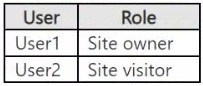
You have a Microsoft 365 tenant named contoso.com that contains two users named User1 and User2. The tenant uses Microsoft Purview Message Encryption.
User1 plans to send emails that contain attachments as shown in the following table.

User2 plans to send emails that contain attachments as shown in the following table.

For which emails will the attachments be encrypted? To answer, select the appropriate options in the answer area.
Note: Each correct selection is worth one point.
Hot Area:

  1. See Explanation section for answer.

Answer(s): A

Explanation:


Reference:

https://support.microsoft.com/en-gb/office/introduction-to-irm-for-email-messages-bb643d33-4a3f-4ac7-9770-f d50d95f58dc?ui=en-us&rs=en-gb&ad=gb#FileTypesforIRM
https://docs.microsoft.com/en-us/microsoft-365/compliance/ome?view=o365-worldwide https://docs.microsoft.com/en-us/office365/servicedescriptions/exchange-online-service-description/exchange-
online-limits#message-limits-1


View Related Case Study

You have a Microsoft 365 subscription that contains a Microsoft SharePoint Online site named Site1. Site1
contains sensitive documents.
You need to create a retention solution that meets the following requirements:
● The documents must be deleted seven years after being created.
● The solution must ensure that the documents can be deleted before the seven-year period expires.
● The solution must prevent the deletion of documents on Litigation Hold.
● The solution must minimize administrative effort.
What should you create first?

  1. a retention policy
  2. a retention label
  3. a preservation lock
  4. a sensitivity label

Answer(s): D

Explanation:

To meet all four requirements with low administration, you should create a retention policy first. Delete after 7
years: A single retention policy applied to the SharePoint site location can automatically delete items 7 years after they were created.
Allow deletion before 7 years: Retention policies allow users to delete files normally before the retention period expires, the deleted items are moved to the Preservation Hold Library in the background.
Prevent deletion of Litigation Hold: Microsoft 365 retention automatically respects and defers to Litigation Hold or eDiscovery holds; items on hold are preserved regardless of the policy.
Low administration: Applying a broad site-level retention policy requires minimal administrative effort compared to creating, publishing, and managing individual retention labels for every sensitive document.


Reference:

https://spin.ai/blog/microsoft-office-365-retention-policy-how-to-set-apply-avoid-pitfalls


View Related Case Study

DRAG DROP (Drag and Drop is not supported)
You have a Microsoft 365 tenant.
A new regulatory requirement states that all documents containing a patent ID be labeled, retained for 10
years, and then deleted. The policy used to apply the retention settings must never be disabled or deleted by anyone.
You need to implement the regulatory requirement.
Which three actions should you perform in sequence? To answer, move the appropriate actions from the list of actions to the answer area and arrange them in the correct order.
Select and Place:

  1. See Explanation section for answer.

Answer(s): A

Explanation:


Preservation Lock locks a retention policy or retention label policy so that no one—including a global admin—can turn off the policy, delete the policy, or make it less restrictive. This configuration might be needed for regulatory requirements and can help safeguard against rogue administrators.
When a retention policy is locked:
No one can disable the policy or delete it
Locations can be added but not removed
You can extend the retention period but not decrease it


Reference:

https://docs.microsoft.com/en-us/microsoft-365/compliance/retention https://docs.microsoft.com/en-us/microsoft-365/compliance/retention-preservation-lock


View Related Case Study

HOTSPOT (Drag and Drop is not supported)
You have a Microsoft 365 E5 subscription that contains the sensitive information types (SITs) shown in the following table.

A user sends the email messages shown in the following table.

For each of the following statements, select Yes if the statement is true. Otherwise, select No.
Note: Each correct selection is worth one point.
Hot Area:

  1. See Explanation section for answer.

Answer(s): A

Explanation:


Box 1: Yes
Yes - SIT1 will identity and match the content in Email1.
Prd:1234 will match the regular expression of SIT1.
Box 2: Yes
Yes - SIT2 will identity and match the content in Email2.
111-111-1111 will match the exclusion of SIT2.
However, 123456789012 will match the regular expression of SIT2.
Note: Sensitive information type additional checks
Here are the definitions and some examples for the available additional checks.
* Exclude specific matches: This check lets you define keywords to exclude when detecting matches for the pattern you're editing. For example, you might exclude test credit card numbers like '4111111111111111' so that they're not matched as a valid number.
Box 3: No
No - SIT3 will identity and match the content in Email3.
The full credit card number is not inclued in Email3.
Note:
Sensitive information types (SIT) can use functions as primary elements for identifying sensitive items. For example, the Credit Card Number SIT uses the Func_credit_card function to detect credit card number.


Reference:

https://learn.microsoft.com/en-us/purview/sit-regex-validators-additional-checks#sensitive-information-type-reg ular-expression-validators https://learn.microsoft.com/en-us/purview/sit-functions


Viewing page 17 of 60
Viewing questions 81 - 85 out of 291 questions


Post your Comments and Discuss Microsoft SC-401 exam prep with other Community members:

AI Tutor AI Tutor 👋 I’m here to help!