Case study:
This is a case study. Case studies are not timed separately. You can use as much exam time as you would like to complete each case. However, there may be additional case studies and sections on this exam. You must manage your time to ensure that you are able to complete all questions included on this exam in the time provided.
To answer the questions included in a case study, you will need to reference information that is provided in the case study. Case studies might contain exhibits and other resources that provide more information about the scenario that is described in the case study. Each question is independent of the other questions in this case study.
At the end of this case study, a review screen will appear. This screen allows you to review your answers and to make changes before you move to the next section of the exam. After you begin a new section, you cannot return to this section.
To start the case study
To display the first question in this case study, click the Next button. Use the buttons in the left pane to explore the content of the case study before you answer the questions. Clicking these buttons displays information such as business requirements, existing environment, and problem statements. If the case study has an All Information tab, note that the information displayed is identical to the information displayed on the subsequent tabs. When you are ready to answer a question, click the question button to return to the question.
Background:
Bellows Sports is the region’s newest, largest, and most complete sports complex. The company features baseball and soccer fields and two full-size hockey rinks. The complex provides coaching, recreational leagues, a pro shop, and state-of-the art customer and player amenities.
The company is organized into the following divisions:
-Baseball
-Hockey
-Soccer
Bellow Sports runs tournaments several times per year. Each tournament runs six weeks.
Current environment:
Requirements
Bellow Sports tracks players and events in Microsoft Excel workbooks and uses email to communicate with players, partners, and prospective customers. The company uses a proprietary cloud-based accounting system.
The company relies on referrals from athletes for new business. Bellows uses a third-party marketing company to gather feedback and referrals from athletes. The third-party marketing company uploads a Microsoft Excel file containing lists of potential customers and players to the FTP site that Bellows Sports maintains.
Tournaments
Customer information is stored in the Accounts entity. Each tournament record must list the associated sales representative as the tournament owner. When team members create tournament records they must enter the start date for a tournament. The end date of the tournament must be automatically calculated.
Registration form
You must create a form to allow players to register for tournaments. The registration form must meet the following requirements:

-Each division has tournaments that take place in specific locations. Users must be able to select the division for a tournament location.
-Information about upcoming tournaments must be pre-located into the registration form when the registration form loads.
-The form must include a custom button that sends an email confirmation to the player after the player registers.
-The button must not be visible until after the form is saved.
Security
The company identifies the following job roles:
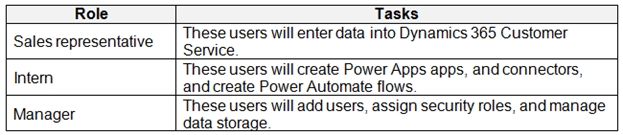
You must grant users the minimum permissions required to perform their job tasks.
Data automation
-Customer name must be added to Dynamics 365 Finance automatically after it is entered.
-You must produce a report that details the number of registrations for a day and send the report as a PDF to the management team.
-You must implement mechanisms to handle all code-related errors.
-When a customer record is updated, the system must look up the account number for the customer in the accounting system.
-Referrals must be imported into the system as soon as they are available.
Issues Apps
-The captions for the New and Save buttons do not render properly on the form.
-Interns can create apps but cannot interact with their own data.
Portal
The query for all registered users must return the data categorized by division. Queries must return only the Name and Sport fields. Queries return all fields. The query is as follows:

Solution checker issues
You run solution checker and observe Plug-in or workflow activity errors in the following code sets:
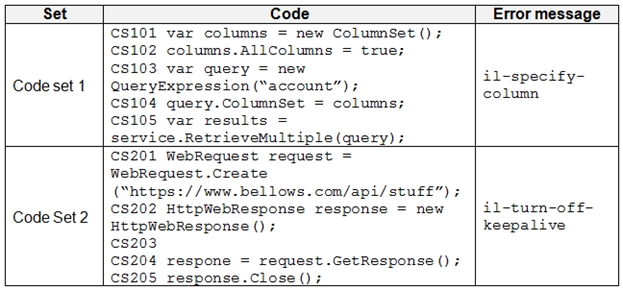
Code
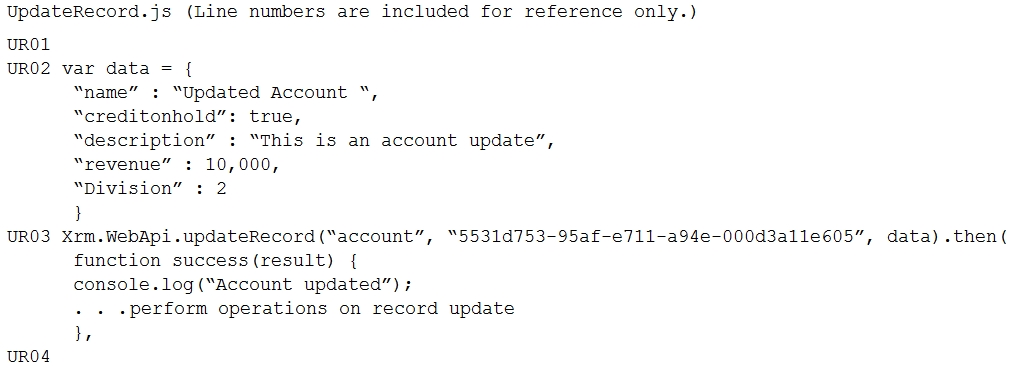
The following code runs when the registration form loads. You must implement a mechanism to handle errors that occur in the code: