Free SC-500 Exam Braindumps
Implementing End-to-End Security Controls for Cloud and AI Workloads Questions 14–18 (page: 18)

Updated On: 23-Oct-2026
View Related Case Study

You have an Azure virtual machine named VM1. A network security group (NSG) named NSG1 is linked to the network adapter of VM1.
VM1 allows inbound RDP (TCP 3389) from an on-premises network.
You need to reduce exposure on VM1. The solution must ensure that required RDP access is allowed for only a maximum of four hours.
What should you do?

  1. Create a Conditional Access policy.
  2. Deploy an Azure Bastion host.
  3. Add a security rule to NSG1.
  4. Enable just-in-time (JIT) VM access for VM1.

Answer(s): D

Explanation:

To secure the VM and limit RDP (TCP 3389) exposure to a maximum of four hours, enable Just-In-Time (JIT) VM Access via Microsoft Defender for Cloud.
Temporary Authorization: When a user requests access, JIT automatically modifies your NSG to temporarily allow RDP traffic for a custom timeframe (with a configurable maximum of 3 hours).
Automatic Lockdown: Once the approved time elapses, the JIT rule is deleted, reverting the NSG to its default state of denying all incoming internet traffic on the RDP port.
Constrained Source: JIT can lock down access specifically to the requesting on-premises IP address, preventing unauthorized remote access from other networks.


Reference:

https://learn.microsoft.com/en-us/azure/defender-for-cloud/enable-just-in-time-access


View Related Case Study

HOTSPOT (Drag and Drop is not supported)
You have an Azure subscription that contains three storage accounts, an Azure SQL managed instance named SQL1, and three Azure SQL databases.
The storage accounts are configured as shown in the following table.

SQL1 has the following settings:
● Auditing: On
● Audit log destination: storage1
The Azure SQL databases are configured as shown in the following table.

For each of the following statements, select Yes if the statement is true. Otherwise, select No.
Note: Each correct selection is worth one point.
Hot Area:

  1. See Explanation section for answer.

Answer(s): A

Explanation:


Yes
Yes
Yes
A server-level Azure SQL auditing policy applies to all databases on the server even when database-level auditing is disabled. Therefore, DB1 inherits the server auditing policy and writes its audit events to storage1.
DB2 has its own database-level auditing policy in addition to the server-level policy. Both policies operate side by side, so its audit events are written according to both configurations: storage1 through the server policy and storage2 through the database policy.
Azure SQL auditing supports premium storage accounts of the BlockBlobStorage type, so storage3 can be configured as an audit-log destination.


Reference:

https://learn.microsoft.com/en-us/azure/azure-sql/database/auditing-server-level-database-level?vi ew=azuresql https://learn.microsoft.com/en-us/azure/azure-sql/database/auditing-setup?view=azuresql https://learn.microsoft.com/en-us/azure/azure-sql/database/auditing-overview?view=azuresql https://learn.microsoft.com/en-us/Azure/azure-sql/database/audit-write-storage-account-behind-vnet-firewall?vi ew=azuresql


View Related Case Study

You have an Azure subscription that contains the resources shown in the following table.
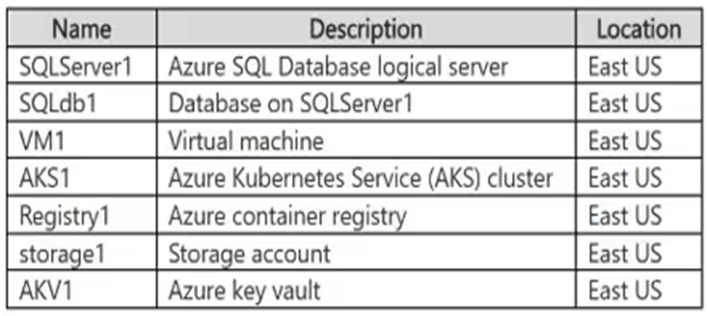
App1 uses Function1, SQL1, and storage1.
You need to secure the traffic between App1, Function1, SQL1, and storage1, by using private endpoints.
With which resources can App1 communicate by using a private endpoint?

  1. SQL1 only
  2. storage1 only
  3. Function1 only
  4. SQL1 and storage1 only
  5. storage1 and Function1 only
  6. storage1, SQL1, and Function1

Answer(s): D

Explanation:

Azure SQL Managed Instance and Azure Storage support private endpoints. With App1’s virtual network integration and appropriate DNS configuration, App1 can access SQL1 and storage1 through their private IP addresses over Azure Private Link.


Reference:

https://learn.microsoft.com/en-us/azure/azure-sql/managed-instance/private-endpoint-overview?vie w=azuresql&tabs=separate-vnets https://learn.microsoft.com/en-us/azure/storage/common/storage-private-endpoints


View Related Case Study

HOTSPOT (Drag and Drop is not supported)
You have a network security group (NSG) bound to an Azure subnet.
You run Get-AzNetworkSecurityRuleConfig and receive the output shown in the following exhibit.

Use the drop-down menus to select the answer choice that completes each statement based on the information presented in the graphic.
Note: Each correct selection is worth one point.
Hot Area:

  1. See Explanation section for answer.

Answer(s): A

Explanation:


able to connect to East US 2
dropped
The outbound rule allowing traffic to Storage.EastUS2 on destination port 443 has priority 104, so it takes precedence over the rule denying all Storage traffic at priority 105. NSGs process rules in ascending priority-number order.
The FTP allow rule applies specifically to destination 10.0.0.5/32 on TCP port 21. Traffic to 10.0.0.10 does not match that rule and is blocked by the default DenyAllInbound rule.


Reference:

https://learn.microsoft.com/en-us/%20azure/virtual-network/network-security-groups-overview https://learn.microsoft.com/en-us/troubleshoot/azure/virtual-network/virtual-network-troubleshoot-nsg-blocking-traffic


View Related Case Study

DRAG DROP (Drag and Drop is not supported)
You use Azure Virtual Network Manager to manage multiple virtual networks organized into two network groups named Production and Development.
You need to configure Virtual Network Manager to meet the following requirements:
-Allow traffic between all the virtual networks in Production.
-Block traffic between Development and Production.
What should you use for each requirement? To answer, drag the components to the correct requirements. Each component may be used once, more than once, or not at all. You may need to drag the split bar between panes or scroll to view content.
Note: Each correct selection is worth one point.
Select and Place:

  1. See Explanation section for answer.

Answer(s): A

Explanation:


Box 1: Connectivity configuration
To allow traffic between all the virtual networks in a single network group using Azure Virtual Network Manager, you must configure a Connectivity configuration using a Mesh network topology and deploy it to the target regions.
Box 2: Security Admin Configuration
To block traffic between the two network groups using Azure Virtual Network Manager (AVNM), you must configure a Security Admin Configuration containing a rule collection that explicitly denies traffic between the two groups, and then deploy that configuration to the target regions.


Reference:

https://learn.microsoft.com/en-us/azure/virtual-network-manager/overview


Viewing page 18 of 43
Viewing questions 86 - 90 out of 207 questions


Post your Comments and Discuss Microsoft SC-500 exam prep with other Community members:

AI Tutor AI Tutor 👋 I’m here to help!