Free SC-500 Exam Braindumps
Implementing End-to-End Security Controls for Cloud and AI Workloads Questions 24–28 (page: 20)

Updated On: 23-Oct-2026
View Related Case Study

HOTSPOT (Drag and Drop is not supported)
You have an Azure App Service web app named App1 as shown in the following exhibit.

Subnet 2 contains a virtual machine named VM1.
Use the drop-down menus to select the answer choice that completes each statement based on the information presented in the graphic.
Note: Each correct selection is worth one point.
Hot Area:

  1. See Explanation section for answer.

Answer(s): A

Explanation:


To deny outbound access, configure a network security group (NSG) on Subnet2.
To connect to a virtual network in a different region, configure Gateway-required VNet integrations.
An NSG associated with the integration subnet can control outbound traffic from an App Service app that uses virtual network integration.
Regional virtual network integration is limited to virtual networks in the same region as the App Service plan. To integrate with a virtual network in another region, gateway-required virtual network integration is required.


View Related Case Study

HOTSPOT (Drag and Drop is not supported)
You have an Azure subscription that contains a blob container named cont1. Cont1 has the access policies shown in the following exhibit.

Use the drop-down menus to select the answer choice that completes each statement based on the information presented in the graphic.
Note: Each correct selection is worth one point.
Hot Area:

  1. See Explanation section for answer.

Answer(s): A

Explanation:


Maximum number of additional stored access policies: 4
Maximum number of additional immutable blob storage policies: 1
An Azure Blob container supports a maximum of five stored access policies at a time. Because cont1 already has one stored access policy, four more can be added.
Immutable Blob Storage supports both a time-based retention policy and a legal hold at the container level, and the two can coexist. Because cont1 already has a time-based retention policy, one additional immutable policy—a legal hold—can be configured.


Reference:

https://learn.microsoft.com/en-us/rest/api/storageservices/define-stored-access-policy https://learn.microsoft.com/en-us/azure/storage/blobs/immutable-storage-overview https://learn.microsoft.com/en-us/azure/storage/blobs/immutable-policy-configure-container-scope?tabs=azure -portal&trk=article-ssr-frontend-pulse_little-text-block


View Related Case Study

Note: This section contains one or more sets of questions with the same scenario and problem. Each question presents a unique solution to the problem. You must determine whether the solution meets the stated goals. More than one solution in the set might solve the problem. It is also possible that none of the solutions in the set solve the problem.
After you answer a question in this section, you will NOT be able to return. As a result, these questions do not appear on the Review Screen.
You have an Azure subscription that contains two virtual machines named VM1 and VM2. Each virtual machine has system-assigned managed identity enabled.
You have an Azure Storage account named storage1. Public access from all networks is enabled for storage1.
You need to ensure that VM1 and VM2 can access storage1.
Solution: You add each virtual machine to a role on storage1.
Does this meet the goal?

  1. Yes
  2. No

Answer(s): A

Explanation:

Each virtual machine already has its own system-assigned managed identity. Assigning an appropriate Azure Storage data-access role on storage1 to the managed identity of each VM authorizes both virtual machines to access the storage account by using Microsoft Entra authentication. Public network access is already enabled, so the required network connectivity is available.


Reference:

https://learn.microsoft.com/en-us/entra/identity/managed-identities-azure-resources/tutorial-window s-managed-identities-vm-access?pivots=identity-windows-mi-vm-access-data-lake https://learn.microsoft.com/en-us/azure/storage/blobs/authorize-access-azure-active-directory


View Related Case Study

DRAG DROP (Drag and Drop is not supported)
You need to deploy an Azure Kubernetes Service (AKS) cluster that will contain an initial node pool named Pool1 for general workloads and an additional node pool named Pool2 for sensitive workloads. Each node pool must be assigned to a subnet, and pod IP addresses will be allocated directly from the subnet. The solution must support future node pools and minimize administrative effort.
Which type of subnet should you assign for each node pool? To answer, drag the appropriate subnet types to the correct node pools. Each subnet type may be used once, more than once, or not at all. You may need to drag the split bar between panes or scroll to view content.
Note: Each correct selection is worth one point.
Select and Place:

  1. See Explanation section for answer.

Answer(s): A

Explanation:


Pool1: An Azure Container Networking Interface (CNI) subnet
Pool2: An Azure Container Networking Interface (CNI) subnet
Azure CNI assigns pod IP addresses directly from the Azure virtual network subnet, satisfying the requirement that pods use subnet IP addresses. Separate Azure CNI subnets can be assigned to different node pools, which supports workload isolation and allows additional node pools to be added later. AKS node-pool subnets cannot be delegated subnets.


Reference:

https://learn.microsoft.com/en-us/azure/aks/concepts-network-legacy-cni https://learn.microsoft.com/en-us/azure/aks/concepts-network-cni-overview


View Related Case Study

You have an Azure subscription that contains the resources shown in the following table.
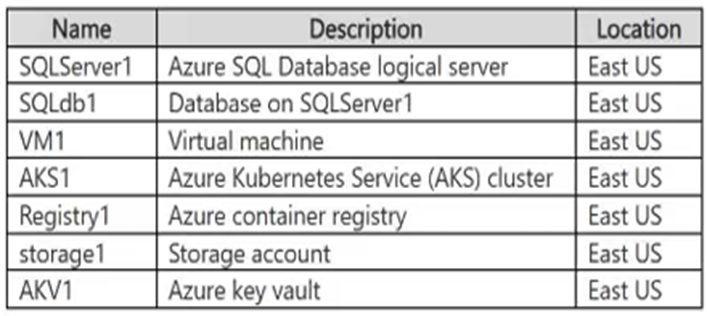
VM1 contains an application that accesses storage1. Another application accesses storage1 from a public IP address of xxx.xxx.xx.xx.
For storage1, you set Public network access to Enabled from selected virtual networks and IP addresses. You add an IP network rule for xxx.xxx.xx.xx.
After the configuration, only connections from xxx.xxx.xx.xx succeed.
You need to ensure that both VM1 and xxx.xxx.xx.xx.can access storage1 over the public endpoint, while preventing all other access.
What should you do?

  1. Set Public network access to Enabled from all networks.
  2. Enable a private endpoint for storage1.
  3. Add a public IP address to VM1.
  4. Enable the Microsoft.Storage service endpoint for Subnet1.

Answer(s): D

Explanation:

To ensure that both the Azure Virtual Machine and the external public IP address can access the storage account over its public endpoint while blocking all other traffic, you must enable a Virtual Network Service Endpoint (Microsoft.Storage) on the VM's subnet and add a Virtual Network Rule for that subnet to the storage account's firewall


Reference:

https://towardsdatascience.com/demystifying-azure-storage-account-network-access-9e024d2f02c6/


Viewing page 20 of 43
Viewing questions 96 - 100 out of 207 questions


Post your Comments and Discuss Microsoft SC-500 exam prep with other Community members:

AI Tutor AI Tutor 👋 I’m here to help!