Free SC-500 Exam Braindumps
Implementing End-to-End Security Controls for Cloud and AI Workloads Questions 34–38 (page: 22)

Updated On: 23-Oct-2026
View Related Case Study

HOTSPOT (Drag and Drop is not supported)
You have an Azure subscription that contains the following resources:
-An Azure SQL Database logical server named Server1 that contains a database named DB1
-An Azure SQL Managed Instance named Instance1 that contains a database named DB2
You need to configure database auditing. The solution must meet the following requirements:
-Ensure that audit data is centrally available in a location that supports for KQL queries.
-Minimize ongoing administrative effort as additional databases are added.
What should you configure? To answer, select the appropriate options in the answer area.
Note: Each correct selection is worth one point.
Hot Area:

  1. See Explanation section for answer.

Answer(s): A

Explanation:


Auditing scope: Enable on each server or instance.
Auditing destination: A Log Analytics workspace
Configuring auditing at the logical server and managed instance levels applies auditing centrally and reduces administration as additional databases are created. Sending the audit logs to a Log Analytics workspace provides a centralized destination where the audit data can be queried by using KQL.


Reference:

https://learn.microsoft.com/en-us/azure/azure-sql/database/auditing-overview?view=azuresql https://learn.microsoft.com/en-us/azure/azure-monitor/platform/diagnostic-settings?tabs=portal


View Related Case Study

You have an Azure SQL Database server named SQL1.
For SQL1, you turn on Microsoft Defender for SQL to detect all threat detection types.
Which action will Microsoft Defender for SQL detect as a threat?

  1. A user deletes more than 100 records from the same table
  2. A user updates more than 50 percent of the records in a table
  3. A user attempts to sign in as Select * FROM table1.
  4. A user is added to the db_owner database role.

Answer(s): C

Explanation:

Microsoft Defender for SQL can detect SQL injection attempts by identifying malicious SQL statements supplied through application inputs, including authentication fields. Attempting to sign in using a value such as Select * FROM table1 can trigger SQL injection threat detection.


View Related Case Study

You have an Azure subscription that contains the virtual machines shown in the following table.

All the virtual networks are peered.
You deploy Azure Bastion to VNET2.
Which virtual machines can be protected by the bastion host?

  1. VM2 only
  2. VM2 and VM4 only
  3. VM1, VM2, and VM3 only
  4. VM1, VM2, VM3, and VM4

Answer(s): D

Explanation:

All four virtual machines (VM1, VM2, VM3, and VM4) can be protected by this single Azure Bastion host.
Key Technical Reasons
Virtual Network Peering Support: Azure Bastion natively supports Virtual Network (VNet) Peering.
When VNet peering is configured, an Azure Bastion host deployed in one centralized "hub" VNet can securely connect to virtual machines in any peered "spoke" VNets.
No Regional Restrictions: VNet peering works seamlessly both within the same region and across different Azure regions (known as Global VNet peering). Because Azure Bastion routes your connection over the private Azure backbone network using private IP addresses, the region of the target virtual machine does not restrict access.
Individual Virtual Machine StatusVM1 (East US / VNET1): Accessible because VNET1 is peered with VNET2.
VM2 (West US / VNET2): Accessible because the Azure Bastion host is deployed directly into VNET2.
VM3 (East US / VNET1): Accessible because VNET1 is peered with VNET2.
VM4 (West US / VNET3): Accessible because VNET3 is peered with VNET2.


Reference:

https://learn.microsoft.com/en-us/azure/bastion/vnet-peering


View Related Case Study

HOTSPOT (Drag and Drop is not supported)
You have an Azure subscription that contains an Azure Database for PostgreSQL instance named DB1.
You plan to protect DB1 by using Microsoft Defender for Cloud.
You need to configure Defender for Cloud to detect anomalous activities and database exploitations for DB1. The solution must NOT affect any other databases.
What should you enable? To answer, select the appropriate options in the answer area.
Note: Each correct selection is worth one point.
Hot Area:

  1. See Explanation section for answer.

Answer(s): A

Explanation:


Box 1: At the individual database level
The database protection must be applied at the individual database level (specifically, at the individual database server level).
The requirement specifies that the configuration must not affect other databases.
Individual Database Level: Microsoft Defender for Cloud allows you to navigate directly to the specific Azure Database for PostgreSQL server, expand its Security menu, and enable Microsoft Defender for Cloud specifically for that single resource. This completely isolates the configuration to this instance.
Box 2: Microsoft Defender for Open-Source Relational Databases
The most appropriate plan is Microsoft Defender for Open-Source Relational Databases (which operates under the broader Microsoft Defender for Databases bundle).


Reference:

https://learn.microsoft.com/en-us/azure/defender-for-cloud/defender-for-sql-introduction


View Related Case Study

HOTSPOT (Drag and Drop is not supported)
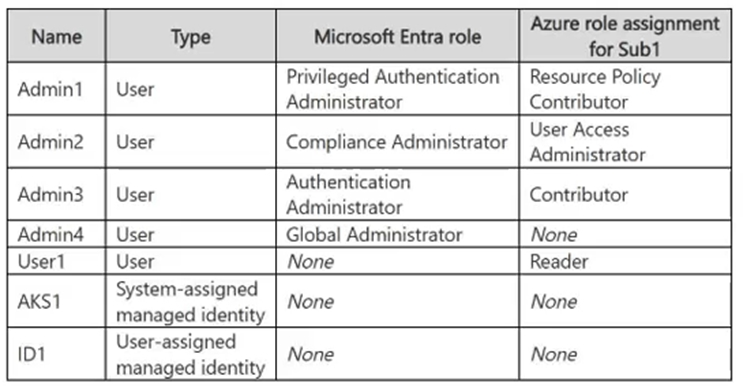
You have an Azure subscription that is linked to a Microsoft Entra tenant. The tenant contains the groups shown in the following table.
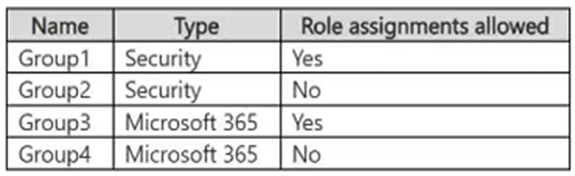
The tenant contains the users shown in the following table.

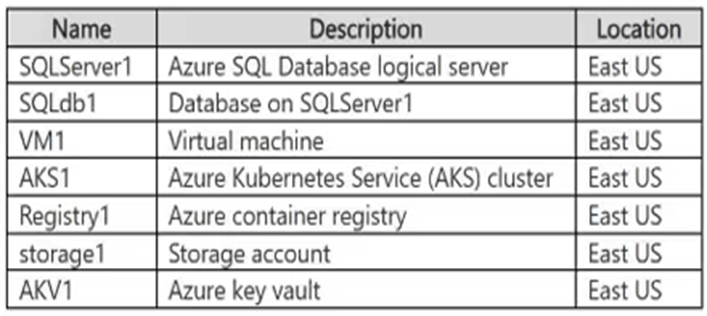
The subscription contains the Azure SQL servers shown in the following table.

The servers are configured for Microsoft Entra-only authentication.
For each of the following statements, select Yes if the statement is true. Otherwise, select No.
Note: Each correct selection is worth one point.
Hot Area:

  1. See Explanation section for answer.

Answer(s): A

Explanation:


Yes
Yes
Yes
The Microsoft Entra administrator has db_owner permissions for every database on its server, including permission to alter schemas. User1 is the administrator of sqlsvr1 and inherits administrator permissions on sqlsvr2 through Group1. User2 also inherits Group1’s administrator permissions through the nested membership of Group2.


Reference:

https://learn.microsoft.com/en-us/azure/azure-sql/database/authentication-aad-overview?view=azuresql


Viewing page 22 of 43
Viewing questions 106 - 110 out of 207 questions


Post your Comments and Discuss Microsoft SC-500 exam prep with other Community members:

AI Tutor AI Tutor 👋 I’m here to help!