Free AZ-700 Exam Braindumps
Designing and Implementing Microsoft Azure Networking Solutions Questions 116–120 (page: 25)

Updated On: 10-Feb-2026
View Related Case Study

HOTSPOT (Drag and Drop is not supported)

You have an Azure subscription that contains a virtual network named VNet1. VNet1 contains the resources shown in the following table.


You need to publish App1 by using AG1 and a URL of https://app1.contoso.com. The solution must meet the following requirements:

TLS connections must terminate on AG1.

Minimize the number of targets in the backend pool of AG1.

Minimize the number of deployed copies of the SSL certificate of App1.

How many locations should you import to the certificate, and how many targets should you add to the backend pool of AG1? To answer, select the appropriate options in the answer area.

Note: Each correct selection is worth one point.

Hot Area:

  1. See Explanation section for answer.

Answer(s): A

Explanation:


Box 1: 1

Use one single certificate.

You can use the Azure portal to configure an application gateway with a certificate for TLS termination that uses virtual machines for backend servers.

Box 2: 4
Four virtual machines in the VMSS. Four backend ´pool targets.

Add backend targets
In this example, you'll use virtual machines as the target backend. You can either use existing virtual machines or create new ones. You'll create two virtual machines that Azure uses as backend servers for the application gateway.

To add backend targets, you'll:

1. Create two new VMs, contosoVM and fabrikamVM, to be used as backend servers.
2. Install IIS on the virtual machines to verify that the application gateway was created successfully.
3. Add the backend servers to the backend pools.


Reference:

https://learn.microsoft.com/en-us/azure/application-gateway/create-multiple-sites-portal


View Related Case Study

HOTSPOT (Drag and Drop is not supported)

You have an Azure subscription that contains a virtual network named Vnet1. Vnet1 has a /24 IPv4 address space.

You need to subdivide Vnet1. The solution must maximize the number of usable subnets.

What is the maximum number of IPv4 subnets you can create, and how many usable IP addresses will be available per subnet? To answer, select the appropriate options in the answer area.

Note: Each correct selection is worth one point.

Hot Area:

  1. See Explanation section for answer.

Answer(s): A

Explanation:


Box 1: 3
Subnet address range: The range must be within the address space you entered for the virtual network. The smallest range you can specify is /29, which provides eight IP addresses for the subnet. Azure reserves the first and last address in each subnet for protocol conformance. Three more addresses are reserved for Azure service usage. As a result, a virtual network with a subnet address range of /29 has only three usable IP addresses.

Box 2: 32
We can make 32 /29 subnets of a /24 IPv4 address space.


Reference:

https://learn.microsoft.com/en-us/azure/virtual-network/manage-virtual-network


View Related Case Study

HOTSPOT (Drag and Drop is not supported)

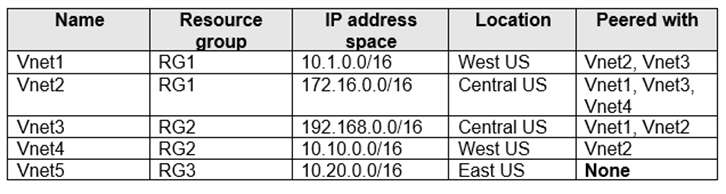
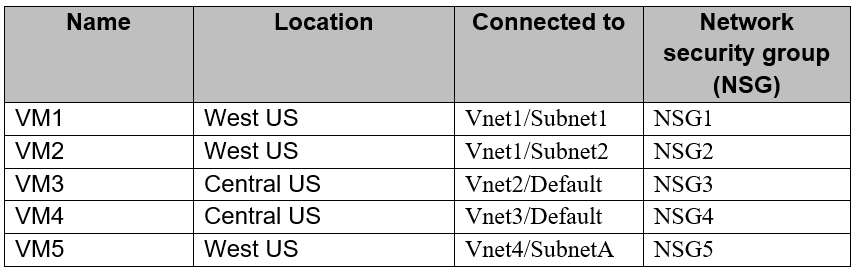
You have an Azure subscription that contains the resources shown in the following table.


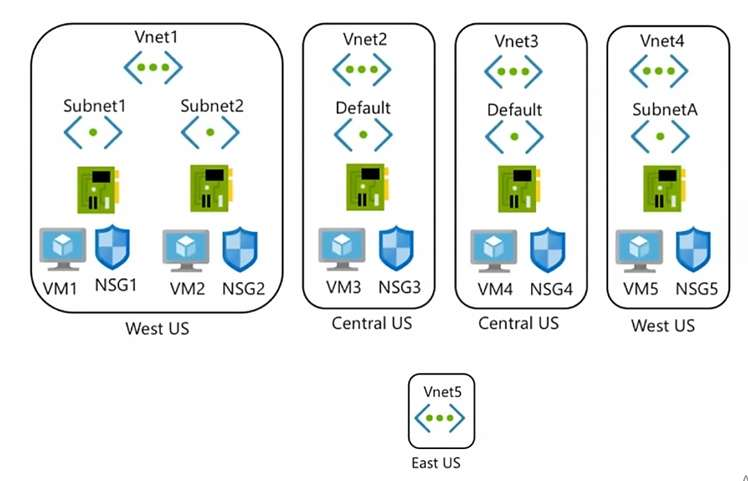
The virtual network topology is shown in the following exhibit.


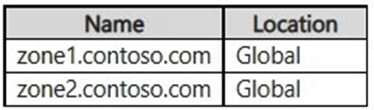
Firewall1 is configured as shown in following exhibit.


FirewallPolicy1 contains the following rules:

Allow outbound traffic from Vnet1 and Vnet2 to the internet.

Allow any traffic between Vnet1 and Vnet2.

No custom private endpoints, service endpoints, routing tables, or network security groups (NSGs) were created.

For each of the following statements, select Yes if the statement is true. Otherwise, select No.

Note: Each correct selection is worth one point.

Hot Area:

  1. See Explanation section for answer.

Answer(s): A

Explanation:


Box 1: No
Routes to the gateway-connected virtual networks or on-premises networks will automatically propagate to the routing tables for the peered virtual networks using the gateway transit.

Note: Virtual network peering enables you to seamlessly connect two or more Virtual Networks in Azure. The virtual networks appear as one for connectivity purposes. The traffic between virtual machines in peered virtual networks uses the Microsoft backbone infrastructure. Like traffic between virtual machines in the same network, traffic is routed through Microsoft's private network only.

Virtual network peering seamlessly connects two Azure virtual networks, merging the two virtual networks into one for connectivity purposes.

Box 2: Yes
Configure VPN gateway transit for virtual network peering
Gateway transit is a peering property that lets one virtual network use the VPN gateway in the peered virtual network for cross-premises or VNet-to-VNet connectivity. The following diagram shows how gateway transit works with virtual network peering.


Note: Use the remote virtual network's gateways or Route Server when you peer VNet-Spoke to VNet-Hub. If Use the remote virtual network's gateways or Route Server is set and Use this virtual network's gateway or Route Server on remote peering is also set, the spoke virtual network uses gateways of the remote virtual network for transit.

Box 3: Yes
Azure Firewall has a feature called Web categories which lets administrators allow or deny user access to web site categories such as gambling websites, social media websites, and others. Web categories are included in Azure Firewall Standard, but it's more fine-tuned in Azure Firewall Premium.


Reference:

https://learn.microsoft.com/en-us/azure/vpn-gateway/vpn-gateway-peering-gateway-transit https://learn.microsoft.com/en-us/answers/questions/564023/denying-specific-websites(facebook-youtube)- throug


View Related Case Study

HOTSPOT (Drag and Drop is not supported)

Your company has 40 branch offices across North America and Europe.

You have an Azure subscription that contains the following virtual networks:

Two networks in the East US Azure region

Three networks in the West Europe Azure region

You need to implement Azure Virtual WAN. The solution must meet the following requirements:

Each branch office in North America must have an ExpressRoute circuit and a Site-to-Site VPN that connects to the East US region.
Each branch office in Europe must have an ExpressRoute circuit and a Site-to-Site VPN that connects to the West Europe region.
Transitive connections must be supported between all the branch offices and all the virtual networks.

Costs must be minimized.

What is the minimum number of Virtual WAN resources required? To answer, select the appropriate options in the answer area.

Note: Each correct selection is worth one point.

Hot Area:

  1. See Explanation section for answer.

Answer(s): A

Explanation:


Box 1: Two Standard virtual WANs.
Need Standard for ExpressRoute.
Two VLANs: One for North America, and one for Europe.

Note: Virtual WAN: The virtualWAN resource represents a virtual overlay of your Azure network and is a collection of multiple resources. It contains links to all your virtual hubs that you would like to have within the virtual WAN. Virtual WANs are isolated from each other and can't contain a common hub. Virtual hubs in different virtual WANs don't communicate with each other.

Virtual WAN types
There are two types of virtual WANs: Basic and Standard. The following table shows the available configurations for each type.

* Basic
Site-to-site VPN only

* Standard
ExpressRoute
User VPN (P2S)
VPN (site-to-site)
Inter-hub and VNet-to-VNet transiting through the virtual hub Azure Firewall
NVA in a virtual WAN

Box 2: Five Virtual WAN hubs
One virtual WAN hub for each site; two in East US and three in West Europe.

Note: Hub: A virtual hub is a Microsoft-managed virtual network. The hub contains various service endpoints to enable connectivity. From your on-premises network (vpnsite), you can connect to a VPN gateway inside the virtual hub, connect ExpressRoute circuits to a virtual hub, or even connect mobile users to a point-to-site gateway in the virtual hub. The hub is the core of your network in a region. Multiple virtual hubs can be created in the same region.

A hub gateway isn't the same as a virtual network gateway that you use for ExpressRoute and VPN Gateway. For example, when using Virtual WAN, you don't create a site-to-site connection from your on-premises site directly to your VNet. Instead, you create a site-to-site connection to the hub. The traffic always goes through the hub gateway. This means that your VNets don't need their own virtual network gateway. Virtual WAN lets your VNets take advantage of scaling easily through the virtual hub and the virtual hub gateway.

Box 3: Two virtual network gateways
One virtual gateway for East US and one for West Europe.


Reference:

https://learn.microsoft.com/en-us/azure/virtual-wan/virtual-wan-about


View Related Case Study

Note: This question is part of a series of questions that present the same scenario. Each question in the series contains a unique solution that might meet the stated goals. Some question sets might have more than one correct solution, while others might not have a correct solution.

After you answer a question in this section, you will NOT be able to return to it. As a result, these questions will not appear in the review screen.

You have two Azure virtual networks named Vnet1 and Vnet2.

You have a Windows 10 device named Client1 that connects to Vnet1 by using a Point-to-Site (P2S) IKEv2

VPN.

You implement virtual network peering between Vnet1 and Vnet2. Vnet1 allows gateway transit. Vnet2 can use the remote gateway.

You discover that Client1 cannot communicate with Vnet2.

You need to ensure that Client1 can communicate with Vnet2.

Solution: You reset the gateway of Vnet1.

Does this meet the goal?

  1. Yes
  2. No

Answer(s): B

Explanation:

The VPN client must be downloaded again if any changes are made to VNet peering or the network topology.


Reference:

https://docs.microsoft.com/en-us/azure/vpn-gateway/vpn-gateway-about-point-to-site-routing


Viewing page 25 of 75
Viewing questions 121 - 125 out of 396 questions


Post your Comments and Discuss Microsoft AZ-700 exam prep with other Community members:

AI Tutor AI Tutor 👋 I’m here to help!