Free AZ-700 Exam Braindumps
Designing and Implementing Microsoft Azure Networking Solutions Questions 126–130 (page: 27)

Updated On: 10-Feb-2026
View Related Case Study

HOTSPOT (Drag and Drop is not supported)

You have an Azure subscription that contain a storage account named st1 in the East US Azure region.

You have the virtual networks shown in the following table.
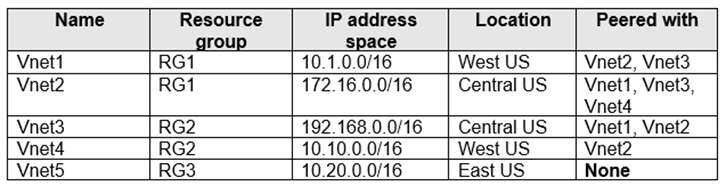


You have the subnets shown in the following table.


For each of the following statements, select Yes if the statement is true. Otherwise, select No.

Note: Each correct selection is worth one point.

Hot Area:

  1. See Explanation section for answer.

Answer(s): A

Explanation:


Box 1: No
Azure Bastion subnet
You must create this subnet in the same virtual network that you want to deploy Azure Bastion to. The subnet must have the following configuration: Subnet name must be AzureBastionSubnet. Subnet size must be /26 or larger (/25, /24 etc.).
The subnet can't contain other resources.

Box 2: Yes
Subnet-1 has IP address range 10.2.1.0/25
Total Number of Hosts: 128
Number of Usable Hosts: 126

Box 3: No
Subnet3-1 has an IP address range of 10.3.1.0/26.
Vnet3 has an IP address space of 10.3.0.0/16.
10.3.1.0/6 would not be within the Vnet3 IP address range.


Reference:

https://learn.microsoft.com/en-us/azure/bastion/configuration-settings https://www.calculator.net/ip-subnet-calculator.html


View Related Case Study

You are planning the IP addressing for the subnets in Azure virtual networks.

Which type of resource requires IP addresses in the subnets?

  1. storage account
  2. internal load balancers
  3. service endpoints
  4. service endpoint policies

Answer(s): B

Explanation:

During the creation of the load balancer, you'll configure:
Frontend IP address
Backend pool
Inbound load-balancing rules
When you create an internal load balancer, a virtual network is configured as the network for the load balancer.
A private IP address in the virtual network is configured as the frontend for the load balancer. The frontend IP address can be Static or Dynamic.
Incorrect:
* service endpoints
A service endpoint is created in a virtual subnet, but there is no IP address defined for the Service endpoint.
Service endpoints are a way for Azure DevOps to connect to external systems or services. They're a bundle of properties securely stored by Azure DevOps, which includes but isn't limited to the following properties:
Service name
Description
Server URL
Certificates or tokens
User names and passwords
* service endpoint policies
Service Endpoint Policy object, example.
"serviceEndpointPolicyDefinitions": [
{
"description": null,
"name": "MySEP-Definition",
"resourceGroup": "MySEPDeployment",
"service": "Microsoft.Storage",
"serviceResources": [
"/subscriptions/subscriptionID/resourceGroups/MySEPDeployment/providers/Microsoft.Storage/ storageAccounts/mystgacc"
],
"type": "Microsoft.Network/serviceEndpointPolicies/serviceEndpointPolicyDefinitions" }
]


Reference:

https://learn.microsoft.com/en-us/azure/load-balancer/quickstart-load-balancer-standard-internal-portal https://learn.microsoft.com/en-us/azure/virtual-network/virtual-network-service-endpoint-policies-overview


View Related Case Study

You have the Azure virtual networks shown in the following table.


You deploy Azure Firewall to Vnet3.

You need to ensure that the traffic from Subnet1-1 to Subnet2-1 passes through the firewall.

What should you configure?

  1. peering links between Vnet1 and Vnet2
  2. a route table associated to Subnet1-1 and Subnet2-1
  3. an Azure private DNS zone
  4. a route table associated to AzureFirewallSubnet

Answer(s): B

Explanation:

Azure automatically routes traffic between Azure subnets, virtual networks, and on-premises networks. If you want to change Azure's default routing, you do so by creating a route table.
Route tables aren't associated to virtual networks. You must associate a route table to each subnet you want the route table associated to.


Reference:

https://learn.microsoft.com/en-us/azure/virtual-network/manage-route-table


View Related Case Study

You plan to implement an Azure virtual network that will contain 10 virtual subnets. The subnets will use IPv6 addresses. Each subnet will host up to 200 load-balanced virtual machines.

You need to recommend which subnet mask size to use for the virtual subnets.

What should you recommend?

  1. /64
  2. /120
  3. /48
  4. /24

Answer(s): A


View Related Case Study

DRAG DROP (Drag and Drop is not supported)

You have two on-premises datacenters.

You have an Azure subscription that contains four virtual networks named VNet1, VNet2, VNet3, and VNet4.

You create an Azure virtual WAN named VWAN1. VWAN1 contains a single virtual hub that is connected to both on-premises datacenters and all the virtual networks in a full mesh topology.

You create a route table named RT1.

You need to configure VWAN1 to meet the following requirements:

Connectivity between VNet1 and VNet2 and both on-premises datacenters must be allowed.

Connectivity between VNet3 and VNet4 and both on-premises datacenters must be allowed.

VNet1 and VNet2 must be isolated from VNet3 and VNet4.

How should you configure routing for VNet1 and VNet2 and for both on-premises datacenters? To answer, drag the appropriate route tables and route table propagation to the correct requirements. Each route table and route table propagation may be used once, more than once, or not at all. You may need to drag the split bar between panes or scroll to view content.

Note: Each correct selection is worth one point.

Select and Place:

  1. See Explanation section for answer.

Answer(s): A

Explanation:


Box 1: Associated route table: RT1
Propagating to route tables: Default

Vnet1 and VNet2

Scenario: Isolating VNets
When working with Virtual WAN virtual hub routing, there are quite a few available scenarios. In this scenario, the goal is to prevent VNets from being able to reach other. This is known as isolating VNets.

Design
In this scenario, the workload within a certain VNet remains isolated and is not able to communicate with other VNets. However, the VNets are required to reach all branches (VPN, ER, and User VPN). In order to figure out how many route tables will be needed, you can build a connectivity matrix. For this scenario it will look like the following table, where each cell represents whether a source (row) can communicate to a destination (column):


Each of the cells in the previous table describes whether a Virtual WAN connection (the "From" side of the flow, the row headers) communicates with a destination prefix (the "To" side of the flow, the column headers in italics). In this scenario there are no firewalls or Network Virtual Appliances, so communications flows directly over Virtual WAN (hence the word "Direct" in the table).

This connectivity matrix gives us two different row patterns, which translate to two route tables. Virtual WAN already has a Default route table, so we will need another route table. For this example, we will name the route table RT_VNET.

VNets will be associated to this RT_VNET route table. Because they need connectivity to branches, branches will need to propagate to RT_VNET (otherwise the VNets would not learn the branch prefixes). Since the branches are always associated to the Default route table, VNets will need to propagate to the Default route table. As a result, this is the final design:

Virtual networks:
Associated route table: RT_VNET
Propagating to route tables: Default

Branches:
Associated route table: Default
Propagating to route tables: RT_VNET and Default

Notice that since only branches propagate to the route table RT_VNET, those will be the only prefixes that VNets will learn, and not those of other VNets.

Box 2: Associated route table: Default
Propagating to route tables: RT1 and Default

On-premises datacenters


Reference:

https://learn.microsoft.com/en-us/azure/virtual-wan/scenario-isolate-vnets


Viewing page 27 of 75
Viewing questions 131 - 135 out of 396 questions


Post your Comments and Discuss Microsoft AZ-700 exam prep with other Community members:

AI Tutor AI Tutor 👋 I’m here to help!