Case Study
This is a case study. Case studies are not timed separately. You can use as much exam time as you would like to complete each case. However, there may be additional case studies and sections on this exam. You must manage your time to ensure that you are able to complete all questions included on this exam in the time provided.
To answer the questions included in a case study, you will need to reference information that is provided in the case study. Case studies might contain exhibits and other resources that provide more information about the scenario that is described in the case study. Each question is independent of the other questions in this case study.
At the end of this case study, a review screen will appear. This screen allows you to review your answers and to make changes before you move to the next section of the exam. After you begin a new section, you cannot return to this section.
To start the case study
To display the first question in this case study, click the Next button. Use the buttons in the left pane to explore the content of the case study before you answer the questions. Clicking these buttons displays information such as business requirements, existing environment, and problem statements.
When you are ready to answer a question, click the Question button to return to the question.
Overview
Contoso, Ltd. is a consulting company that has a main office in San Francisco and a branch office in Dallas.
Contoso recently purchased an Azure subscription and is performing its first pilot project in Azure.
Existing Environment
Azure Network Infrastructure
Contoso has a Microsoft Entra tenant named contoso.com.
The Azure subscription contains the virtual networks shown in the following table.
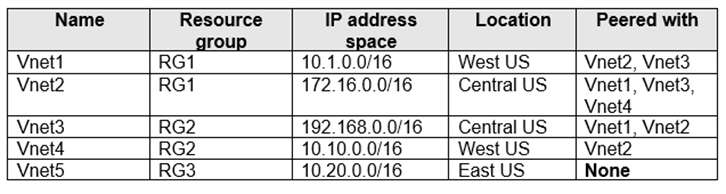
Vnet1 contains a virtual network gateway named GW1.
Azure Virtual Machines
The Azure subscription contains virtual machines that run Windows Server 2022 as shown in the following table.
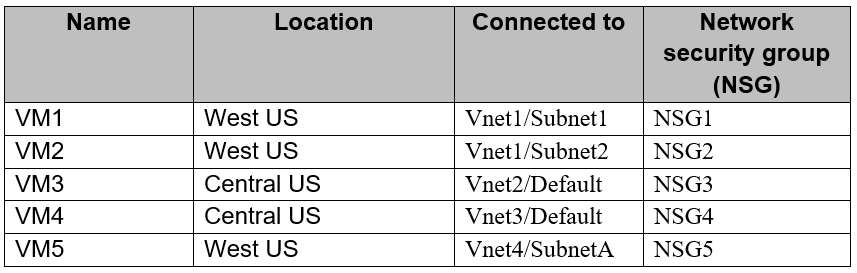
The NSGs are associated to the network interfaces on the virtual machines. Each NSG has one custom security rule that allows RDP connections from the internet. The firewall on each virtual machine allows ICMP traffic.
An application security group named ASG1 is associated to the network interface of VM1.
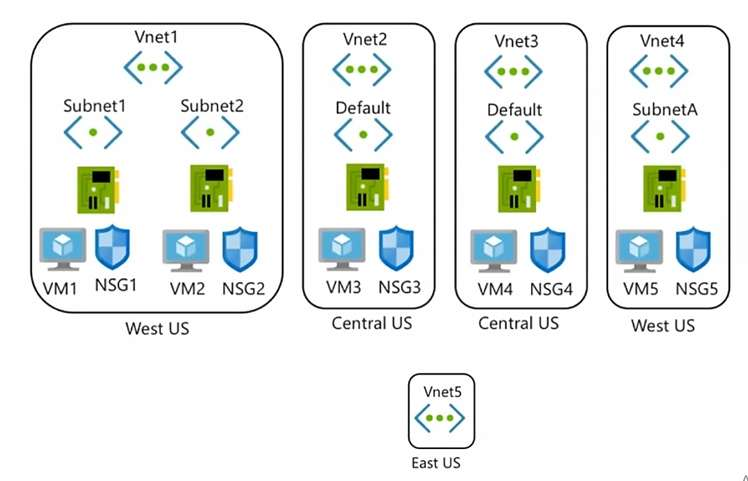
Azure Network Infrastructure Diagram
Azure Private DNS Zones
The Azure subscription contains the Azure private DNS zones shown in the following table.
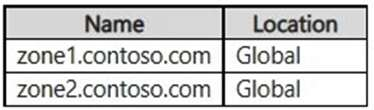
Zone1.contoso.com has the virtual network links shown in the following table.

Other Azure Resources
The Azure subscription contains additional resources as shown in the following table.

Requirements
Virtual Network Requirements
Contoso has the following virtual network requirements:
Create a virtual network named Vnet6 in West US that will contain the following resources and configurations:
- Two container groups that connect to Vnet6
- Three virtual machines that connect to Vnet6
- Allow VPN connections to be established to Vnet6
- Allow the resources in Vnet6 to access KeyVault1, DB1, and Vnet1 over the Microsoft backbone network. The virtual machines in Vnet4 and Vnet5 must be able to communicate over the Microsoft backbone network.
A virtual machine named VM-Analyze will be deployed to Subnet1. VM-Analyze must inspect the outbound network traffic from Subnet2 to the internet.
Network Security Requirements
Contoso has the following network security requirements:
Configure Microsoft Entra authentication for Point-to-Site (P2S) VPN users.
Enable NSG flow logs for NSG3 and NSG4.
Create an NSG named NSG10 that will be associated to Vnet1/Subnet1 and will have the custom inbound security rules shown in the following table.

Create an NSG named NSG11 that will be associated to Vnet1/Subnet2 and will have the custom outbound security rules shown in the following table.
