Free AZ-700 Exam Braindumps
Designing and Implementing Microsoft Azure Networking Solutions Questions 131–135 (page: 28)

Updated On: 10-Feb-2026
View Related Case Study

You are planning the IP addressing for the subnets in Azure virtual networks.

Which type of resource requires IP addresses in the subnets?

  1. Azure Virtual Network NAT
  2. service endpoint policies
  3. internal load balancers
  4. virtual network peering

Answer(s): C

Explanation:

During the creation of the load balancer, you'll configure:
Frontend IP address
Backend pool
Inbound load-balancing rules
When you create an internal load balancer, a virtual network is configured as the network for the load balancer.
A private IP address in the virtual network is configured as the frontend for the load balancer. The frontend IP address can be Static or Dynamic.
Incorrect:
* service endpoints
A service endpoint is created in a virtual subnet, but there is no IP address defined for the Service endpoint.
Service endpoints are a way for Azure DevOps to connect to external systems or services. They're a bundle of properties securely stored by Azure DevOps, which includes but isn't limited to the following properties:
Service name
Description
Server URL
Certificates or tokens
User names and passwords
* service endpoint policies
Service Endpoint Policy object, example.
"serviceEndpointPolicyDefinitions": [
{
"description": null,
"name": "MySEP-Definition",
"resourceGroup": "MySEPDeployment",
"service": "Microsoft.Storage",
"serviceResources": [
"/subscriptions/subscriptionID/resourceGroups/MySEPDeployment/providers/Microsoft.Storage/ storageAccounts/mystgacc"
],
"type": "Microsoft.Network/serviceEndpointPolicies/serviceEndpointPolicyDefinitions" }
]


Reference:

https://learn.microsoft.com/en-us/azure/load-balancer/quickstart-load-balancer-standard-internal-portal https://learn.microsoft.com/en-us/azure/virtual-network/virtual-network-service-endpoint-policies-overview


View Related Case Study

HOTSPOT (Drag and Drop is not supported)

You have an Azure subscription that contains an Azure key vault named Vault1 and an app registration for a Microsoft Entra app named App1.

You have a DNS domain named contoso.com that is hosted by a third-party DNS provider.

You plan to deploy App1 by using Azure App Service. App1 will have the following configurations:

App1 will be hosted across five App Service apps.

Users will access App1 by using a URL of https://app1.contoso.com.

The user traffic of App1 will be managed by using Azure Front Door.

The traffic between Front Door and the App Service apps will be sent by using HTTP.

App1 will be secured by using an SSL certificate from a third-party certificate authority (CA).

You need to support the Front Door deployment.

Which two DNS records should you create, and to where should you import the SSL certificate for App1? To answer, select the appropriate options in the answer area.

Note: Each correct selection is worth one point.

Hot Area:

  1. See Explanation section for answer.

Answer(s): A

Explanation:


Box 1: An A record and a CNAME record
DNS records

Map an existing custom DNS name to Azure App Service
Azure App Service provides a highly scalable, self-patching web hosting service. The DNS record type you need to add with your domain provider depends on the domain you want to add to App Service.

Scenario (Example, Recommended DNS record)
* Root domain contoso.com
A record. Don't use the CNAME record for the root record (for information, see RFC 1912 Section 2.4).

* Subdomain www.contoso.com, my.contoso.com
CNAME record. You can map a subdomain to the app's IP address directly with an A record, but it's possible for the IP address to change. The CNAME maps to the app's default hostname instead, which is less susceptible to change.

* Wildcard
*.contoso.com
CNAME record.

Box 2: Vault1
Import the certificate to

Configure HTTPS on an Azure Front Door custom domain using the Azure portal Azure Front Door enables secure TLS delivery to your applications by default when you use your own custom domains.

Azure Front Door supports Azure-managed certificates and customer-managed certificates.

Using your own certificate
You can also choose to use your own TLS certificate. Your TLS certificate must meet certain requirements.

Prepare your key vault and certificate
If you already have a certificate, you can upload it to your key vault. Otherwise, create a new certificate directly through Azure Key Vault from one of the partner certificate authorities (CAs) that Azure Key Vault integrates with.


Reference:

https://learn.microsoft.com/en-us/azure/app-service/app-service-web-tutorial-custom-domain? https://learn.microsoft.com/en-us/azure/frontdoor/standard-premium/how-to-configure-https-custom-domain


View Related Case Study

You have an Azure subscription that contains a virtual network named VNet1. VNet1 has a subnet mask of/24.

You plan to implement an Azure application gateway that will have the following configurations:

Public endpoints: 1

Private endpoints: 1

Minimum instances: 1

Maximum instances: 10

You need to configure the address space for the subnet of the application gateway. The solution must minimize the number of IP addresses allocated to the application gateway subnet.

What is the minimum number of assignable IP addresses required?

  1. 1
  2. 2
  3. 11
  4. 12
  5. 20

Answer(s): C

Explanation:

In our case:
10 IP addresses for the instances
1 for the private endpoint
The public endpoint is not in this subnet.
Note: Size of the subnet
Application Gateway uses one private IP address per instance, plus another private IP address if a private frontend IP is configured.
Azure also reserves five IP addresses in each subnet for internal use: the first four and the last IP addresses.
For example, consider 15 application gateway instances with no private frontend IP. You need at least 20 IP addresses for this subnet: five for internal use and 15 for the application gateway instances.
Consider a subnet that has 27 application gateway instances and an IP address for a private frontend IP. In this case, you need 33 IP addresses: 27 for the application gateway instances, one for the private front end, and five for internal use.


Reference:

https://learn.microsoft.com/en-us/azure/application-gateway/configuration-infrastructure


View Related Case Study

HOTSPOT (Drag and Drop is not supported)

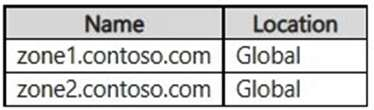
Your on-premises network contains a server named DNS1 that runs Windows Server 2022. DNS1 has the DNS server role and an IP address of 10.1.0.1. The network contains computers that use DNS1 for name resolution.

You have an Azure subscription that contains the resources shown in the following table.


The on-premises network connects to Vnet1 by using a Site-to-Site VPN.

You need to ensure that the computers on the on-premises network can resolve the IP address for sql1.private.fabrikam.com.

What should you do on DNS1 and DNS2? To answer, drag the appropriate actions to the correct servers. Each action may be used once, more than once, or not at all. You may need to drag the split bar between panes or scroll to view content.

Note: Each correct selection is worth one point.

Hot Area:

  1. See Explanation section for answer.

Answer(s): A

Explanation:


Box 1: Configure forwarding to 168.63.129.16
DNS1

Virtual network and on-premises workloads using a DNS forwarder For workloads accessing a private endpoint from virtual and on-premises networks, use a DNS forwarder to resolve the Azure service public DNS zone deployed in Azure.

The following scenario is for an on-premises network with virtual networks in Azure. Both networks access the private endpoint located in a shared hub network.

This DNS forwarder is responsible for resolving all the DNS queries via a server-level forwarder to the Azure- provided DNS service 168.63.129.16.

The following diagram shows the DNS resolution for both networks, on-premises and virtual networks. The resolution is using a DNS forwarder. The resolution is made by a private DNS zone linked to a virtual network:


Incorrect:
* Configure forwarding to 10.1.01.
This IP address is in the on-premises network.

* Configure forwarding to 10.100.0.1
From the On-premises network, we cannot directly use the IP address of the DNS server in the Virtual network.

Box 2: Configure forwarding to 10.100.0.1
DNS2
Need to setup a DNS forwarder in the virtual network.

Incorrect:
* Create a stub zone for private.fabrikam.com.
* Create a secondary zone for private.fabrikam.com.


Reference:

https://learn.microsoft.com/en-us/azure/private-link/private-endpoint-dns


View Related Case Study

DRAG DROP (Drag and Drop is not supported)

You have an Azure subscription that contains the resources shown in the following table.


You need to associate Gateway1 with Subnet1. The solution must minimize downtime on VM1.

Which three actions should you perform in sequence? To answer, move the appropriate actions from the list of actions to the answer area and arrange them in the correct order.

Select and Place:

  1. See Explanation section for answer.

Answer(s): A

Explanation:


Step 1: Disassociate PIP1 from NIC1
Azure NAT Gateway resources enable outbound Internet connections from subnets in a virtual network. Resources deployed in the NAT gateway virtual network subnet must be the standard SKU. Deployment of a NAT gateway to a virtual network subnet with basic SKU resources is unsupported.

Resource using Basic SKU public IP addresses, Decision path
* Virtual Machine or Virtual Machine Scale Sets (flex model) Disassociate IP(s) and utilize the upgrade options detailed after the table.

Step 2: Change the Pip1 SKU to standard

Step 3: Associate PIP1 from NIC1


Reference:

https://learn.microsoft.com/en-us/azure/virtual-network/ip-services/public-ip-basic-upgrade-guidance https://learn.microsoft.com/en-us/azure/virtual-network/ip-services/configure-public-ip-nat-gateway


Viewing page 28 of 75
Viewing questions 136 - 140 out of 396 questions


Post your Comments and Discuss Microsoft AZ-700 exam prep with other Community members:

AI Tutor AI Tutor 👋 I’m here to help!