Free AZ-700 Exam Braindumps
Designing and Implementing Microsoft Azure Networking Solutions Questions 151–155 (page: 32)

Updated On: 10-Feb-2026
View Related Case Study

HOTSPOT (Drag and Drop is not supported)

You have an Azure subscription that contains a virtual network named VNet1.

Your on-premises network connects to VNet1 by using a Site-to-Site (S2S) VPN connection.

You need to ensure that Azure Network Watcher generates an alert if the VPN connection fails.

Which Network Watcher feature should you use to generate the alert, and which data source should the feature query? To answer, select the appropriate options in the answer area.

Note: Each correct selection is worth one point.

Hot Area:

  1. See Explanation section for answer.

Answer(s): A

Explanation:


Box 1: VPN troubleshoot
Feature

Network Watcher, VPN troubleshoot overview
Virtual network gateways provide connectivity between on-premises resources and Azure Virtual Networks. Monitoring virtual network gateways and their connections are critical to ensure communication isn't broken. Azure Network Watcher VPN troubleshoot provides the capability to troubleshoot virtual network gateways and their connections. VPN troubleshoot can be called through the Azure portal, Azure PowerShell, Azure CLI, or REST API.
When called, Network Watcher diagnoses the health of the gateway, or connection, and returns the appropriate results. The request is a long running transaction. The results are returned once the diagnosis is complete.


Box 2: Network security group (NSG) flow logs

Data source

Network Watcher, Log network traffic to and from a virtual machine using the Azure portal Network security group flow logging is a feature of Azure Network Watcher that allows you to log information about IP traffic flowing through a network security group.

Use NSG flow logs to log a virtual machine's network traffic that flows through the network security group associated to its network interface.


Reference:

https://learn.microsoft.com/en-us/azure/network-watcher/vpn-troubleshoot-overview https://learn.microsoft.com/en-us/azure/network-watcher/nsg-flow-logs-tutorial


View Related Case Study

HOTSPOT (Drag and Drop is not supported)

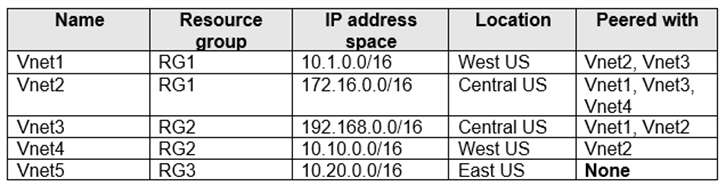
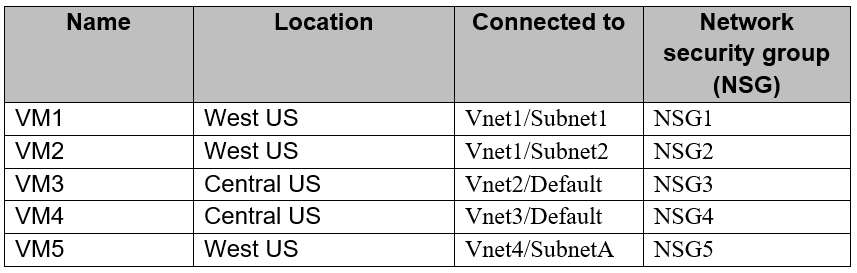
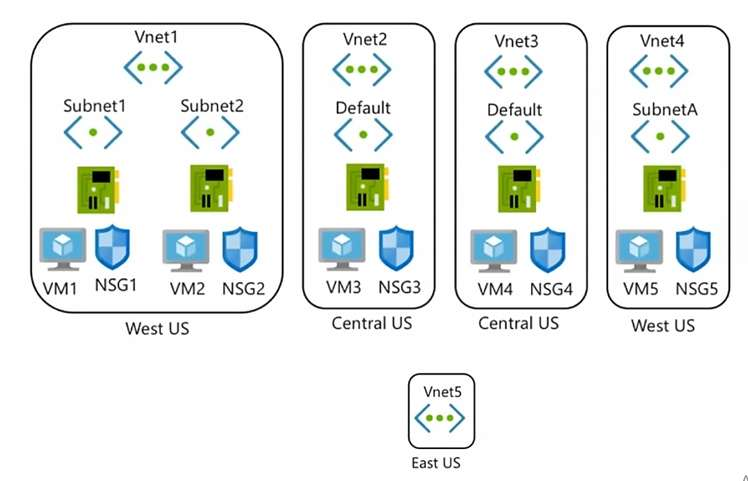
You have an Azure subscription that contains the resources shown in the following table.


You need to ensure that remote users can establish RDP connections to the virtual machines by using Bastion1.

How should you configure the rules for NSG1 for traffic from the internet to AzureBastionSubnet and for traffic from AzureBastionSubnet to Subnet1? To answer, select the appropriate options in the answer area.

Note: Each correct selection is worth one point.

Hot Area:

  1. See Explanation section for answer.

Answer(s): A

Explanation:


Box 1: Enable TCP port 443 inbound
Traffic from the internet to AzureBastionSubnet

AzureBastionSubnet
Azure Bastion is deployed specifically to AzureBastionSubnet.

Ingress Traffic:

Ingress Traffic from public internet: The Azure Bastion will create a public IP that needs port 443 enabled on the public IP for ingress traffic. Port 3389/22 are NOT required to be opened on the AzureBastionSubnet. Note that the source can be either the Internet or a set of public IP addresses that you specify.

Box 2: Enable TCP port 3389 outbound
Traffic from AzureBastionSubnet to Subnet1:

Egress Traffic to target VMs: Azure Bastion will reach the target VMs over private IP. The NSGs need to allow egress traffic to other target VM subnets for port 3389 and 22. If you're utilizing the custom port functionality within the Standard SKU, ensure that NSGs allow outbound traffic to the service tag VirtualNetwork as the destination.

Note: Working with NSG access and Azure Bastion
When working with Azure Bastion, you can use network security groups (NSGs).


In this diagram:

The Bastion host is deployed to the virtual network.
The user connects to the Azure portal using any HTML5 browser.
The user navigates to the Azure virtual machine to RDP/SSH.
Connect Integration - Single-click RDP/SSH session inside the browser No public IP is required on the Azure VM.


Reference:

https://learn.microsoft.com/en-us/azure/bastion/bastion-nsg


View Related Case Study

You have the Azure subscriptions shown in the following table.


Each virtual network contains 20 internet-accessible resources that are assigned public IP addresses.

You need to implement Azure DDoS Network Protection to protect the resources. The solution must minimize costs.

What is the minimum number of DDoS Network Protection plans you should deploy?

  1. 1
  2. 2
  3. 3
  4. 6

Answer(s): B

Explanation:

Need two plans as 120 public IP addresses are used.
Note: Manage DDoS Protection Plans: permissions and restrictions A DDoS protection plan works across regions and subscriptions. The same plan can be linked to virtual networks from other subscriptions in different regions, across your tenant. The associated subscription incurs the plan's monthly bill and overage charges if the protected public IP addresses exceed 100.


Reference:

https://learn.microsoft.com/en-us/azure/ddos-protection/manage-permissions


View Related Case Study

HOTSPOT (Drag and Drop is not supported)

You have an Azure subscription that contains the resources shown in the following table.


Each virtual network contains 20 virtual machines and a subnet that has an IP address space of /24.

You need to ensure that you can access the virtual machines from the internet by using Azure Bastion.

What is the minimum number of bastion subnets you should deploy, and what is the smallest supported IP address space for each bastion subnet? To answer, select the appropriate options in the answer area.

Note: Each correct selection is worth one point.

Hot Area:

  1. See Explanation section for answer.

Answer(s): A

Explanation:


Box 1: 1
Bastion subnets

Note:
Virtual network peering and Azure Bastion
Azure Bastion and Virtual Network peering can be used together.
When Virtual Network peering is configured, you don't have to deploy Azure Bastion in each peered VNet. This means if you have an Azure Bastion host configured in one virtual network (VNet), it can be used to connect to VMs deployed in a peered VNet without deploying an additional bastion host.

Once you provision the Azure Bastion service in your virtual network, the RDP/SSH experience is available to all your VMs in the same VNet and peered VNets. This means you can consolidate Bastion deployment to single VNet and still reach VMs deployed in a peered VNet, centralizing the overall deployment.

Box 2: /26
IP address space

A /26 address space has 62 usable hosts.

Note: Azure Bastion subnet
When you deploy Azure Bastion using any SKU except the Developer SKU, Bastion requires a dedicated subnet named AzureBastionSubnet. You must create this subnet in the same virtual network that you want to deploy Azure Bastion to. The subnet must have the following configuration:

Subnet name must be AzureBastionSubnet.
Subnet size must be /26 or larger (/25, /24 etc.).
For host scaling, a /26 or larger subnet is recommended. Using a smaller subnet space limits the number of scale units. For more information, see the Host scaling section of this article.

The subnet must be in the same virtual network and resource group as the bastion host.
The subnet can't contain other resources.


Reference:

https://learn.microsoft.com/en-us/azure/bastion/vnet-peering https://learn.microsoft.com/en-us/azure/bastion/configuration-settings#subnet


View Related Case Study

You have an Azure subscription that contains 100 network security groups (NSGs).

You need to ensure that you log the application of specific NSG rules.

Which type of log should you configure?

  1. flow log
  2. activity log
  3. Azure resource log
  4. audit log

Answer(s): C


Viewing page 32 of 75
Viewing questions 156 - 160 out of 396 questions


Post your Comments and Discuss Microsoft AZ-700 exam prep with other Community members:

AI Tutor AI Tutor 👋 I’m here to help!