Overview
Fabrikam, Inc. is a consulting company. The company has a main office in New York City and branch offices in Amsterdam and Singapore.
Existing Environment. Network environment
The on-premises network contains a datacenter in each office.
Existing Environment. Cloud environment
Fabrikam has two Azure subscriptions named Sub1 and Sub2 and a Microsoft 365 subscription that includes Microsoft 365 E5 licenses.
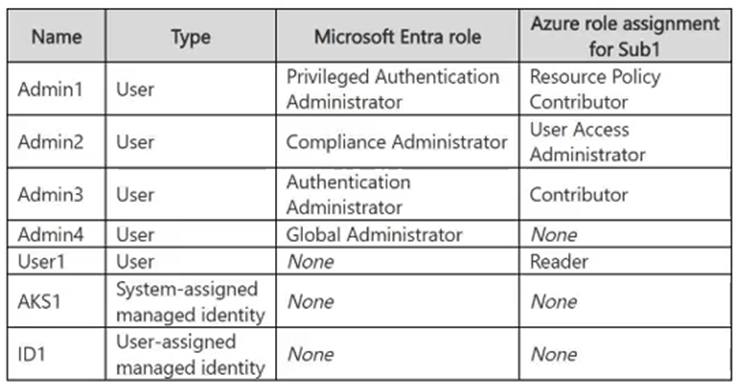
All the subscriptions are linked to a Microsoft Entra tenant named fabrikam.com that contains the identities shown in the following table.
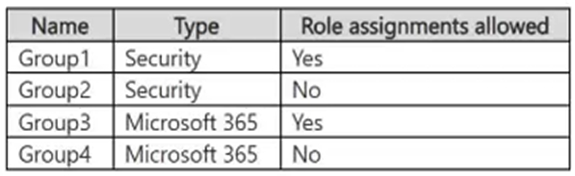
The tenant contains the groups shown in the following table.
All devices are enrolled in Microsoft Intune.
Existing Environment. Sub1 Resources
Sub1 contains a resource group named RG1 that contains the resources shown in the following table.
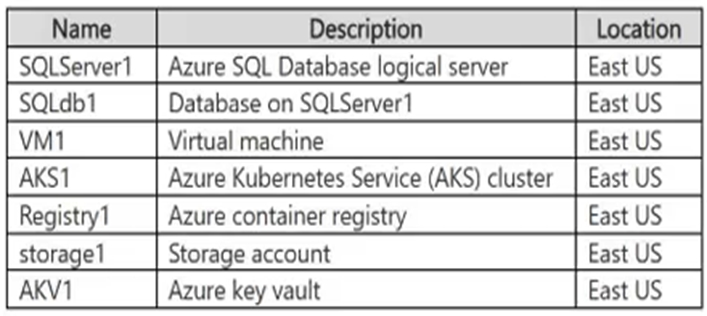
SQLServer1 uses Microsoft SQL Server authentication.
Sub1 has an Azure Web Application Firewall (WAF) named WAF1 that has the following types of rule sets:
• Bot Manager 1.1
• Azure-managed Default Rule Set (DRS)
Sub1 has the following compliance standards assigned in Microsoft Defender for Cloud:
• NIST SP 800-53 Rev. 4
• Microsoft cloud security benchmark (MCSB)
• System and Organization Controls (SOC) 2 Type 2
Existing Environment. Sub2 Resources
Sub2 contains a resource group named RG2.
Planned Changes and Requirements. Planned Changes
Fabrikam plans to implement the following changes:
• Deploy the following key vaults to RG1:
o AKV2 in the West Europe Azure region o AKV3 in the Central US Azure region o AKV4 in the East US Azure region
• Deploy the following key vaults to RG2:
o AKV5 in the East US region
• Configure VM1 to read data from storage1.
• Create function apps that have the following hosting plans:
o Fa1: Flex Consumption hosting plan o Fa2: Consumption hosting plan o Fa3: Dedicated hosting plan
• For WAF1, implement rate limiting rules based on the request location.
• Enable the NIST SP 800-53 Rev. 5 compliance standard in Defender for Cloud.
• Create a new storage account named storage2 that supports Azure Table storage.
• Enforce multifactor authentication (MFA) when database administrators access SQLdb1.
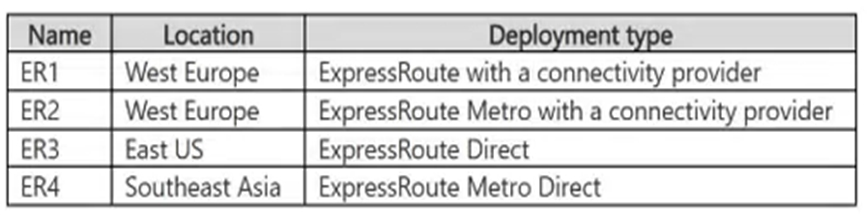
• Implement ExpressRoute circuits to the on-premises network as shown in the following table.
• For RG1, create a new Privileged Identity Management (PIM) eligible role assignment that assigns the Contributor role to supported groups.
Planned Changes and Requirements. Technical Requirements
Fabrikam has the following technical requirements:
• If VM1 is deleted, the permissions for VM1 must be removed automatically.
• The AKS1 managed identity must only be able to pull images from Registry1.
• The ID1 managed identity must be able to push images to and pull images from Registry1.
• All the data in the storage accounts must be encrypted by using Fabrikam-managed keys.
• All outbound traffic from the function apps to the on-premises network must use ExpressRoute circuits.
• ExpressRoute connectivity between the on-premises network and the Azure environment must be encrypted by using Layer 2 or Layer 3 encryption.