Free SC-500 Exam Braindumps
Implementing End-to-End Security Controls for Cloud and AI Workloads Questions 1–60 (page: 14)

Updated On: 23-Oct-2026
View Related Case Study

DRAG DROP (Drag and Drop is not supported)
You have a Microsoft Entra tenant.
On January1, you configure a Multifactor authentication registration policy that has the following settings:
● Assignments: All users
● Require Microsoft Entra ID authentication registration: Enabled
● Enforce policy: On
On January 3, you create two new users named User1 and User2.
On January 5, User1 authenticates to Microsoft Entra ID for the first time. On January 7, User2 authenticates to Microsoft Entra ID for the first time.
On which date will User1 and User2 be forced to register for MFA? To answer, drag the appropriate dates to the correct users. Each date may be used once, more than once, or not at all. You may need to drag the split bar between panes or scroll to view content.
Note: Each correct selection is worth one point.
Select and Place:

  1. See Explanation section for answer.

Answer(s): A

Explanation:


User1: January 19
User2: January 21
The MFA registration policy provides a 14-day grace period beginning with each user’s first interactive sign-in. User1’s period begins January 5 and ends January 19; User2’s begins January 7 and ends January 21. After that period, registration is required before the user can complete sign-in.


Reference:

https://learn.microsoft.com/en-us/entra/id-protection/howto-identity-protection-configure-mfa-policy


View Related Case Study

HOTSPOT (Drag and Drop is not supported)
You have an Azure subscription that contains a resource group named RG1. RG1 contains a storage account named storage1.
You have two custom Azure roles named Role1 and Role2 that are scoped to RG1.
The permissions for Role1 are shown in the following JSON code.

The permissions for Role2 are shown in the following JSON code.

You assign the roles to the users shown in the following table.

For each of the following statements, select Yes if the statement is true. Otherwise, select No.
Note: Each correct selection is worth one point.
Hot Area:

  1. See Explanation section for answer.

Answer(s): A

Explanation:


Yes
Yes
No
Both roles permit retrieving storage account keys: Role1 explicitly includes listKeys/action, and Role2 includes it through Microsoft.Storage/storageAccounts/*. These keys allow users to read storage data through Shared Key authorization.
Combining the roles does not grant the Azure Backup permissions required to initiate a restore, such as those provided by the Backup Contributor role at the appropriate vault scope.


Reference:

https://learn.microsoft.com/en-us/azure/storage/blobs/authorize-data-operations-portal https://learn.microsoft.com/en-us/azure/backup/backup-rbac-rs-vault


View Related Case Study

HOTSPOT (Drag and Drop is not supported)
You have an Azure subscription that contains an Azure SQL database named SQL1.
You plan to deploy an Azure app service web app named App1.
You need to provide App1 with read and write access to SQL1. The solution must meet the following requirements:
● Provide App1 with access to SQL1 without storing a password.
● Use the principle of least privilege.
● Minimize administrative effort.
Which type of account should App1 use to access SQL1, and which database roles should you assign to App1? To answer, select the appropriate options in the answer area.
Note: Each correct selection is worth one point.
Hot Area:

  1. See Explanation section for answer.

Answer(s): A

Explanation:


Managed identity db_datareader and db_datawriter
A managed identity allows App1 to authenticate to SQL1 using Microsoft Entra tokens without storing a password. Azure manages the identity’s credentials, minimizing administrative effort.
Assign db_datareader to read data and db_datawriter to insert, update, and delete data. Together, these roles provide the required read and write access with the least privilege among the available choices.


Reference:

https://learn.microsoft.com/en-us/azure/app-service/tutorial-connect-msi-sql-database?tabs=windo wsclient%2Cefcore https://learn.microsoft.com/en-us/azure/azure-sql/database/azure-sql-dotnet-quickstart?view=azuresql&tabs=vi sual-studio%2Cpasswordless%2Cservice-connector%2Cportal


View Related Case Study

HOTSPOT (Drag and Drop is not supported)
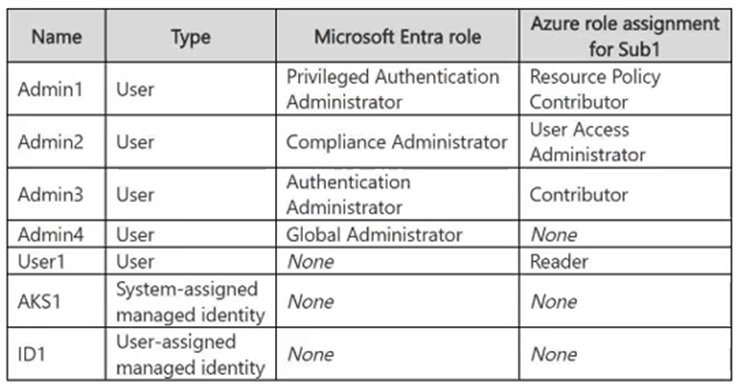
You have a Microsoft Entra tenant that contains the users shown in the following table.

In Microsoft Entra Privileged Identity Management, the Role settings for the Contributor role are configured as shown in the exhibit.

You assign users the Contributor role on May 1 as shown in the following table.

For each of the following statements, select Yes if the statement is true. Otherwise, select No.
Note: Each correct selection is worth one point.
Hot Area:

  1. See Explanation section for answer.

Answer(s): A

Explanation:


Yes
Yes
No
User1 has an eligible assignment that remains valid for three months from May 1. Eligible users can activate the role after satisfying the configured activation requirements, including MFA and justification.
User2 has an active assignment that remains valid for one month from May 1, so the Contributor privileges are available on May 15 without activation. The MFA requirement for active assignments applies when the administrator creates the active assignment, not each time the assigned user uses the role.
User3's active assignment expires after one month. By June 15 it has expired, and because User3 was not given an eligible assignment, there is no Contributor role assignment available to activate.


Reference:

https://learn.microsoft.com/en-us/entra/id-governance/privileged-identity-management/pim-resourc e-roles-configure-role-settings https://learn.microsoft.com/en-us/entra/id-governance/privileged-identity-management/pim-resource-roles-assi gn-roles


View Related Case Study

For which storage accounts can you implement the planned changes for storage?

  1. storage1, storage2, storage3, and storage4
  2. storage1, storage2, and storage4 only
  3. storage2 and storage4 only
  4. storage1 and storage3 only
  5. storage2, storage3, and storage4 only
  6. storage1 only

Answer(s): D

Explanation:

Scenario: Planned changes: Enable Microsoft Entra Kerberos authentication for all supported storage. Storage1 is Standard account in West US.
Storage2 is Block blobs Premium account in East US.
Storage3 is File shares Premium account in East US.
Storage4 is Page blobs Premium account in East US.
--
You can enable Microsoft Entra Kerberos authentication on Storage1 and Storage3. This feature is exclusively supported for Azure Files. Block and Page blob accounts (Storage2, Storage4) do not support SMB protocol access and cannot use Microsoft Entra Kerberos authentication.


Reference:

https://docs.azure.cn/en-us/storage/files/storage-files-identity-auth-hybrid-identities-enable


Viewing page 14 of 43
Viewing questions 66 - 70 out of 207 questions


Post your Comments and Discuss Microsoft SC-500 exam prep with other Community members:

AI Tutor AI Tutor 👋 I’m here to help!