Microsoft SC-500 Exam Prep
Implementing End-to-End Security Controls for Cloud and AI Workloads (Page 2 )

Updated On: 24-Aug-2026
View Related Case Study

HOTSPOT (Drag and Drop is not supported)
User1 has requested to use the AI Administrator role.
Which approvers can approve the request, and how long will User1 be an AI administrator after the role is approved? To answer, select the appropriate options in the answer area.
Note: Each correct selection is worth one point.
Hot Area:

  1. See Explanation section for answer.

Answer(s): A

Explanation:


Eligible approvers: Admin1 and Admin3 only Maximum active duration of the role: 1 day
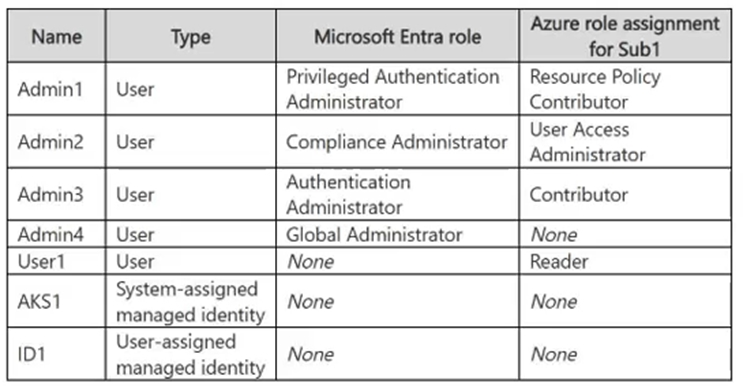
Approval is required for activation of the AI Administrator role, but no specific approvers are configured. For a Microsoft Entra role, active Global Administrators and Privileged Role Administrators become the default approvers in this situation. Admin1 is a Global Administrator, and Admin3 is a Privileged Role Administrator. The configured activation maximum duration for the AI Administrator role is one day, so User1’s activated access expires after one day.


View Related Case Study

HOTSPOT (Drag and Drop is not supported)
For each of the following statements, select Yes if the statement is true. Otherwise, select No.
Note: Each correct selection is worth one point.
Hot Area:

  1. See Explanation section for answer.

Answer(s): A

Explanation:


Admin1 must approve requests for the Agent ID Developer role: No Admin2 can approve requests for the AI Administrator role: No Admin3 can assign User1 a two-day active assignment for the Agent ID Developer role: Yes
The Agent ID Developer role does not require approval for activation, so no approval request is generated. The AI Administrator role requires approval, but because no specific approvers are configured, only active Global Administrators and Privileged Role Administrators act as default approvers; an AI Administrator is not a default approver. Admin3 is a Privileged Role Administrator and can assign Microsoft Entra roles in PIM. The one-day activation maximum duration limits eligible-role activations, not administrator-created active assignments; active assignments for the Agent ID Developer role can last up to the configured 15-day period, so a two-day active assignment is allowed.


View Related Case Study

You need to meet the technical requirements for Vault1.
Which object can you use?

  1. Certificate2
  2. Key1
  3. Certificate1
  4. Secret1

Answer(s): B

Explanation:

To store objects for both authentication and encryption while enforcing an automatic 30-day regeneration cycle, you should use Azure Key Vault keys.
Azure Key Vault provides native key auto-rotation policies that can be configured to automatically generate a new version of a cryptographic key at a specified frequency (such as every 30 days) without needing an external helper service.
Scenario: Store objects used for authentication and encryption in Vault1 and ensure that Vault1 regenerates the objects every 30 days, whenever possible.
Vault1 is an Azure Key Vault.


Reference:

https://learn.microsoft.com/en-us/azure/key-vault/general/autorotation


View Related Case Study

You need to implement the planned change for the AKS1 integration.
What should you configure for AKS1?

  1. application scaling
  2. a workload identity
  3. Secrets Store CSI Driver
  4. Kubernetes role-based access control (Kubernetes RBAC)

Answer(s): C

Explanation:

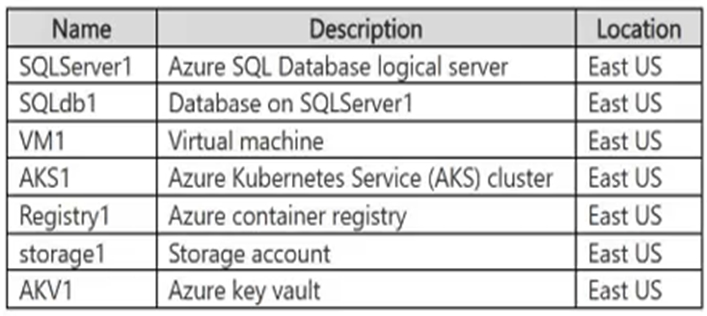
Scenario: Contoso plans to implement the following changes: Integrate AKS1 with Vault1. Vault1 is an Azure Key vault. AKS1 is an Azure Kubernetes Service (AKS) cluster.
To integrate an Azure Kubernetes Service (AKS) cluster with an Azure Key Vault, you must configure the Azure Key Vault Provider for Secrets Store CSI Driver add-on along with identity and authorization controls on the cluster.


Reference:

https://docs.azure.cn/en-us/aks/csi-secrets-store-driver


View Related Case Study

HOTSPOT (Drag and Drop is not supported)
You need to configure the AKS1 and ID1 managed identities to meet the technical requirements. The solution must follow the principle of least privilege.
Which role should you assign to each identity? To answer, select the appropriate options in the answer area.
Note: Each correct selection is worth one point.
Hot Area:

  1. See Explanation section for answer.

Answer(s): A

Explanation:


Box 1: AcrPull Scenario: AKS1 is an Azure Kubernetes Service (AKS) cluster in East US. The AKS1 managed identity must only be able to pull images from Registry1. Registry1 is an Azure container registry in East US.
To allow the Azure Kubernetes Service (AKS) managed identity (specifically the kubelet identity) to only pull images from an Azure Container Registry (ACR), you must assign the AcrPull role.
Box 2: AcrPush The ID1 managed identity must be able to push images to and pull images from Registry1.
To allow a managed identity to both push images to and pull images from an Azure Container Registry (ACR), you must assign it the AcrPush built-in role.


Reference:

https://learn.microsoft.com/en-us/azure/aks/pre-created-kubelet-managed-identity?pivots=azure-cli


View Related Case Study

You implement the planned changes for the key vaults.
To which key vaults can you restore AKV1 backups?

  1. AKV4 only
  2. AKV3 and AKV4 only
  3. AKV4 and AKV5 only
  4. AKV2, AKV3, and AKV4 only
  5. AKV2, AKV3, AKV4, and AKV5

Answer(s): C

Explanation:

You can restore AKV1 backups to AKV4 and AKV5.Azure Key Vault backups are bound to the subscription and the Azure geography of the source. Because both the source (AKV1) and targets (AKV4, AKV5) reside in the same East US region/geography, they share the same security world, making the restoration valid.
Other regions in different geographies (like West Europe) or different security worlds (like Central US) are excluded.
Scenario: AKV1 is an Azure key vault in east us. Fabrikam plans to implement the following changes:
Deploy the following key vaults to RG1: - AKV2 in the West Europe Azure region - AKV3 in the Central US Azure region - AKV4 in the East US Azure region
Deploy the following key vaults to RG2: - AKV5 in the East US region


Reference:

https://learn.microsoft.com/en-us/azure/key-vault/general/overview-security-worlds


View Related Case Study

You need to implement the planned change for VM1 to access storage. The solution must meet the technical requirements.
What should you do first?

  1. Assign the Storage Blob Data Reader role to storage1.
  2. Assign ID1 to VM1.
  3. Configure federated identity credentials for ID1.
  4. Add a role assignment condition to storage1.
  5. Configure a system-assigned managed identity on VM1.

Answer(s): E

Explanation:

You should use a system-assigned managed identity. System-assigned identities are tightly coupled to the lifecycle of the Azure resource they are attached to.
When you delete the virtual machine, the system-assigned identity is automatically deleted from Microsoft Entra ID, ensuring that all associated permissions are automatically revoked. In contrast, user-assigned managed identities are independent standalone resources and must be manually deleted.
Scenario:
Fabrikam plans to implement the following changes: Configure VM1 to read data from storage1.
Fabrikam has the following technical requirements: If VM1 is deleted, the permissions for VM1 must be removed automatically.
ID1 is a user-assigned managed identity.


Reference:

https://learn.microsoft.com/en-us/azure/container-apps/managed-identity


View Related Case Study

HOTSPOT (Drag and Drop is not supported)
You need to implement the planned change for the PIM role assignment.
Which users can perform the planned change, and for which groups? To answer, select the appropriate options in the answer area.
Note: Each correct selection is worth one point.
Hot Area:

  1. See Explanation section for answer.

Answer(s): A

Explanation:


Scenario: Planned change: For RG1, create a new Privileged Identity Management (PIM) eligible role assignment that assigns the Contributor role to supported groups.
Box 1: Admin2 only Scenario: Admin2 has the Microsoft Entra role Compliance administrator, and the Azure role assignment User Access Administrator. Admin3 has the Microsoft Entra role Authentication administrator, and the Azure role assignment Contributor. Admin4 has the Microsoft Entra role Global administrator, and no Azure role assignment.
--Only Admin2 can perform the required task.
Creating a Privileged Identity Management (PIM) eligible role assignment for Azure requires the ability to write role assignments at the desired scope (like Microsoft.Authorization/roleAssignments/write). This authorization is specifically granted by the Azure User Access Administrator or Owner roles.
Breakdown of the administrators: Admin2: Has the Azure role User Access Administrator, which permits managing PIM assignments for Azure resources.
Admin3: Has the Azure Contributor role.
While Contributor can manage resources, it does not include permissions to assign roles or configure PIM.
Admin4: Is a Global Administrator in Microsoft Entra ID. While Global Administrators can manage Microsoft Entra roles in PIM, they do not automatically have permissions to manage or assign Azure resource roles unless they have been explicitly granted an Azure role like User Access Administrator.
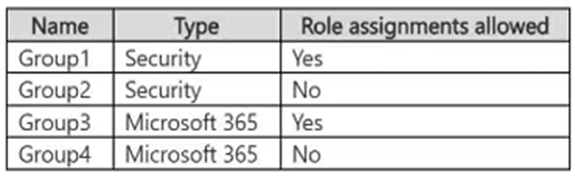
Box 2: Group1 only Scenario: Group1 is a security group and role assignment is allowed. Group2 is a security group and role assignment is not allowed. Group3 is a Microsoft 365 group and role assignment is allowed. Group4 is a Microsoft 365 group and role assignment is not allowed.
--The Contributor role can be assigned to Group1.To assign a role (like Contributor) to a group in Microsoft Entra (Azure RBAC), the group must be a cloud-only security or Microsoft 365 group that has the isAssignableToRole property explicitly enabled at the time of creation.
Here is the breakdown for each of your groups: Group1 (Yes): It is a security group, and role assignment is allowed.
Group2 (No): Role assignment is not allowed for this group.
Group3 (No): While it is allowed for assignment, Microsoft 365 groups currently do not support Azure resource roles (only Microsoft Entra directory roles are supported).
Group4 (No): Role assignment is not allowed.


Reference:

https://docs.azure.cn/en-us/entra/id-governance/privileged-identity-management/pim-deployment-plan


Viewing page 2 of 16
Viewing questions 9 - 16 out of 121 questions


Post your Comments and Discuss Microsoft SC-500 exam prep with other Community members:

AI Tutor AI Tutor 👋 I’m here to help!