Free SC-500 Exam Braindumps
Implementing End-to-End Security Controls for Cloud and AI Workloads Questions 2–6 (page: 3)

Updated On: 23-Oct-2026
View Related Case Study

You implement the planned changes for the key vaults.
To which key vaults can you restore AKV1 backups?

  1. AKV4 only
  2. AKV3 and AKV4 only
  3. AKV4 and AKV5 only
  4. AKV2, AKV3, and AKV4 only
  5. AKV2, AKV3, AKV4, and AKV5

Answer(s): C

Explanation:

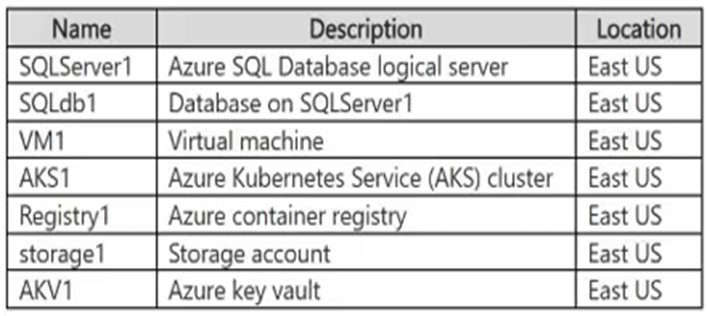
You can restore AKV1 backups to AKV4 and AKV5.Azure Key Vault backups are bound to the subscription and the Azure geography of the source. Because both the source (AKV1) and targets (AKV4, AKV5) reside in the same East US region/geography, they share the same security world, making the restoration valid.
Other regions in different geographies (like West Europe) or different security worlds (like Central US) are excluded.
Scenario:
AKV1 is an Azure key vault in east us.
Fabrikam plans to implement the following changes:
-Deploy the following key vaults to RG1:
-- AKV2 in the West Europe Azure region
-- AKV3 in the Central US Azure region
-- AKV4 in the East US Azure region
-Deploy the following key vaults to RG2:
-- AKV5 in the East US region


Reference:

https://learn.microsoft.com/en-us/azure/key-vault/general/overview-security-worlds


View Related Case Study

You need to implement the planned change for VM1 to access storage. The solution must meet the technical requirements.
What should you do first?

  1. Assign the Storage Blob Data Reader role to storage1.
  2. Assign ID1 to VM1.
  3. Configure federated identity credentials for ID1.
  4. Add a role assignment condition to storage1.
  5. Configure a system-assigned managed identity on VM1.

Answer(s): E

Explanation:

You should use a system-assigned managed identity.
System-assigned identities are tightly coupled to the lifecycle of the Azure resource they are attached to.
When you delete the virtual machine, the system-assigned identity is automatically deleted from Microsoft Entra ID, ensuring that all associated permissions are automatically revoked. In contrast, user-assigned managed identities are independent standalone resources and must be manually deleted.
Scenario:
Fabrikam plans to implement the following changes:
Configure VM1 to read data from storage1.
Fabrikam has the following technical requirements:
If VM1 is deleted, the permissions for VM1 must be removed automatically.
ID1 is a user-assigned managed identity.


Reference:

https://learn.microsoft.com/en-us/azure/container-apps/managed-identity


View Related Case Study

HOTSPOT (Drag and Drop is not supported)
You need to implement the planned change for the PIM role assignment.
Which users can perform the planned change, and for which groups? To answer, select the appropriate options in the answer area.
Note: Each correct selection is worth one point.
Hot Area:

  1. See Explanation section for answer.

Answer(s): A

Explanation:


Scenario:
Planned change: For RG1, create a new Privileged Identity Management (PIM) eligible role assignment that assigns the Contributor role to supported groups.
Box 1: Admin2 only
Scenario:
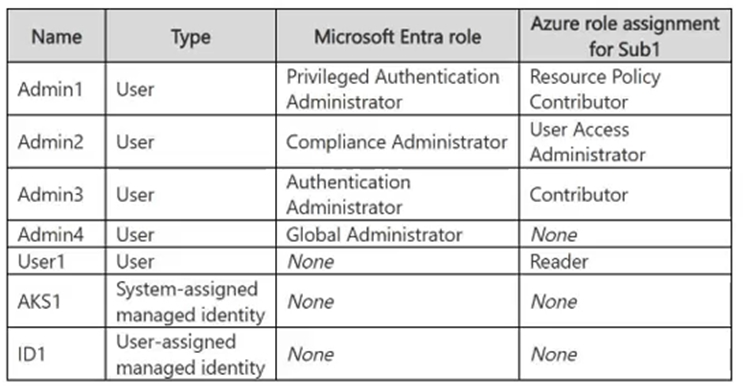
Admin2 has the Microsoft Entra role Compliance administrator, and the Azure role assignment User Access Administrator.
Admin3 has the Microsoft Entra role Authentication administrator, and the Azure role assignment Contributor. Admin4 has the Microsoft Entra role Global administrator, and no Azure role assignment.
--
Only Admin2 can perform the required task.
Creating a Privileged Identity Management (PIM) eligible role assignment for Azure requires the ability to write role assignments at the desired scope (like Microsoft.Authorization/roleAssignments/write). This authorization is specifically granted by the Azure User Access Administrator or Owner roles.
Breakdown of the administrators:
Admin2: Has the Azure role User Access Administrator, which permits managing PIM assignments for Azure resources.
Admin3: Has the Azure Contributor role.
While Contributor can manage resources, it does not include permissions to assign roles or configure PIM.
Admin4: Is a Global Administrator in Microsoft Entra ID. While Global Administrators can manage Microsoft Entra roles in PIM, they do not automatically have permissions to manage or assign Azure resource roles unless they have been explicitly granted an Azure role like User Access Administrator.
Box 2: Group1 only
Scenario:
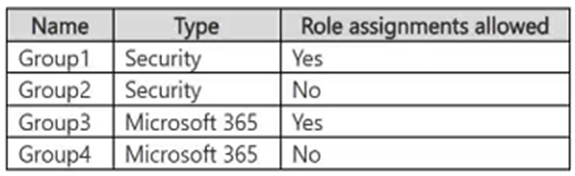
Group1 is a security group and role assignment is allowed.
Group2 is a security group and role assignment is not allowed.
Group3 is a Microsoft 365 group and role assignment is allowed.
Group4 is a Microsoft 365 group and role assignment is not allowed.
--
The Contributor role can be assigned to Group1.To assign a role (like Contributor) to a group in Microsoft Entra (Azure RBAC), the group must be a cloud-only security or Microsoft 365 group that has the isAssignableToRole property explicitly enabled at the time of creation.
Here is the breakdown for each of your groups:
Group1 (Yes): It is a security group, and role assignment is allowed.
Group2 (No): Role assignment is not allowed for this group.
Group3 (No): While it is allowed for assignment, Microsoft 365 groups currently do not support Azure resource roles (only Microsoft Entra directory roles are supported).
Group4 (No): Role assignment is not allowed.


Reference:

https://docs.azure.cn/en-us/entra/id-governance/privileged-identity-management/pim-deployment-plan


View Related Case Study

You have an Azure SQL Database logical server named Server1 that contains a database named DB1.
You need to configure authentication for Server1 to meet the following requirements:
-SQL authentication cannot be used for any databases on Server1.
-The solution must be enforced centrally at the server level.
What should you do?

  1. Configure a Microsoft Entra administrator for Server1.
  2. Enable a managed identity for Server1.
  3. Enable Microsoft Entra-only authentication for Server1.
  4. Remove SQL logins from DB1.

Answer(s): C

Explanation:

Enabling Microsoft Entra-only authentication on the Azure SQL logical server disables SQL authentication at the server level for every database hosted on Server1. Only Microsoft Entra-authenticated connections are permitted, centrally enforcing the required authentication policy.


Reference:

https://learn.microsoft.com/en-us/azure/azure-sql/database/authentication-azure-ad-only-authentic ation?view=azuresql&tabs=azure-cli


View Related Case Study

You have a Microsoft Entra tenant that has the following configurations:
-User consent for applications is disabled.
-Only administrators can grant permissions to applications.
You register an application named App1 that uses delegated Microsoft Graph permissions.
You need to configure App1 to meet the following requirements:
-Enable user sign-ins without interactive consent prompts.
-Enable App1 to access Microsoft Graph on behalf of the signed-in user.
What should you do?

  1. Configure enterprise applications to require user assignment and assign users to App1.
  2. Modify the app registration to use application permissions instead of delegated permissions.
  3. Add the required delegated Microsoft Graph permissions to the app registration and rely on user consent during sign-in.
  4. Grant admin consent to App1 for the required delegated permissions.

Answer(s): D

Explanation:

Admin consent grants the required delegated Microsoft Graph permissions on behalf of the tenant. App1 can then call Microsoft Graph in the context of a signed-in user without requiring individual users to respond to consent prompts, which is necessary because user consent is disabled.


Reference:

https://learn.microsoft.com/en-us/entra/identity/enterprise-apps/grant-admin-consent?pivots=portal https://learn.microsoft.com/en-us/entra/identity-platform/quickstart-configure-app-access-web-apis


Viewing page 3 of 43
Viewing questions 11 - 15 out of 207 questions


Post your Comments and Discuss Microsoft SC-500 exam prep with other Community members:

AI Tutor AI Tutor 👋 I’m here to help!