Microsoft SC-500 Exam Actual Questions
Implementing End-to-End Security Controls for Cloud and AI Workloads (Page 4 )

Updated On: 13-Jul-2026
View Related Case Study

HOTSPOT (Drag and Drop is not supported)
User1 has requested to use the AI Administrator role.
Which approvers can approve the request, and how long will User1 be an AI administrator after the role is approved? To answer, select the appropriate options in the answer area.
Note: Each correct selection is worth one point.

Hot Area:

  1. See Explanation section for answer.

Answer(s): A

Explanation:


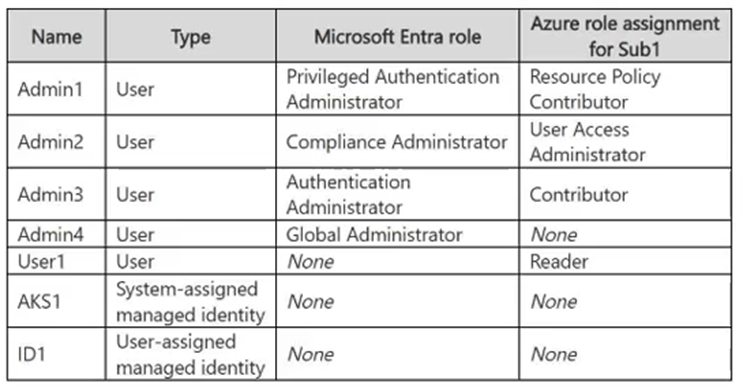
Eligible approvers: Admin1 and Admin3 only Maximum active duration of the role: 1 day
Approval is required for activation of the AI Administrator role, but no specific approvers are configured. For a Microsoft Entra role, active Global Administrators and Privileged Role Administrators become the default approvers in this situation. Admin1 is a Global Administrator, and Admin3 is a Privileged Role Administrator. The configured activation maximum duration for the AI Administrator role is one day, so User1’s activated access expires after one day.


Reference:

https://learn.microsoft.com/en-us/entra/id-governance/privileged-identity-management/pim-how-to-change-default-settings


View Related Case Study

HOTSPOT (Drag and Drop is not supported)
For each of the following statements, select Yes if the statement is true. Otherwise, select No.
Note: Each correct selection is worth one point.
Hot Area:

  1. See Explanation section for answer.

Answer(s): A

Explanation:


Admin1 must approve requests for the Agent ID Developer role: No Admin2 can approve requests for the AI Administrator role: No Admin3 can assign User1 a two-day active assignment for the Agent ID Developer role: Yes
The Agent ID Developer role does not require approval for activation, so no approval request is generated. The AI Administrator role requires approval, but because no specific approvers are configured, only active Global Administrators and Privileged Role Administrators act as default approvers; an AI Administrator is not a default approver. Admin3 is a Privileged Role Administrator and can assign Microsoft Entra roles in PIM. The one-day activation maximum duration limits eligible-role activations, not administrator-created active assignments; active assignments for the Agent ID Developer role can last up to the configured 15-day period, so a two-day active assignment is allowed.


Reference:

https://learn.microsoft.com/en-us/entra/id-governance/privileged-identity-management/pim-how-to-change-default-settings


You have an Azure SQL Database logical server named Server1 that contains a database named DB1.
You need to configure authentication for Server1 to meet the following requirements:
-SQL authentication cannot be used for any databases on Server1.
-The solution must be enforced centrally at the server level.
What should you do?

  1. Configure a Microsoft Entra administrator for Server1.
  2. Enable a managed identity for Server1.
  3. Enable Microsoft Entra-only authentication for Server1.
  4. Remove SQL logins from DB1.

Answer(s): C

Explanation:

Enabling Microsoft Entra-only authentication on the Azure SQL logical server disables SQL authentication at the server level for every database hosted on Server1. Only Microsoft Entra-authenticated connections are permitted, centrally enforcing the required authentication policy.


Reference:

https://learn.microsoft.com/en-us/azure/azure-sql/database/authentication-azure-ad-only-authentication?view=azuresql&tabs=azure-cli


You have a Microsoft Entra tenant that has the following configurations:
-User consent for applications is disabled.
-Only administrators can grant permissions to applications.
You register an application named App1 that uses delegated Microsoft Graph permissions.
You need to configure App1 to meet the following requirements:
-Enable user sign-ins without interactive consent prompts.
-Enable App1 to access Microsoft Graph on behalf of the signed-in user.
What should you do?

  1. Configure enterprise applications to require user assignment and assign users to App1.
  2. Modify the app registration to use application permissions instead of delegated permissions.
  3. Add the required delegated Microsoft Graph permissions to the app registration and rely on user consent during sign-in.
  4. Grant admin consent to App1 for the required delegated permissions.

Answer(s): D

Explanation:

Admin consent grants the required delegated Microsoft Graph permissions on behalf of the tenant. App1 can then call Microsoft Graph in the context of a signed-in user without requiring individual users to respond to consent prompts, which is necessary because user consent is disabled.


Reference:

https://learn.microsoft.com/en-us/entra/identity/enterprise-apps/grant-admin-consent?pivots=portal https://learn.microsoft.com/en-us/entra/identity-platform/quickstart-configure-app-access-web-apis


You have a Microsoft Entra tenant that uses Privileged Identity Management (PIM).
You need to modify the AI Administrator role settings to meet the following requirements:
-Elevated access must be evaluated by another administrator before it is granted.
-Privileged access must be removed automatically after a fixed period.
Which two settings should you configure? Each correct answer presents part of the solution.
Note: Each correct selection is worth one point.

  1. Expire active assignments after
  2. Require approval to activate
  3. Require justification on activation
  4. Expire eligible assignments after
  5. Activation maximum duration

Answer(s): B,E

Explanation:

Requiring approval to activate ensures that a designated administrator must evaluate and approve an eligible user’s elevation request before privileged access is granted. Setting an activation maximum duration makes each activated role assignment time-bound, automatically removing the elevated access when the configured activation period expires.


Reference:

https://learn.microsoft.com/en-us/entra/id-governance/privileged-identity-management/pim-how-to-change-default-settings https://learn.microsoft.com/en-us/entra/id-governance/privileged-identity-management/pim-how-to-activate-role


You have two management groups named MG1 and MG2 that contain multiple Azure subscriptions. The subscriptions are linked to a Microsoft Entra tenant.
You have a user named User1 and a global administrator named Admin1.
You are informed that User1 created an Azure subscription named Sub1 under the MG2 management group and is the only owner of the subscription.
You need to ensure that Admin1 can remove the Owner role from User1 for Sub1.
What should you do first?

  1. Move Sub1 to MG1.
  2. Assign Admin1 the User Access Administrator role for Sub1.
  3. Instruct Admin1 to use Privileged Identity Management (PIM) to request the Security Administrator role.
  4. Instruct Admin1 to enable Access management for Azure resources.

Answer(s): D

Explanation:

Enabling Access management for Azure resources allows a Microsoft Entra Global Administrator to elevate access and receive the User Access Administrator role at the root scope. This inherited access applies to Sub1 and enables Admin1 to remove User1’s Owner role assignment from the subscription.


Reference:

https://learn.microsoft.com/en-us/azure/role-based-access-control/elevate-access-global-admin? tabs=azure-portal%2Centra-audit-logs https://learn.microsoft.com/en-us/azure/role-based-access-control/rbac-and-directory-admin-roles


You have a management group named MG1 that contains two subscriptions named Sub1 and Sub2.
Sub1 contains a resource group named RG-Exception and a resource group named RG1 that hosts Microsoft Foundry resources.
You need to assign an Azure policy to force new Foundry deployments in MG1 to use private endpoints. The solution must NOT restrict deployments in RG-Exception.
How should you configure the policy?

  1. Assign the policy to MG1 and exclude RG-Exception.
  2. Assign the policy to Sub1 and RG-Exception.
  3. Assign the policy to MG1 and RG-Exception.
  4. Assign the policy to Sub1 and exclude RG-Exception.

Answer(s): A

Explanation:

Assigning the policy at the MG1 scope enforces the private endpoint requirement for new Microsoft Foundry deployments in all subscriptions and resource groups beneath the management group. Configuring RG-Exception as an excluded scope prevents the policy from restricting deployments in that resource group while maintaining centralized enforcement everywhere else in MG1.


Reference:

https://learn.microsoft.com/en-us/azure/governance/policy/overview https://learn.microsoft.com/en-us/azure/governance/policy/tutorials/create-and-manage


You have an Azure key vault named KV1 that uses role-based access control (RBAC) authorization. KV1 stores database connection strings for an Azure App Service web app named App1.
You enable a firewall on KV1 and allow access to KV1 from only the virtual network that contains App1.
You need to ensure that App1 can retrieve secrets from KV1 without using credentials stored in the application configuration.
What should you create?

  1. an access policy for KV1
  2. an app registration for App1
  3. a private endpoint for KV1
  4. a managed identity for App1

Answer(s): D

Explanation:

A managed identity enables App1 to authenticate to Azure Key Vault through Microsoft Entra ID without storing or managing application credentials. Because KV1 uses RBAC authorization, the identity must also be assigned an appropriate Key Vault data-plane role, such as Key Vault Secrets User, to retrieve the stored connection strings.


Reference:

https://learn.microsoft.com/en-us/azure/key-vault/general/authentication https://learn.microsoft.com/en-us/azure/app-service/overview-managed-identity?tabs=portal%2Chttp https://learn.microsoft.com/en-us/azure/key-vault/general/rbac-guide?tabs=azure-cli


Viewing page 4 of 10
Viewing questions 25 - 32 out of 67 questions


Post your Comments and Discuss Microsoft SC-500 exam prep with other Community members:

AI Tutor AI Tutor 👋 I’m here to help!