Free SC-500 Exam Braindumps
Implementing End-to-End Security Controls for Cloud and AI Workloads Questions 17–21 (page: 6)

Updated On: 23-Oct-2026
View Related Case Study

You have a Microsoft Entra tenant that has user consent for applications disabled.
You register an application named App1 that requests the following Microsoft Graph delegated permissions:
-User.Read
-Mail.Read
You need to configure tenant permissions to meet the following requirements:
-Enable users to grant consent for low-risk permissions without administrator interaction.
-Ensure that applications requesting higher-privilege permissions require administrator approval.
What should you do?

  1. Grant tenant-wide admin consent to App1.
  2. Configure application assignments for App1.
  3. Configure Privileged Identity Management (PIM) role assignments.
  4. Create an app consent policy.

Answer(s): D

Explanation:

An app consent policy defines the conditions under which users can consent to delegated permissions, such as permitting approved low-risk permissions while withholding consent rights for higher-privilege permissions. Permissions outside the allowed policy conditions require administrator consent or approval.


Reference:

https://learn.microsoft.com/en-us/entra/identity/enterprise-apps/manage-app-consent-policies?pivot s=ms-powershell https://learn.microsoft.com/en-us/entra/identity/enterprise-apps/configure-user-consent?pivots=portal


View Related Case Study

You use Microsoft Security Copilot.
Users are assigned either the Security Copilot Contributor role or the Security Copilot Owner role.
A contributor enables a custom plugin that is NOT approved, and some Security Copilot features in embedded experiences no longer function.
You need to ensure that plugins affecting all users can only be added by owners.
What should you do in the Plugin settings?

  1. Select Contributors and Owners to configure which users can add custom plugins at the user scope.
  2. Select Contributors and Owners to configure which users can add custom plugins at the workspace scope.
  3. Select Owners only to configure which users can add custom plugins at the workspace scope.
  4. Select Owners only to configure which users can add custom plugins at the user scope.

Answer(s): C

Explanation:

To restrict the addition and management of plugins that affect all users to Owners only, you should configure the setting at the workspace scope.
In Microsoft Security Copilot, selecting Owners only at the workspace scope prevents Contributors from adding, configuring, or managing custom plugins for the entire organization. Contributors will only be allowed to manage plugins for themselves at the user scope, ensuring governance over platform-wide integrations.


Reference:

https://learn.microsoft.com/en-us/copilot/security/authentication


View Related Case Study

You have an Azure subscription that contains a resource group named RG1 and has Microsoft Defender for Cloud enabled.
You connect an Amazon Web Services (AWS) account to Defender for Cloud by creating the AWS connector in RG1.
You have a Microsoft Entra group named Group1 that contains the user accounts of the security analysts at your company.
You need to ensure that the members of Group1 can view multicloud recommendations and security alerts for the connected AWS account. The solution must follow the principle of least privilege.
Which role should you assign to Group1 for RG1?

  1. Security Reader
  2. Reader
  3. Owner
  4. Security Administrator

Answer(s): A

Explanation:

To meet the requirements while keeping permissions as low as possible, you should assign the Security Reader role to the Microsoft Entra group.
Required Capabilities: The Security Reader role grants read-only access to Microsoft Defender for Cloud. Members can fully view all multicloud recommendations, security alerts, security policies, and security states.
Least Privilege: Unlike the Security Admin role (which allows users to dismiss alerts and modify security policies), or general platform roles like Reader or Contributor, the Security Reader role provides exactly the necessary visibility into the AWS connector's security data within that resource group without allowing any changes.


Reference:

https://learn.microsoft.com/en-us/azure/defender-for-cloud/permissions


View Related Case Study

HOTSPOT (Drag and Drop is not supported)
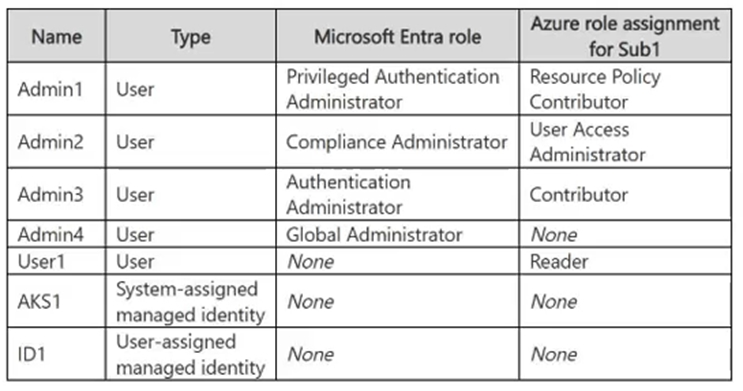
You have an Azure subscription named Sub1 that contains the resource groups shown in the following table.

You create the azure policy definition shown in the following exhibit.

You assign the policy to Sub1.
You plan to create the resources shown in the following table.
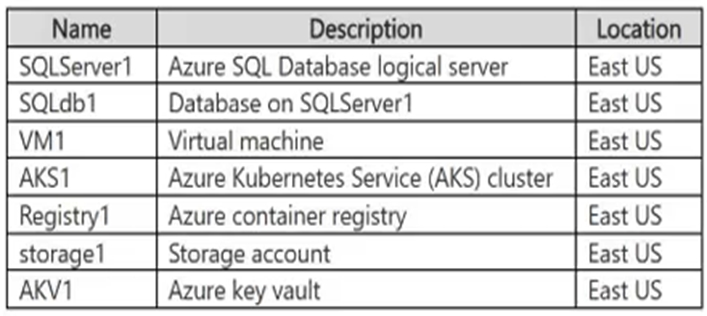
For each of the following statements, select Yes if the statement is true. Otherwise, select No.
Note: Each correct selection is worth one point.
Hot Area:

  1. See Explanation section for answer.

Answer(s): A

Explanation:


Yes
Yes
Yes
The policy denies a deployment when the resource location differs from its resource group location or when the resource name does not contain obj. Azure Policy string comparisons such as notContains are case-insensitive. IPObject1 is in East US with RG2 and its name contains obj; OBJ3 is in West US with RG1 and its name also contains obj. The resource group obj1 also satisfies the naming requirement and can be created.


Reference:

https://learn.microsoft.com/en-us/azure/governance/policy/concepts/definition-structure-policy-rule https://learn.microsoft.com/en-us/azure/governance/policy/concepts/definition-structure-basics?trk=article-ssr-f rontend-pulse_little-text-block


View Related Case Study

HOTSPOT (Drag and Drop is not supported)
You have a Microsoft Entra tenant that contains the users shown in the following table.

The tenant contains a Conditional Access policy named CA1 that has the following settings:
-Assignments:
-- Users or agents:
--- Include: Directory roles: Global Administrator
-Target resources:
-- Resources (formerly cloud apps):
--- Include: All resources
-Conditions:
-- Locations:
--- Configure: Yes
--- Include: Any network or location
-Access controls:
-- Grant:
--- Require multifactor authentication
-- Grant:
--- Require device to be marked as compliant
-- For multiple controls:
--- Require all the selected controls
The tenant contains a Conditional Access policy named CA2 that has the following settings:
-Assignments:
-- Users or agents:
--- Include: Users and groups: Group1
-Target resources:
-- Resources (formerly cloud apps)
--- Include: Select resources: Office 365
-Conditions:
-- Locations:
--- Configure: Yes
--- Include: Any network or location
-Access controls:
-- Grant:
--- Require multifactor authentication
-- Grant:
--- Require app protection policy
-- For multiple controls:
--- Require one of the selected controls
The users perform the following tasks:
-User1 signs in to Microsoft 365 from a home network by using Microsoft Outlook on a noncompliant device.
-User2 signs in to Microsoft 365 without an app protection policy by using a noncompliant device.
-User3 signs in to the Azure portal from a home network by using a compliant device.
For each of the following statements, select Yes if the statement is true. Otherwise, select No.
Note: Each correct selection is worth one point.
Hot Area:

  1. See Explanation section for answer.

Answer(s): A

Explanation:


Box 1: No
No, User1 will be denied access to Microsoft 365.Even though User1 satisfies the requirements for policy CA2, they are blocked by policy CA1 because their device is noncompliant.
In Microsoft Entra ID, all applicable Conditional Access policies must be satisfied simultaneously for access to be granted.
Box 2: No
No, User2 will be blocked from accessing Microsoft 365 because they fail to meet the strict security requirements of Conditional Access policy CA2.
Box 3: Yes
Yes, User3 is granted access to the Azure portal after completing multifactor authentication.
CA1 Application: User3 is a Global Administrator, so CA1 applies to them.
Target Match: User3 is accessing the Azure portal, which falls under "All resources.
"CA1 Requirements: CA1 requires both Multifactor Authentication (MFA) and a compliant device.
User3 Status: User3 satisfies both conditions because they successfully completed MFA and are using a compliant device.
CA2 Exclusion: CA2 does not apply to User3 because User3 is not a member of Group1.


Reference:

https://learn.microsoft.com/en-us/entra/identity/conditional-access/concept-conditional-access-policies


Viewing page 6 of 43
Viewing questions 26 - 30 out of 207 questions


Post your Comments and Discuss Microsoft SC-500 exam prep with other Community members:

AI Tutor AI Tutor 👋 I’m here to help!